Networking problem with Windows 7, possible bug?

acidrain

Executive Member
Joined
Jan 7, 2007
Messages
6,966
Reaction score
1,765
Location
At a computer
Hi guys,

Well someone hinted i create a new thread so here it is.

On this machine i installed": Windows 7 Ultimate 7600.16385.090713-1255_x64

I have two network connections setup. 1 being for my WUG connection and the other being my pppoe to the modem for inet.

Now it's either i'm just unlucky and got a botched copy but it seems the wug network works when ever it feels like it. I will paste screenshots to explain.

Apologies for the photobucket links, my file sizes exceed mybb requirements.

My IPCONFIG
ipconfig.jpg


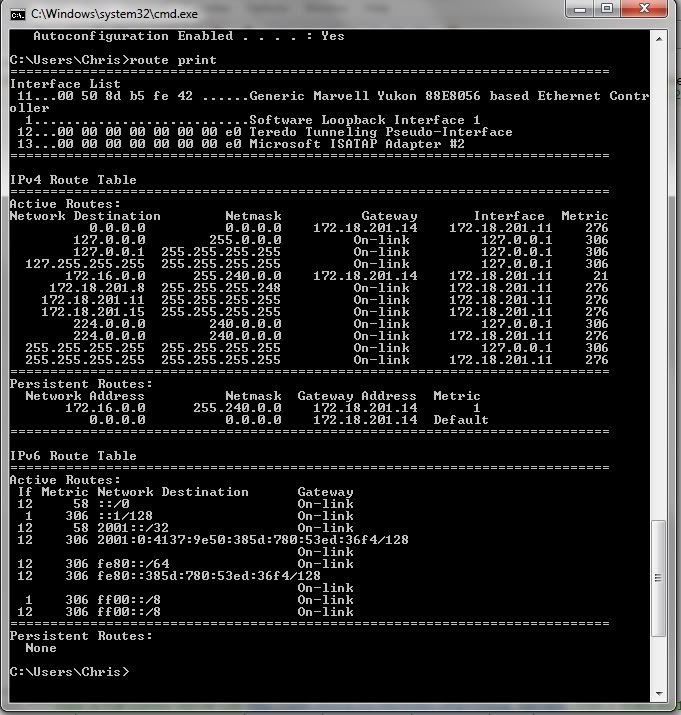
My Route Print
routeprint.jpg


Pinging server with PPPOE connected
pingpppoeon.jpg


Immediately afterwards disconnecting PPPOE. pings still running: Notice the error in the network icon saying "No Internet Access". Sometimes it disappears and pings work again, other times it insists there is no "internet". As you can see My router, in the background, aka 172.18.201.14, is still pinging the ip address successfully
pingpppoeoff.jpg


Between connecting and disconnecting pppoe my router kicks me out aswell:
networkdisconnect.jpg


Also I noticed when pppoe is on i can't connect to the router via IP, only through mac, and when it's off it's the other way round, so only through IP and not MAC.

After discovery this, I'm assuming the two networks can't operate independant of each other, hence causing the problems. The part where i reckon it's a bug is XP does not have this problem.

Is it possible to tell W7 which network to route traffic over, i.e. over "Network 2" so "Internet" does not interrupt.

Hope this is all clear
 
Last edited:
Hi guys,

Well someone hinted i create a new thread so here it is.

On this machine i installed": Windows 7 Ultimate 7600.16385.090713-1255_x64

I have two network connections setup. 1 being for my WUG connection and the other being my pppoe to the modem for inet.

Now it's either i'm just unlucky and got a botched copy but it seems the wug network works when ever it feels like it. I will paste screenshots to explain.

Apologies for the photobucket links, my file sizes exceed mybb requirements.

My IPCONFIG
ipconfig.jpg


My Route Print
routeprint.jpg


Pinging server with PPPOE connected
pingpppoeon.jpg


Immediately afterwards disconnecting PPPOE. pings still running: Notice the error in the network icon saying "No Internet Access". Sometimes it disappears and pings work again, other times it insists there is no "internet". As you can see My router, in the background, aka 172.18.201.14, is still pinging the ip address successfully
pingpppoeoff.jpg


Between connecting and disconnecting pppoe my router kicks me out aswell:
networkdisconnect.jpg


Also I noticed when pppoe is on i can't connect to the router via IP, only through mac, and when it's off it's the other way round, so only through IP and not MAC.

After discovery this, I'm assuming the two networks can't operate independant of each other, hence causing the problems. The part where i reckon it's a bug is XP does not have this problem.

Is it possible to tell W7 which network to route traffic over, i.e. over "Network 2" so "Internet" does not interrupt.

Hope this is all clear

Phew! Talk about info..
Nice.

Have you tried to disable IPv6? I find that for some funny reason MS Windows doesn't know it's ass from it's elbow when running it. (Yes I know our networks are dodge on it)

Try disable it, and run only IPv4. Reboot and try again.
:)

Fail that, then Techie is a good scratch pad.

:)


:D
 
By disable you mean go into the interface properties and untick IPv6? If so, already did that.

It seems alot isnt working, just found out my COD4 multiplayer keeps crashing. Really considering moving back to XP at this rate... stability > beauty... hehe

Edit: I think the problem is, the networks can't help but interfere with each other. I almost certain they not running independantly, but then again i aint no M$ techie
 
Last edited:
LOl, just when you think you got it figured out, something new happens. Now without touching anything it decides to not ping a thing
 
Did you route add 172.*.*.* mask 255.240.0.0 your-routerbord-ip -p?

* = your wug ip allowance

No WUG without it :)
 
I doubt it's routing related as my XP machine works 100% stable. but to answer the question yes it is routed on my board too, only the gateway is different

Is it an Nvidia chipset, ASUS mobo by any chance?
AI Net and Nvidia networking are dodgy. I know, I had 2 mobos like that.
Gave EXACTLY the same probs you having.

I disabled AI Net, and Nvidia network nonesense, and worked ok. Still gave problems.
I ended up buying a Dlink Gigabit NIC, and now everything is super awesome smooth.

:)
 
Do you have different default gateways? Your ipconfig /all seens to only show the setting for one adapter.

If you do, you need to metric-ise them..
 
Is it an Nvidia chipset, ASUS mobo by any chance?
AI Net and Nvidia networking are dodgy. I know, I had 2 mobos like that.
Gave EXACTLY the same probs you having.

I disabled AI Net, and Nvidia network nonesense, and worked ok. Still gave problems.
I ended up buying a Dlink Gigabit NIC, and now everything is super awesome smooth.

:)
Nope its an Abit mobo, Marvell Yukon something or other network card.

Do you have different default gateways? Your ipconfig /all seens to only show the setting for one adapter.

If you do, you need to metric-ise them..

I've never really looked, but I've never done it on XP, maybe there's a difference but we'll never know. Showed that crap os a toffee and said ill reconsider it on release of SP2+ :D
 
Post this on the Microsoft Connect site. If its a bug then they will get it fixed, otherwise they will tell you what you are doing wrong...
 
Your problem is routing related, and the fact that you have two 'default gateways' configured when the PPPOE connection for INET is being established (very, very bad practise to have two default gateways). When you disconnect your PPPOE (INET) session, my guess is that Windows 7 then removes both default routes, instead of just the inet one (BUG).

On your WUG network interface in the properties, remove the default gateway that you have configured there. Then add a persistent static route (route add 172.18.0.0 mask 255.255.0.0 <ip of your rb>) as someone else had posted before already. You problem -should- now go away.

If not, post ifconfig/all and route print after you made the above change, whilst your INET PPPOE session is connected.
 
Top
Sign up to the MyBroadband newsletter
X