Which is better depends on a number of factors/requirements...
If screen-size vs price is a key issue, then plasma offers bigger screens for less cash.
If dark blacks and overall colour balance in lower ambient light levels are factors then, once again, plasma wins out
If full HD at smaller screen size is an issue, then LCD/LED are the only real options
If live sport and motion-intensive video material are a major usage, then plasma offers less motion smearing at realistic prices.
If the viewing area is brightly lit then LED backlit LCD offers the best solution
Taking the options...
Plasma: Pro: Size:Cost ratio, good motion reproduction, good blacks & colour; Con: Heat generated by panel, Full HD only on larger panels, best in lowish ambient light levels
CCFL-backlit LCD: Pro: Costs dropping due to LED, Full HD on small panels, low heat generation, work well in highish ambient light levels; Con: CCFL lamp(s) blows = replace panel, motion smearing on cheaper panels, blacks not black
LED-backlit LCD: Pro: Prices improving due to volumes, Full HD on small panels, low heat generation, low current consumption, work very well in high ambient light levels, should last due to LEDs; Con: Motion smearing on cheaper panels, blacks not back
The best plasma panel I've ever seen was the latest design level TV from Pioneer but it was pricey. The picture at full HD on a 46" panel was the best I've ever seen on any flat panel.
CCFL (Cold Cathode Fluorescent Lamp) panels usually have lamp integrated into panel, so if lamp packs up, then the panel can be thrown away. One or two manufacturers (Sharp? Toshiba? I'm not sure which) use replaceable CCFL "modules" but these are also quite pricey.
LED-backlit panels come in two flavours:
1) Direct-illuminated where LEDs are located across the full screen area. These allow individual area LEDs to be turned off completely for better blacks, but the cost is higher and panels tend to be thicker
2) Edge-illuminated where LEDs are located around the edges. Blacks not as black as direct-illuminated, but panels can be very thin and the cost tends to be lower
Motion smearing has been recognised as an issue in LCD panels and manufacturers have reacted by offering faster refresh rates (up to 400fps) and interpolative software to plug in the additional frames over and above the typical video standard of 25fps
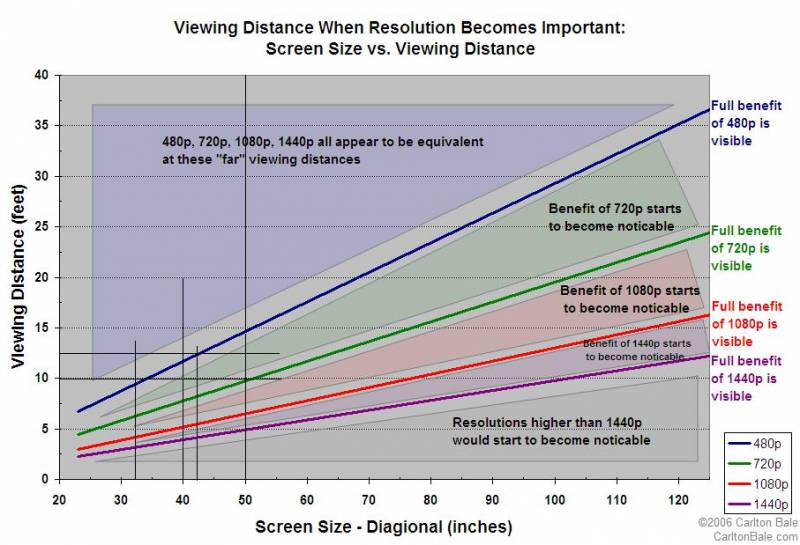
Another common misunderstanding lies in the size vs viewing distance equation. Many people ignore the mix of programme material and the resultant mix in source resolutions viewed. Selecting a humungous panel based only on HD program material at a given viewing distance provides a set-up that optimised for HD, but is NOT optimised for lower resolution material, which becomes very grainy and over-pixellated. When selecting panel size, REMEMBER to take into account source programming to be viewed!
So, what it all comes down to is that it's a case of horses for courses - depending on your requirements balance or priorities - where one technology will best address your specific needs. To attempt to define one as "the best" in all circumstances is likely to be misleading.
Late last year, a nearby lightning strike on the power line caused a surge that took out our old CRT TV sets so we decided to move to flat screens. Wife and I have very different tastes in viewing materials, so we did not go for one large (42" or larger) panel but chose, instead, to opt for 2 x 32" TVs. After much activity viewing options, we settled for 2 x Samsung 32" Full HD LED-backlit LCD TVs (UA32C5000). After almost a year, I have no regrets whatsoever - viewing distance is just under 3m in both cases and 32" is a good compromise size at this distance when viewing a mix of terrestrial analogue material (SABC/eTV/MNet) and HD movies.
Finally, DO TAKE THE TROUBLE TO RTFM AND GET TO UNDERSTAND HOW TO OPTIMISE THE COLOUR/CONTRAST/BRIGHTNESS/GAMMA SETTINGS! Also, switch the set from "Showroom" to "Home" (or whatever terminology is used) before carrying out adjustments to picture. If you want to get the best out of any panel - be it plasma or LCD - the picture settings need to be optimised for the environment(s) in which the TV will be used. You may well need to set up two or more sets of settings - one for daytime viewing and another for nighttime viewing.
A Tip: Rather than approach picture settings from scratch, I went web-surfing and Googled the make/model and "picture settings" and then read the posts found and selected one set that seemed to match my needs and setup the Samsung TV to the settings shown in the post. This gave very good results and a fine picture that only needed a few minor "tweaks" to optimise for my tastes. Much quicker and less frustrating than starting from first principles!
Have fun!




 )
)
