Offsidestreams & NTV Streaming Live TV

HOW TO SETUP EPG FOR OFFSIDESTREAMS
(NTV COMING LATER, WORKS THE SAME)

What you need

1. Latest Nightly version of XBMC

2. The TVGuide Addon for XBMC.
Get it from the default XBMC.org repository or here http://tommy.winther.nu/xbmc/zip.php?addon=script.tvguide

3. OffSideStreams Addon.

4. Channel listings file
See post #90 for new file updated weekly

5. TVGuide Addons.ini file
https://dl.dropboxusercontent.com/u/35759481/addons.ini.zip

Step 1. Install OffSideStreams and add all the channels to your global favourites.
Right-click or use the Context Menu to select the 'Add To Favorites' option.
Exit OffSideStreams and check your favorites list. The method of getting to your favorites depends on the skin you use.

Step 2. Install TVGuide and edit it's settings.
TVGuide needs to know a source for the listings it will display. Under the Source menu, select XMLTV as your source type. Below that you can then browse to the channels.xml file
Under the Startup section in the settings, select 'Use alternate streaming method'. This allows OffSideStreams to work properly.
Exit the settings menu and launch the TVGuide addon.

Step 3
. Link the two addons together.
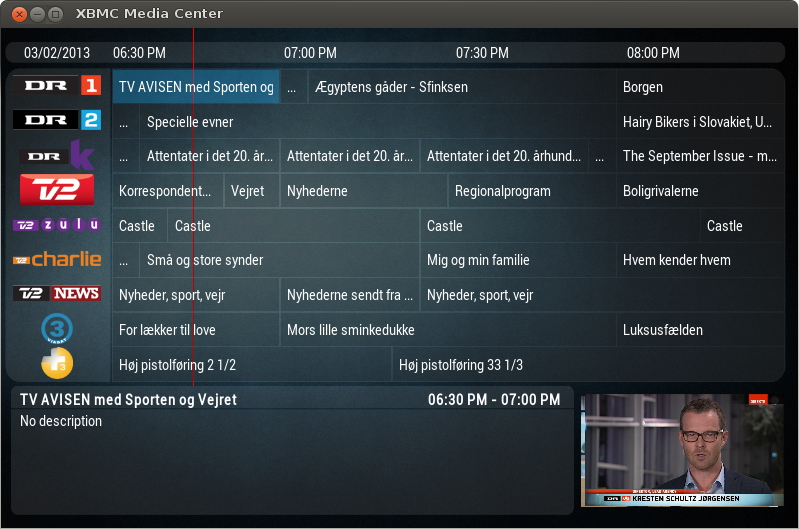
If everthing worked, you should now see a nice EPG of your channels. If you select a channel for the first time TVGuide will ask you to link a stream to it. There are 3 options for this bit. 1. Link a .strm file. 2. Link to a Favourite. 3. Use an Addon link.
You select Favourites and your list should appear below. Scroll down to the right one and link the channel to your corresponding OffSideStreams favourite. Do this for each channel and that's it.
UPDATE Copy the Addons.ini file to your C:\Users\***\AppData\Roaming\XBMC\addons\script.tvguide*\resources folder then you don't have to map the channels yourself.(Works for OSS & NTV(Since NTV doesn't have add to favorites yet))

When you go to TVGuide and select a channel, it will trigger the OffSideStreams favourite/addon.ini file and start the stream.

Please wait patiently, the stream will then start.

You can then delete the links from your favorites list because TVGuide adds them to it's internal database.

Will look something like this

script.tvguide-2.0.0a.png
 
Last edited:
HOW TO SETUP EPG FOR OFFSIDESTREAMS
(NTV COMING LATER, WORKS THE SAME)

What you need

1. Latest Nightly version of XBMC

2. The TVGuide Addon for XBMC.
Get it from the default XBMC.org repository or here http://tommy.winther.nu/xbmc/zip.php?addon=script.tvguide

3. OffSideStreams Addon.

4. Channel listings file
https://www.dropbox.com/sh/3cd65ofskrpy99u/j9Q56ri86T/channels.xml


Step 1. Install OffSideStreams and add all the channels to your global favourites.
Right-click or use the Context Menu to select the 'Add To Favorites' option.
Exit OffSideStreams and check your favorites list. The method of getting to your favorites depends on the skin you use.

Step 2. Install TVGuide and edit it's settings.
TVGuide needs to know a source for the listings it will display. Under the Source menu, select XMLTV as your source type. Below that you can then browse to the channels.xml file
Under the Startup section in the settings, select 'Use alternate streaming method'. This allows OffSideStreams to work properly.
Exit the settings menu and launch the TVGuide addon.

Step 3
. Link the two addons together.
If everthing worked, you should now see a nice EPG of your channels. If you select a channel for the first time TVGuide will ask you to link a stream to it. There are 3 options for this bit. 1. Link a .strm file. 2. Link to a Favourite. 3. Use an Addon link.
You select Favourites and your list should appear below. Scroll down to the right one and link the channel to your corresponding OffSideStreams favourite. Do this for each channel and that's it.

When you go to TVGuide and select a channel, it will trigger the OffSideStreams favourite and start the stream.

Please wait patiently, the stream will then start.

You can then delete the links from your favorites list because TVGuide adds them to it's internal database.

Will look something like this

script.tvguide-2.0.0a.png

Wow, thanks man. much appreciated. I prefer the image and sound quality of offside streams to that of ntv. I will be keeping my futubox and offsidestreams subs.
 
HOW TO SETUP EPG FOR OFFSIDESTREAMS
(NTV COMING LATER, WORKS THE SAME)

What you need

1. Latest Nightly version of XBMC

2. The TVGuide Addon for XBMC.
Get it from the default XBMC.org repository or here http://tommy.winther.nu/xbmc/zip.php?addon=script.tvguide

3. OffSideStreams Addon.

4. Channel listings file
https://www.dropbox.com/sh/3cd65ofskrpy99u/j9Q56ri86T/channels.xml


Step 1. Install OffSideStreams and add all the channels to your global favourites.
Right-click or use the Context Menu to select the 'Add To Favorites' option.
Exit OffSideStreams and check your favorites list. The method of getting to your favorites depends on the skin you use.

Step 2. Install TVGuide and edit it's settings.
TVGuide needs to know a source for the listings it will display. Under the Source menu, select XMLTV as your source type. Below that you can then browse to the channels.xml file
Under the Startup section in the settings, select 'Use alternate streaming method'. This allows OffSideStreams to work properly.
Exit the settings menu and launch the TVGuide addon.

Step 3
. Link the two addons together.
If everthing worked, you should now see a nice EPG of your channels. If you select a channel for the first time TVGuide will ask you to link a stream to it. There are 3 options for this bit. 1. Link a .strm file. 2. Link to a Favourite. 3. Use an Addon link.
You select Favourites and your list should appear below. Scroll down to the right one and link the channel to your corresponding OffSideStreams favourite. Do this for each channel and that's it.

When you go to TVGuide and select a channel, it will trigger the OffSideStreams favourite and start the stream.

Please wait patiently, the stream will then start.

You can then delete the links from your favorites list because TVGuide adds them to it's internal database.

Will look something like this

script.tvguide-2.0.0a.png

Thanks this worked perfectly!

Just a few questions, on the channel list file you gave, there were some streams that I did not have (Sky Disney ect) - are those ones you added yourself or are they from another service?

Secondly, how do I get channel logos to display?

Thirdly, is there any way to replace the "TV Guide" in XBMC main menu, with the one I installed to get the EPG to work? If not it is no big deal, will go the normal way of selecting add-ons and then TV Guide, just thought it be nice to have it on the home screen.

Lastly, what theme are you using?

Thanks again, this is really helpful.
 
Last edited:
Thanks this worked perfectly!

Just a few questions, on the channel list file you gave, there were some streams that I did not have (Sky Disney ect) - are those ones you added yourself or are they from another service?

Secondly, how do I get channel logos to display?

Thirdly, is there any way to replace the "TV Guide" in XBMC main menu, with the one I installed to get the EPG to work? If not it is no big deal, will go the normal way of selecting add-ons and then TV Guide, just thought it be nice to have it on the home screen.

Lastly, what theme are you using?

Thanks again, this is really helpful.

1. The channel list is still WIP and will get updated weekly with the EPG data. There might be 2 or 3 channels that shouldn't be there incl Disney. Still experimenting creating my own channel list.
Maybe try this channel list https://app.box.com/dixiedean/1/1079377151/9739011339/1

2. Channel logos might be visible if you change view options. Move mouse to left side of the screen and a popup menu will appear.
There are different view options for lists, big icons, poster view etc.

3. Remember you can also right click on a channel name or plugin for extra settings.
Right click on OSS addon and click add to favourites, same for tv guide then when you click on
the star in the bottom left hand corner, those two addons will be selectable as shortcuts in
the default skin.
A better way is to go to system-appearance-skin-settings-addon shortcuts-home page video shortcuts and add the plugins shortcut there, only video addons work for that. When you move the mouse over videos in the homescreen, a shortcut of OSS will appear beneath it, one click to open addon instead of three.

For a skin with lots more settings to change try Aeon Nox. With that you can change menu names and shortcuts and have even better layouts for videos and plugins, see 2 above.

UPDATE: NTV
New channels added:
- Setanta Ireland
- Setanta Sports 1
- AlJazeera sport and others in the works.
Addon is also updated
- Channels now have logos
- Show information added
- Full TV Guide available, not just current show when right clicking on channel and selecting TV Guide.
- TV Record function, right clicking on channel, select record will record live stream of show like
VCR not PVR.

Setup can then look like this(NTV)
http://imageshack.us/a/img824/6902/eaj4.jpg
 
Last edited:
UPDATE: NTV
New channels added:
- Setanta Ireland
- Setanta Sports 1
- AlJazeera sport and others in the works.
Addon is also updated
- Channels now have logos
- Show information added
- Full TV Guide available, not just current show when right clicking on channel and selecting TV Guide.
- TV Record function, right clicking on channel, select record will record live stream of show like
VCR not PVR.

Setup can then look like this(NTV)
http://imageshack.us/a/img824/6902/eaj4.jpg


Oh, nice!

Thanks for the update - do we need to update the add-on client in XBMC?
 
This is the most awesome thing ever! Just set up my NTV last night, started with my 1 week trial, and tbh, after my trial is finished, im definitely going to get it!

MOST AWESOME! Thanks for this!
 
Do you guys know by any chance which of the three: OffsideStreams vs NTV vs Futubox has the lowest delay to realtime broadcast?

I was about to sign up for Al Jazeera Sport due to competitive prices (US$135 / year), wide coverage of league games (all major except Bundesliga), mobiles apps with AirPlay streaming abilities (so one can watch on TV) but what is putting me off is the 20s delay which I don't find acceptable.
 
How's the streaming/image quality on these services?

Honestly I prefer OffsideStream. The Sky Sports streams run perfectly on my line with almost no problems at all (only once did the stream die but then was quick to restart). On sunday watched the Ashes and then the Golf all day and night without any problems.

Between OffsideStream and NTV, I think OffsideStream picture and sound quality a little better but then again it could be completely different for someone else.
 
Would someone be so kind to compare for me delay on Sky Sports 1 between OffsideStreams and the following stream:
http://www.coolsport.tv/skysports1.html

I can see Futubox is the same as Coolsport stream above (or split seconds faster / slower), while NTV is few seconds behind.
 
offside streams xbmc addon seems to be broken. Website offline as well.

EPL started so huge stress test.
Both NTV & Futubox works.
OffsideStream seems cannot handle the traffic on their servers.
 
Last edited:
EPL started so huge stress test.
Both NTV & Futubox works.
OffsideStream seems cannot handle the traffic on their servers.

Yeah, gave NTV a try this weekend to watch some of the football and rugby. Picture quality is okay, "standard definition", if anything. The sound is a little tinny, but I suspect it's only an issue if watching a blockbuster movie - fine for sports. Streaming was very smooth, although one time it did cut out and I couldn't restart for about 2 minutes. One issue I did encounter though was that one of the Al Jazeera Sports channels wouldn't start at all for about an hour. XBMC would hang with the message "getting stream". I'd have to eventually kill the XBMC process manually via system monitor, because it locks up everything and you can't cancel the action.

Haven't tried OffsideStreams. Does OffsideStream even have Jazeera Sports? Sky Sports are only showing a few of the big BPL matches this year, so AL Jazeera is really needed for those following smaller teams.
 
Last edited:
Yeah, gave NTV a try this weekend to watch some of the football and rugby. Picture quality is okay, "standard definition", if anything. The sound is a little tinny, but I suspect it's only an issue if watching a blockbuster movie - fine for sports. Streaming was very smooth, although one time it did cut out and I couldn't restart for about 2 minutes. One issue I did encounter though was that one of the Al Jazeera Sports channels wouldn't start at all for about an hour. XBMC would hang with the message "getting stream". I'd have to eventually kill the XBMC process manually via system monitor, because it locks up everything and you can't cancel the action.

Haven't tried OffsideStreams. Does OffsideStream even have Jazeera Sports? Sky Sports are only showing a few of the big BPL matches this year, so AL Jazeera is really needed for those following smaller teams.

Offside streams has Aljazeera sports 5 to 9 as well. i.e if you select the Europe server.
 
Offside streams has Aljazeera sports 5 to 9 as well. i.e if you select the Europe server.

Cool. Will give them a try once the NTV trial is finished, and compare. I'm really just after the sports, so Offsidestreams would be the cheaper option in that regard.
 
Top
Sign up to the MyBroadband newsletter
X