Olarm and texecom

petum

Well-Known Member
Joined
May 26, 2016
Messages
473
Reaction score
119
Hi.

Since olarm and the paradox is working so lekker at home, I've decided to extend it to my work alarm.

Unfortunately it's texecom and might be a bit dated. There is no model printed on the pc board. See att.

I don't know where the com1 is on the panel or what the 'engineering code' is.

Any help is appreciated. Thanks.
0f79e24f329215da378183a530852b5e.jpg
cbdead562a787ddbe8423c1035e84e58.jpg
 
Hi.

Since olarm and the paradox is working so lekker at home, I've decided to extend it to my work alarm.

Unfortunately it's texecom and might be a bit dated. There is no model printed on the pc board. See att.

I don't know where the com1 is on the panel or what the 'engineering code' is.

Any help is appreciated. Thanks.
0f79e24f329215da378183a530852b5e.jpg
cbdead562a787ddbe8423c1035e84e58.jpg
Com1 is the top most right (when looking at the panel) port

Have you tried 1234 / 0000 / 9999

 
Last edited:
Hi.

Since olarm and the paradox is working so lekker at home, I've decided to extend it to my work alarm.

Unfortunately it's texecom and might be a bit dated. There is no model printed on the pc board. See att.

I don't know where the com1 is on the panel or what the 'engineering code' is.

Any help is appreciated. Thanks.
0f79e24f329215da378183a530852b5e.jpg
cbdead562a787ddbe8423c1035e84e58.jpg

Engineer is user code 00 so you need to program it as well as enable it.
 

Attachments

Hi.

Since olarm and the paradox is working so lekker at home, I've decided to extend it to my work alarm.

Unfortunately it's texecom and might be a bit dated. There is no model printed on the pc board. See att.

I don't know where the com1 is on the panel or what the 'engineering code' is.

Any help is appreciated. Thanks.
0f79e24f329215da378183a530852b5e.jpg
cbdead562a787ddbe8423c1035e84e58.jpg
might have the same issue

bought the olarm pro as it is "texecom compatible"
cycles to RED, so the issue is the alarm/serial connection is not programmed correctly

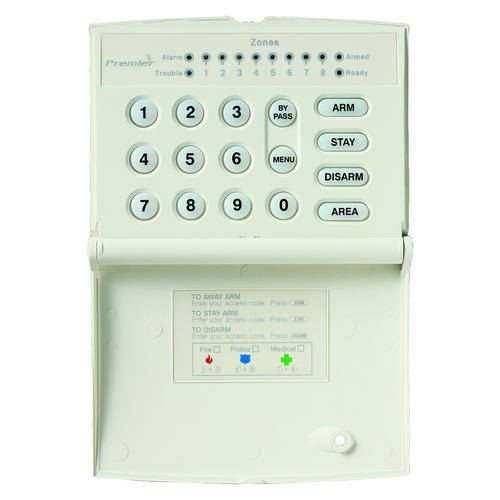
problem is my keypad only has led
so looks like this

1251867_120627173147_RKP8_open.jpg


alarm itself is hard to work out the model number as it must be printed on reverse, but appears to be Premier 412 (and does have 2003 on it, but was probably installed ~2016 going by the previous house owner)

I do have an electrical engineering degree and 5 years of embedded programming experience so figured it can't be that hard to work out. but after going through the programming manual it's not entirely certain if maybe my system is too old.

for instance i don't seem to have the red functions
and not sure if the orange ones are universal or i need to find my site specific ones.

1680713411170.png


would be nice to know if I have bought an incompatible lemon before i call an expert to come make it work. don't feel like spending 5 hours working out how to get a "plug and play" product to work.

have sent a support ticket, so will probably get the answer tomorrow anyway, but figured this might help someone in similar issue.
 
might have the same issue

bought the olarm pro as it is "texecom compatible"
cycles to RED, so the issue is the alarm/serial connection is not programmed correctly

problem is my keypad only has led
so looks like this

1251867_120627173147_RKP8_open.jpg


alarm itself is hard to work out the model number as it must be printed on reverse, but appears to be Premier 412 (and does have 2003 on it, but was probably installed ~2016 going by the previous house owner)

I do have an electrical engineering degree and 5 years of embedded programming experience so figured it can't be that hard to work out. but after going through the programming manual it's not entirely certain if maybe my system is too old.

for instance i don't seem to have the red functions
and not sure if the orange ones are universal or i need to find my site specific ones.

View attachment 1503937


would be nice to know if I have bought an incompatible lemon before i call an expert to come make it work. don't feel like spending 5 hours working out how to get a "plug and play" product to work.

have sent a support ticket, so will probably get the answer tomorrow anyway, but figured this might help someone in similar issue.
Hi, I found that Red (in the above pic) is the Menu button.
 
Yup got out working. Definitely worth the effort.

Tried to give them a call? Very helpful
 
I got the app to work yesterday. But have lost connection to my alarm company’s control room (I get alarm trigger signal on my app but service provider does not get my alarm trigger signal)…

Here is the response from Olarm,
“If you'd like them to monitor your Olarm, please provide them the serial number so they can claim the device on their monitoring platform. ”

I now need my service provider to add my Olarm to their platform.
 
Top
Sign up to the MyBroadband newsletter
X