kronoSX
Honorary Master
Seeing that i could not get firefox to work anymore and there is no fix as yet(check my post about my problem about firefox).I installed opera for the first time.
1-I suck at spelling sometimes,But the spell checker i do have is aspell and i installed the dic.But the spell checker sucks as it does not give me all the words listed for correct spelling.
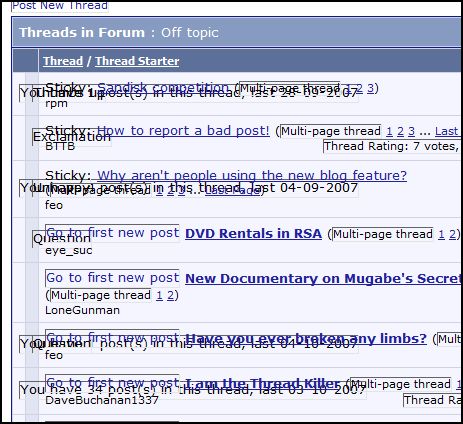
2-There is this weird words on top of one another on all sites including this one,the effect it fives is like writing 6 words on top of each other making it hard to read,what is the fix for this,other than that opera looks good.I will post a link to how it looks with this weird black lines.
http://mybroadband.co.za/photos/data/500/operajunk.JPG
1-I suck at spelling sometimes,But the spell checker i do have is aspell and i installed the dic.But the spell checker sucks as it does not give me all the words listed for correct spelling.
2-There is this weird words on top of one another on all sites including this one,the effect it fives is like writing 6 words on top of each other making it hard to read,what is the fix for this,other than that opera looks good.I will post a link to how it looks with this weird black lines.
http://mybroadband.co.za/photos/data/500/operajunk.JPG
Last edited: