Overlapping wifi channels

powermzii

Expert Member
Joined
Jun 4, 2007
Messages
4,860
Reaction score
1,429
Location
Pretoria East
Are there use cases where using overlapping wifi channels makes sense? e.g. channels1, 4 and 6?

I saw something on a Unifi blog that if you want seamless roaming then its advisable to do this but general wisdom always says use non overlapping channels
 
2.4GHz-channels-metageek.png

Normally your 'speed' is made up from bonding channels to create your channel width, the wider you go the more interference you might have.
 
Are there use cases where using overlapping wifi channels makes sense? e.g. channels1, 4 and 6?

I saw something on a Unifi blog that if you want seamless roaming then its advisable to do this but general wisdom always says use non overlapping channels
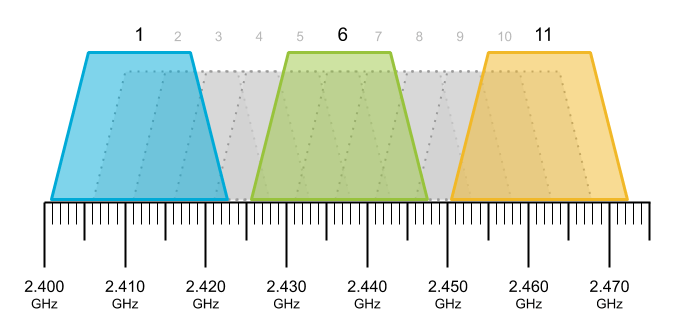
Good question! Anybody have an answer? Note the highlighted part.

I'm going to be using two older routers in "extender" mode connected to my main router via lan cable. That way most of my yard is covered by Wi-Fi. All with same SSID and passwords.

Hence the question.
 
Good question! Anybody have an answer? Note the highlighted part.

I'm going to be using two older routers in "extender" mode connected to my main router via lan cable. That way most of my yard is covered by Wi-Fi. All with same SSID and passwords.

Hence the question.
You'll want to use non-overlapping. There definitely isn't any handover if you're not using a mesh system (also not sure that it'd be better for handover, but not applicable here)
 
The "seamless roaming" the UniFi blog was referring to was an older implementation similar to 802.11r or 802.11k. It required the APs to operate on the same channel for the seamless roaming to work & I think it only really helped someone with WiFi VoIP phones. It's a situation to be avoided in most cases. You don't want all your APs transmitting on the same channel even if logically they are part of the same network. If your dual band 802.11n/ac (WiFi4/5) UniFi AP is going to "mesh" to a neighbouring cabled UniFi AP it's best to use the 5GHz interface. Repeating or extending this way always leads to a slight increase in latency & a reduction in throughput. The radios are simplex & they have to listen, buffer retransmit. This reduces the amount of time the radio has to engage with the client devices & thus it reduces the throughput. If you want 3 non overlapping channels on the 2.4ghz interface it's 1,6 & 11 with a 20MHz channel width. In short there isn't any advantage in having overlapping channels just the opposite.
 
Also, as a suggestion from someone who had a couple of APs previously (moved to mesh now), use different SSIDs. It's super frustrating not knowing which AP you're connected to when moving around the house. Sometimes you're right next to an AP but still connected to the further one (it'll only switch when the existing connection drops) and then having different SSID makes it quick to pop across to the closer AP.
 
Also, as a suggestion from someone who had a couple of APs previously (moved to mesh now), use different SSIDs. It's super frustrating not knowing which AP you're connected to when moving around the house. Sometimes you're right next to an AP but still connected to the further one (it'll only switch when the existing connection drops) and then having different SSID makes it quick to pop across to the closer AP.
This can depend on the client devices NIC and it's roaming aggressiveness but some APs can offer improvements when they have 802.11k. My Ubiquiti AmpliFi HD has 802.11k & the roaming between the AP & the mesh points is fast. If you access the web GUI you can see how fast it happens. On UniFi AP's you can also set a minimum RSSI (a weakest signal, eg -85) level & the AP will kick the client device off which would force a re-association. However if there are no closer APs it can cause problems.
 
This can depend on the client devices NIC and it's roaming aggressiveness but some APs can offer improvements when they have 802.11k. My Ubiquiti AmpliFi HD has 802.11k & the roaming between the AP & the mesh points is fast. If you access the web GUI you can see how fast it happens. On UniFi AP's you can also set a minimum RSSI (a weakest signal, eg -85) level & the AP will kick the client device off which would force a re-association. However if there are no closer APs it can cause problems.
I've set the min RSSI but it doesn't always work - maybe my phone is just too sticky.... Wifi truly is a dark art, lol
 
So i tried that a few months ago - then i lost all my IoT devices that connected to the 802.11 g speed (some door sensors) lol...

I guess its a compromise
Odd because it drops 802.11b support and makes 6mbps 802.11g the min that it will accept. What IoT do you have? Sonoff?
 
Are there use cases where using overlapping wifi channels makes sense? e.g. channels1, 4 and 6?

I saw something on a Unifi blog that if you want seamless roaming then its advisable to do this but general wisdom always says use non overlapping channels
It may be a bit counter to oft-used mantra,but its a lesson we learnt long ago transitioning from unifi's seamless-handover to non years ago:
Use the exact same channel,but drop the strength of each AP till they are almost imperceptible to one-another,and set the min-rssi accordingly
The same frequency reduces dead-drops in the connection switching frequencies when changing AP (remember the battery drain cell c 4g used to cause? Sameish premise)
 
Odd because it drops 802.11b support and makes 6mbps 802.11g the min that it will accept. What IoT do you have? Sonoff?
Yes Sonoffs... battled to get them online until I set that slider to the minimum level. They don't have great WiFi chips tbh and should be replaced in a few months

Anyways... maybe I just live with this for now
 
Top
Sign up to the MyBroadband newsletter
X