


Start of summer time
Things getting hot, especially cars, going to see a lot of overheating cars by the side of the road with the driver going ehhh aikona.
You in the wrong thread, fool.
South Africa’s biggest forum. Discuss, discover, and connect with thousands of members.
Start of summer time
Things getting hot, especially cars, going to see a lot of overheating cars by the side of the road with the driver going ehhh aikona.

Is it, is it really.You in the wrong thread, fool.

The poor bloke has a screw looseYou in the wrong thread, fool.
Really? So its a dud? I bought this as a refurbished PC. Didn't know too much about the machine but the specs looked ok. Here is the rest ... is it worth holding onto this machine and trying to sort it out/upgrading what I have or should I just look at a better system? Honestly speaking though ... I am not made of money, use it mostly for editing photos and for editing video in Adobe Premiere Pro. I don't need it for streaming or gaming.Yeah that's not a pc, it's server hardware and it's old server hardware


There's the problem what is the case it's in? Upgrading it isn't going to be easy, also looks like you were given a Chinese motherboardReally? So its a dud? I bought this as a refurbished PC. Didn't know too much about the machine but the specs looked ok. Here is the rest ... is it worth holding onto this machine and trying to sort it out/upgrading what I have or should I just look at a better system? Honestly speaking though ... I am not made of money, use it mostly for editing photos and for editing video in Adobe Premiere Pro. I don't need it for streaming or gaming.
I got this detail from Speccy. I also notice that the motherboard is running extremely hot - this could be the problem right? I wasn't sure if Speccy was correct and used CPUID HWMonitor which confirm those temperatures in the range of 120degC
View attachment 1584586
View attachment 1584588
Assume I can replace the motherboard - is there an alternative (non chinese junk) that could be recommended? The case is aThere's the problem what is the case it's in? Upgrading it isn't going to be easy, also looks like you were given a Chinese motherboard
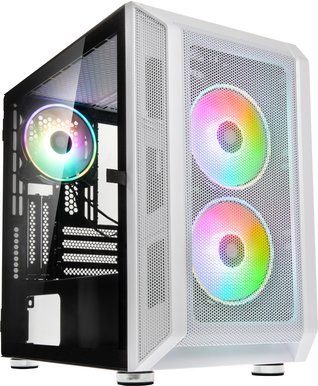
Honestly not sure the Xr99 is a later board but mostly chinese brands used it. You could see if you could find away to cool that board maybe check the fans are sucking in and the rear is blowing outAssume I can replace the motherboard - is there an alternative (non chinese junk) that could be recommended? The case is a
Kolink Citadel Mesh RGB, MicroATX, TG, aRGB

Really? So its a dud? I bought this as a refurbished PC. Didn't know too much about the machine but the specs looked ok. Here is the rest ... is it worth holding onto this machine and trying to sort it out/upgrading what I have or should I just look at a better system? Honestly speaking though ... I am not made of money, use it mostly for editing photos and for editing video in Adobe Premiere Pro. I don't need it for streaming or gaming.
I got this detail from Speccy. I also notice that the motherboard is running extremely hot - this could be the problem right? I wasn't sure if Speccy was correct and used CPUID HWMonitor which confirm those temperatures in the range of 120degC
View attachment 1584586
View attachment 1584588
Yes clean and reseat every card or component. Often the temperature change from winter to spring / summer causes cards to become unseated. We have also had cases where wood dust has become damp in Durban humidity as summer approaches.. Damp causing dust to transmit electricity causing short circuits etc.yeah could be that the ram needs reseating.
Go check what event viewer is logging when these freezes happen.
Start --> Run --> Event Viewer
Expand Windows Logs on the left and click on System.
You can filter by error type but it's easier just to use the time you had the issue and look at the events logged at that time.

Yeah, the logs are generated as things happen.ok, thanks ... will try all of those. It just crashed again so will wait a little before I restart it.
when my machine fails, i have to do a hard power off as nothing is responsive. Is that ok? check the event viewer after restart?


In all my years of experience building these things, I have found one recurring theme.Hi All,
I am struggling with a PC that freezes randomly. It does so after a little use, a lot of use, with few programs open or with many - just random. I am not even able to activate the task monitor. Mouse and keyboard are frozen - nothing works. Only solution is to power down and back up.
I have changed the SSD main drive and have also changed the OS and it still does it. The only thing I havenet changed is the processor, the RAM and the motherboard.
Any ideas what could be causing this?
Thanks
Vic

This is the last messages on Event Viewer before failure ...Go check what event viewer is logging when these freezes happen.
Start --> Run --> Event Viewer
Expand Windows Logs on the left and click on System.
You can filter by error type but it's easier just to use the time you had the issue and look at the events logged at that time.

Stuff gets logged there continuously....did you make note of the time when the last freeze was? Look for what was logged at that time.This is the last messages on Event Viewer before failure ...
View attachment 1584802
