PC Noise.

Mephisto_Helix

Resident Postwhore
Joined
Jan 29, 2008
Messages
33,892
Reaction score
11,779
Location
UK
This new PC is like rush hour at an airport it's so noisy :o What would be some suggestions on quieting the b@stard down. Bear in mind that I'm technologically challenged so if you have a suggestion, please dumb it down for me ;):D
 
Over 4000 posts? With Grandmaster status comes great responsibility :p

Seriously though: what are the specs on the PC? Are you running stock coolers (fans, heatsinks, etc) ? Is it always noisy, or does it go through phases? Are you able to figure out where the bulk of the noise is coming from (power supply, processor, graphics card) ?
 
Methinks it's the gfx card (8800GT Alpha Dog) coz I read online that they can be quite noisy :o Or the 2 giganto fans on the side of the case. All stock on the fans, heatsinks ands whatnot. It's always noisy but kicks up a gear when playing games hence /me thinking it's the card. Oh and the processor is an E8400.
 
Well, i've got a Xeon E3110, which is identical to the e8400 that you have. Use a program like CPUID HWMonitor to check your temps and fan speeds. I'm overclocking to 3.5GHz, and my temps stay way below 50 degrees, even on extended load. Oh, and my fan speed always stays under 2500RPM.

My guess is the noise is coming from the graphic card. I've got a Leadtek 8800GT, and at full speed the fan sounds like a let getting ready for takeoff. I'd suggest something like rivatuner to check, and if necessary, modify your fan speed settings. Try to keep the temps(on your graphic card) below 80 degrees on load, and you should be safe. Other than that, if your case fans are noisy, maybe some of those silicone vibration-dampers that fit between the fan and the case... But seriously, i've got a similar setup to you, and my system isn't that loud at all.
 
I would have a look and see if your hardware is supported by Speedfan. Then you can set your optimal temps and speeds, unfortunately, Speedfan does take some tweaking.
 
Hmm, some good tips there. I know the Alpha Dog's don't get (aren't supposed to anyway) too hot even under load because of the Zalman fan/cooler but that same fan/cooler's noise is what has guys complaining, so it's probably that. I'll get that rivatuner and play about a bit and those vibration dampers sound like a good thing too.

Thanks bru
 
Try disconnecting the case fans then power up the PC check if its quieter, then power it down again and reconnect.
 
Try disconnecting the case fans then power up the PC check if its quieter, then power it down again and reconnect.

1) too worried that /me fscks up something (clumsy) and 2) it's still under guarantee so I don't wanna void anything :o
 
My CPU, PSU and graphic's fans are all thermal controlled, but not the 3 case fans (2 x 12CM and 1 X 8CM), so I got myself a fan/light controller from Incredible Connection which now my PC is running much quieter.
 
Last edited:
My CPU and graphic's fans are all thermal controlled, but not the 3 case fans (2 x 12CM and 1 X 8CM), so I got myself a fan/light controller from Incredible Connection which now my PC is running much quieter.

I was wondering about these jobbies ...... worth the purchase maybe?
 
I was wondering about these jobbies ...... worth the purchase maybe?

It's worthy to me, as IC got the pricetag wrong as usual so the Fan/Light controller model was priced the same as the Fan controller only for R180 (Same model is selling for R250 online).

But ya, first you need to check the source of the noises before you can take action.
 
I bought an Asus case a while ago and realised that the case fans (2x 12cm fans) were connected straight to DC (rectangular plugs also used on HDD and DVDs). These fans also had the smaller 3-pin plugs for mobo connectivity :)
I hooked them to those rather and could now limit the speed (and hence noise)through the bios :D
This changed noise from a day at the airport runway to a stroll in the park.

(I also have a XFX 8800GT Alpha doggy with Zalman cooler - and she's pretty quiet ;)
 
I bought an Asus case a while ago and realised that the case fans (2x 12cm fans) were connected straight to DC (rectangular plugs also used on HDD and DVDs). These fans also had the smaller 3-pin plugs for mobo connectivity :)
I hooked them to those rather and could now limit the speed (and hence noise)through the bios :D
This changed noise from a day at the airport runway to a stroll in the park.

(I also have a XFX 8800GT Alpha doggy with Zalman cooler - and she's pretty quiet ;)

I have 3 spare 3pin case fan sockets on my motherboard, but the casefan only has 4pin Molex connectors, so can only get a fan controller (can connect to 3pin or 4 pin fans).
 
If you ever replace the fans, or want to, get Vantec Stealth or Vizo muffle case fans. They run pretty darn quietly, even at +- 1500rpm. They also conform to the Intel PWM fan standard, so they adjust dynamically.

Once the system is out of warranty,maybe get a better CPU cooler, like the Arctic Cooling Freezer 7 Pro. Uses same push pins as Intel cooler, but cools better and has a quieter fan.
 
I bought an Asus case a while ago and realised that the case fans (2x 12cm fans) were connected straight to DC (rectangular plugs also used on HDD and DVDs). These fans also had the smaller 3-pin plugs for mobo connectivity :)
I hooked them to those rather and could now limit the speed (and hence noise)through the bios :D
This changed noise from a day at the airport runway to a stroll in the park.

(I also have a XFX 8800GT Alpha doggy with Zalman cooler - and she's pretty quiet ;)
... /me also has an Asus case, with the 2x 12cm fans so that looks like the culprit eh :D

There is a reason why they spinning faster when you play games, they getting hot, check the heat sinks for dust and what not.
... brand new system so doubtful on the dust issue just yet ;)
 
Are your 2 System fans 4 Pin PSU plugs or 4/3 pin Mobo plugs? I have a antech, it's pretty niosy at max RPM [probably cause it's 4 years old] so I just plug it into my Mobo sysfan port and run it at its slowest speed. No noise! :D
Don't think it's your CPU, more likely the sys fans or GPU :)

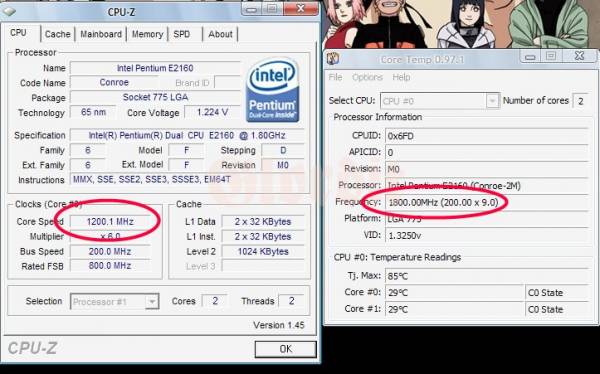
Try activating Speed step in your bios it will drop the CPU's multiplier and slow down the CPU when you are not using it causing less heat! :D got my E2160 at ~27°C - idle at 1.2Ghz

http://mybroadband.co.za/photos/data//500/medium/core-cpuz.jpg
lolz not exactly 27 at the time, although Core Temp does not seem to see speed step and reads it at 1.8Ghz
 
Last edited:
Over 4000 posts? With Grandmaster status comes great responsibility :p

Seriously though: what are the specs on the PC? Are you running stock coolers (fans, heatsinks, etc) ? Is it always noisy, or does it go through phases? Are you able to figure out where the bulk of the noise is coming from (power supply, processor, graphics card) ?

:D:D:D:D
 
1. Big slow turning fans
2. Heatpipe tech that distributes heat to heat sinks cooled by big slow fans
3. Water cooling

There are a myriad of options available to you but the best would be to get a proper solution by a well known brand that allows you to extract with a heat pipe heat to a large surface that can be cooled using a slow big fan.

http://www.zalman.com/ENG/product/C...ategoryname=Water Cooling&categorySecond=CAS8

http://www.zalman.com/ENG/product/Product_Read.asp?idx=278

http://www.coolermaster.com/products/product.php?act=detail&id=4512

http://www.coolermaster.com/product...category&finalflag=N&tbcate=230&cateid=000002
 
Top
Sign up to the MyBroadband newsletter
X