Pc problem - think its the HDD

D3x!

Banned
Joined
Jul 18, 2010
Messages
18,616
Reaction score
12
Location
pew pew pew
Hi all,

My main working pc has started responding very slowly, when booting up tries to run a check disc everytime and has thrown some blue screens.

I think it is the hard drive, how can I confirm this?

Also what can I do to save my programs and data?

Meh otherwise I am going to have to do a fresh install on a brand new drive and this time split in with OS on a smaller drive.

Advice?

Just FYI running 64bit vista ultimate
 
Well, first thing, run seatools for windows (not sure if it works properly on vista 64).

If you can, try to get hard drive sentinel which gives very good diagnostics tests and results
 
Last edited:
Thanks will try seatools in the morning when I get there, as for sentinel, that isn't free from the look of things
 
You haven't told us what error codes you are getting when you get the BSOD's. As for your data you can backup it up to a different hard drive.
 
Sorry the blue screen is too fast to see, only thing I caught was near the bottom it said physical memory dump.
 
Ok managed to disable the automatic restart from the advanced boot menu as today all it does is blue screen.

Technical Information:

*** STOP: 0x0000007A (0xFFFFF880026F79C0, 0xFFFFFFFFC000009C, 0x00000000721BC8C0, 0xFFFFF900C0658000)

Collecting data for crash dump...
Initializing disk for crash dump...
Beginning dump of physical memory.
Dumping physical memory to disk: 100
Physical memory dump complete.
 
ok first drive seemed to be dead, then all of a sudden it booted again, this screen flashes by that is not normally there but again too fast to see, something with GLDR or something like that, then it comes up with a screen to change to boot sector, you can only press enter, boom the BSOD

and worst part is i cannot find my 64bit disc, only my 32bit but since i have 8GB ram i cant use 32bit and use all the ram correct?
 
ok and at the top it says

KERNEL_DATA_INPAGE_ERROR

Yup that's your hard drive, sorry bud, also you will only be able to use about 3.5GB of your ram if you use a 32bit OS.

I suggest you take out your hard drive and put it in an external drive bay and have as much data saved off it to another hard drive asap before the hard drive fails completely. You need to backup all your data asap!

If the hard drive is still under warranty then you should take it back otherwise if it isn't it's time for a new one :)
 
ok first drive seemed to be dead, then all of a sudden it booted again, this screen flashes by that is not normally there but again too fast to see, something with GLDR or something like that, then it comes up with a screen to change to boot sector, you can only press enter, boom the BSOD

and worst part is i cannot find my 64bit disc, only my 32bit but since i have 8GB ram i cant use 32bit and use all the ram correct?

If you know someone who has the x64 disk you could borrow their disk and install using your key.
 
Ok used a buddies 64bit disk to try repair, diagnostic says cannot repair, root cause is bad disk.

dammit so now i need to find my disk and key


clown no pron on this PC

was the key with your disk?

You could try recover the key..
 
If you know someone who has the x64 disk you could borrow their disk and install using your key.
busy installing using that disk now, just choose not to enter the key, that should give me 30 days to find the damn disc with the key.

otherwise time for a new one.

Time for a bigger case anyway, this one is too small and gets a bit hot.

Also need a SSD for my OS and Photoshop.

was the key with your disk?

You could try recover the key..

how so? will it work even if i can't boot onto the drive?
 
busy installing using that disk now, just choose not to enter the key, that should give me 30 days to find the damn disc with the key.

otherwise time for a new one.

Time for a bigger case anyway, this one is too small and gets a bit hot.

Also need a SSD for my OS and Photoshop.


how so? will it work even if i can't boot onto the drive?

You get programs that can do that yes. Permitting it can say run on a data recovery machine, even if it won't allow you to boot from.
 
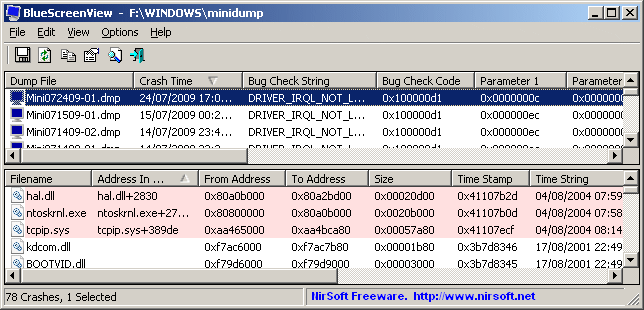
download this
http://www.nirsoft.net/utils/bluescreenview_setup.exe

install it run it.
Post the names of the files in the lower pane thats in red

will look like this
bluescreenview.gif
 
Top
Sign up to the MyBroadband newsletter
X