PLEASE HELP!

mischavalentine

New Member
Joined
Feb 1, 2011
Messages
8
Reaction score
0
Hi there I'm new here and I stumbled across this forum while frantically trying to locate something/one to help me with my PVR.

Yesterday my decoder started displaying this little blue screen with the message;" there is a problem with your harddisk, please power cycle PVR." - right so I decided to reboot. (switch off at plugs and wait .............) then switch on again. nada - my blue friend was still there.

So I phoned multichoice and the lady told me to unscrew the two white wires no: 1 + 4 then screw them back in.
Now there's no sound. and as if my problem wasn't enough two wires at the back that go into a little silver box came out of their casings and now it's all messed up.

I have noticed that at the back of the decoder where the white wires go in they are numbered, as well as where the go into the silver box thingy. Do they need to correspond? As in wire that is plugged into slot number one in the decoder...does the other end need to go into slot number one in the silver thingy too? and so on ...

I have no idea if this makes sense but my husband is in Nigeria and I have no contact with him, so no help there....please help!
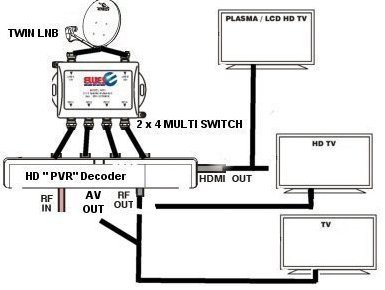
 
I assume that silver box is your multi-switch and you have the PVR that records 2 channels and can watch a third?

If so yes those number correspond, put 1 into 1, 2 into 2, 3 into 3, 4 into 4. those casings. or connectors as they are called screw back onto the cable.
 
Yes I have the decoder that records 2 and watch a 3rd.
I have no Idea if it's a multi-switch, does it have six inputs for the white cables? there's only 4 coming from the decoder though. the other 2 goes from the silver box to the ceiling. (To be quite honest I know ABSOLUTELY NOTHING about anything technical, but since I am home alone for 3months at a time I might as well start learning)
Also we have an extremely complicated surround sound system, won't me fiddling with it cause everything to tune out?
 
yes then that box is the multiswitch, on one side there should be 2 cables coming into it, that is from the dish, on the other side could have 4 or six outputs, if you have 4 then line those up, 1 to 1, 2 to 2 etc into the inputs on the back of the decoder. If it is the one with six outputs, still use the first 4, the other 2 outputs are if you have extra view, even if you do not have extra view don't worry about them, just use the first 4 to go into the 4 inputs on the back of your PVR.

Messing with those cables should not affect your sound system.
 
here see this:

320632_100103073319_2x4_MultiSwitch-Connection-Diagram.jpg


see how the wires are connected between the multi switch and the pvr, like that.
 
Last edited:
Okay so I followed each white wire from the decoder to the silver box and they all correspond from 1-4 (meaning that cable number one in the decoder goes to slot number one on the silver box etc.) Still no sound and still my blue friend is there on the screen.... next step to check?
 
a search indicates you either need to format the drive or take it in to multichoice, have you tried calling them again?
 
I got the sound!!!!!!!! YAY! OMW Dude thanks a trillion! .... now there's still the harddisk problem, but that's minor at this stage now that I'm so extatic about getting something right.... any ideas though?
No I haven't called again.... I will try again tomorrow... it's really hard on my phone bill going.... " yes ma'am I will spell it again"
 
Last edited:
Very simply you have a known issue with the HDPVR, assuming you have the original black Pace HDPVR

You need to take the PVR in for a swap out. If the serial number is less then P300080000 it will be free. If its a later decoder it will cost R342 unless you are on a care plan or its less then a year old

If you have recordings on there you want to watch then you can try leave it off for a few hours, it might work for a while before giving you the blue screen again
 
Very simply you have a known issue with the HDPVR, assuming you have the original black Pace HDPVR

You need to take the PVR in for a swap out. If the serial number is less then P300080000 it will be free. If its a later decoder it will cost R342 unless you are on a care plan or its less then a year old

If you have recordings on there you want to watch then you can try leave it off for a few hours, it might work for a while before giving you the blue screen again
I'll try leaving it off overnight. Thanks where do I check the serial number?
 
I got the sound!!!!!!!! YAY! OMW Dude thanks a trillion! .... now there's still the harddisk problem, but that's minor at this stage now that I'm so extatic about getting something right.... any ideas though?
No I haven't called again.... I will try again tomorrow... it's really hard on my phone bill going.... " yes ma'am I will spell it again"

awesome.

Very simply you have a known issue with the HDPVR, assuming you have the original black Pace HDPVR

You need to take the PVR in for a swap out. If the serial number is less then P300080000 it will be free. If its a later decoder it will cost R342 unless you are on a care plan or its less then a year old

If you have recordings on there you want to watch then you can try leave it off for a few hours, it might work for a while before giving you the blue screen again

Ah good man thanks for your knowledge :)

I'll try leaving it off overnight. Thanks where do I check the serial number?

If I remember its stuck under the decoder
If you can swop it out at an actual Multichoice (JHB, CT or DBN), if you take it to an agency you might have to wait a few days for a replacement

^

I think on the newer models it is stuck on the back, but I think Smuratefrog is right, on this unit it was under the unit.
 
I will check that out tomorrow, I am exhausted after having to work a full day and then coming home to a electronic disaster I know nothing about. Thank God for this forum and you guys or I would still be fidgeting with wires that have nothing to do with anything.
 
Me thinks your decoder is borked....go to Multichoice and get a new one (happened to me a few months back).
 
I will check that out tomorrow, I am exhausted after having to work a full day and then coming home to a electronic disaster I know nothing about. Thank God for this forum and you guys or I would still be fidgeting with wires that have nothing to do with anything.

Lol :)
 
Top
Sign up to the MyBroadband newsletter
X