Powerline Adapters for Ethernet

weelzSA

Expert Member
Joined
Jul 23, 2009
Messages
3,259
Reaction score
51
Location
Cape Town
So I need to get Ethernet to my garage and unfortunately can't use WiFi or run a cable from router to garage.

I was thinking to use a power-line adapter as it seems the simplest solution. I just want to find out if they actually work and are stable. Don't need fast connection at all but needs to be connected 24/7.

Does anyone here have any experience with these and if so which do you recommend? Also I've been told they need to connect directly to power socket in wall - are they able to work over a multi-plug or does it have to be a two-point adapter connected directly to wall socket?

Anything else I need to know or could try please let me know.

Thanks.
 
So I need to get Ethernet to my garage and unfortunately can't use WiFi or run a cable from router to garage.

I was thinking to use a power-line adapter as it seems the simplest solution. I just want to find out if they actually work and are stable. Don't need fast connection at all but needs to be connected 24/7.

Does anyone here have any experience with these and if so which do you recommend? Also I've been told they need to connect directly to power socket in wall - are they able to work over a multi-plug or does it have to be a two-point adapter connected directly to wall socket?

Anything else I need to know or could try please let me know.

Thanks.
They're quite common, and simple enough to use. MUST be plugged into a wall socket (on both ends) - and they're generally 3-point plugs. If you're concerned about losing a socket, you get adapters that act as a pass-through. Also, the most important factor is the wiring in your house/garage. The older it is, the worse, generally. They're electrical cables, and their only purpose is to move power, not data, so don't expect them to be free of interference. I think there's also some caveat that the adapters need to be on the same wiring loop. Your garage doesn't sound like it would be, as it's a separate building away from the house?
 
They're quite common, and simple enough to use. MUST be plugged into a wall socket (on both ends) - and they're generally 3-point plugs. If you're concerned about losing a socket, you get adapters that act as a pass-through. Also, the most important factor is the wiring in your house/garage. The older it is, the worse, generally. They're electrical cables, and their only purpose is to move power, not data, so don't expect them to be free of interference. I think there's also some caveat that the adapters need to be on the same wiring loop. Your garage doesn't sound like it would be, as it's a separate building away from the house?

Thanks for the reply.

The house is new (just under 3 years old) and the garage is built onto the house so I am sure it will be fine. My neighbor is using them for his alarm (identical house to mine).

He gave me a pair to try and they have two point plugs so he uses an adapter to get it to work but my issue is I only have two plug sockets in garage and both have a multi plug connected (for alarm etc) so hence my question is if it will work like that or does it have to be a direct connection (surely a two point adapter is the same as a multi plug or not)?
 
So I need to get Ethernet to my garage and unfortunately can't use WiFi or run a cable from router to garage.

I was thinking to use a power-line adapter as it seems the simplest solution. I just want to find out if they actually work and are stable. Don't need fast connection at all but needs to be connected 24/7.

Does anyone here have any experience with these and if so which do you recommend? Also I've been told they need to connect directly to power socket in wall - are they able to work over a multi-plug or does it have to be a two-point adapter connected directly to wall socket?

Anything else I need to know or could try please let me know.

Thanks.
I use a set at home and they work - not as fast as straight out ethernet cable (don't believe the claims of 300 Mbps its a theoretical max) but still much faster and more stable then wifi. they do not recommend using a multi plug but it comes with a 2 pin so unless you have the new ZA plug sockets none the less i use it on a multi plug and it works fine for me.

You also get 2 types of receivers with and without a wifi repeater so keep that in mind.
 
I use a set at home and they work - not as fast as straight out ethernet cable (don't believe the claims of 300 Mbps its a theoretical max) but still much faster and more stable then wifi. they do not recommend using a multi plug but it comes with a 2 pin so unless you have the new ZA plug sockets none the less i use it on a multi plug and it works fine for me.

You also get 2 types of receivers with and without a wifi repeater so keep that in mind.

Which do you use? As mentioned not worried at all about speed as what I need it for speed doesn't matter - just needs a constant connection.

Don't need WiFi at all - literally just one Ethernet cable from the plug to the device. If I was able to run a cable from my router to garage I would but that is not possible.
 
powerline is well worth it, just pay attention to the wiring of your house,
do all your plugs sit on the same DB board?

then no issues, should be a simple enough operation.
 
From experience if you plan on using a multi-plug make sure that it is plugged in close to the cable and not towards the end of the multi-plug.

For some reason all the appliances that are pulling from the plug can affect it if the two manage to see each other.

Also you can download an app from Tp link which gives you the speed that is being picked up between the two connections, but like you said speed is not a concern to you.
 
I've been using them for ages.
Even connected to an outbuilding that is on a different DB board.
Only issue I ever had was when I plugged the multiplug into a lightning arrestor, then it didn't work.
 
Which do you use? As mentioned not worried at all about speed as what I need it for speed doesn't matter - just needs a constant connection.

Don't need WiFi at all - literally just one Ethernet cable from the plug to the device. If I was able to run a cable from my router to garage I would but that is not possible.
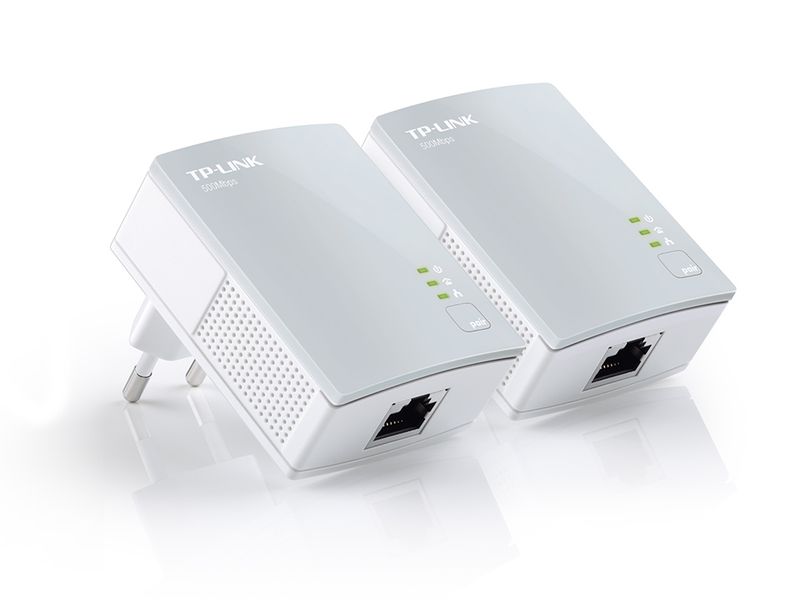
I have this set - but if you don't need wifi look at a cheaper non wifi one like this
 
They're quite common, and simple enough to use. MUST be plugged into a wall socket (on both ends) - and they're generally 3-point plugs. If you're concerned about losing a socket, you get adapters that act as a pass-through. Also, the most important factor is the wiring in your house/garage. The older it is, the worse, generally. They're electrical cables, and their only purpose is to move power, not data, so don't expect them to be free of interference. I think there's also some caveat that the adapters need to be on the same wiring loop. Your garage doesn't sound like it would be, as it's a separate building away from the house?

I have 4 of them, they are all plugged into multiplugs, no issues. Just don't get surge protected plugs...
 
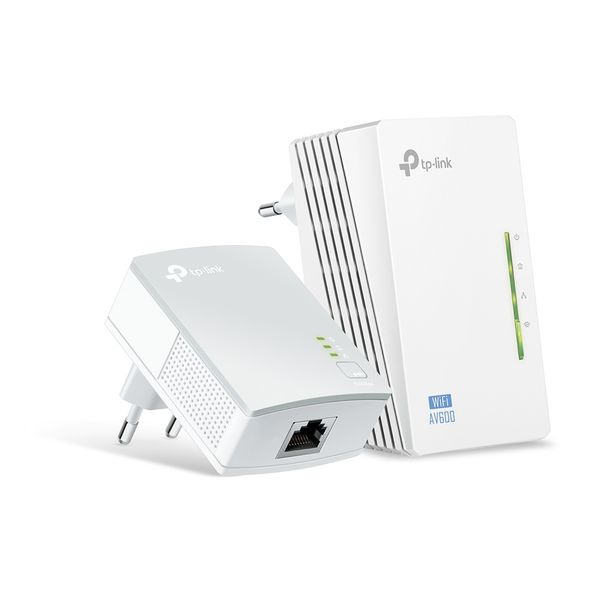
I use these two kits together:

845973031985-1-full.jpg

https://www.takealot.com/tp-link-pa4010k-av500-nano-powerline-starter-kit/PLID40401681

54962202-1-full.jpeg

https://www.takealot.com/tp-link-av600-wi-fi-powerline-extender-starter-kit-white/PLID52034744
 
So I need to get Ethernet to my garage and unfortunately can't use WiFi or run a cable from router to garage.

I was thinking to use a power-line adapter as it seems the simplest solution. I just want to find out if they actually work and are stable. Don't need fast connection at all but needs to be connected 24/7.

Does anyone here have any experience with these and if so which do you recommend? Also I've been told they need to connect directly to power socket in wall - are they able to work over a multi-plug or does it have to be a two-point adapter connected directly to wall socket?

Anything else I need to know or could try please let me know.

Thanks.

Hey man. I switched from wi-fi to powerline earlier this year for my 20 meg fiber. Am super happy with the results. Here's my thread on it:

https://mybroadband.co.za/forum/threads/powerline-networking-in-south-africa.1009298/page-2

TLDR: Downstairs by the fiber, I have a router connected to a WAP for mobile devices. From the router, I have a powerline adapter connected directly to one of the wall plugs. This connects to a regular multiplug upstairs (no surge protector, this will kill the network). The powerline adapter is plugged into this multiplug, as well as another multiplug. Connected to this additional multiplug are my PC and several other devices.

I can't remember exactly what my speeds were (but I think they were 90-100 meg on the internal network but it's definitely more than the 20 meg of my fiber, so I'm happy. Depending on your wiring, you are unlikely to get sub 1 ms. I get 1-4 ms on the internal network, but 0 packet loss so the slight variation in latency is entirely forgiveable.
 
What about these: http://takealot.com/og/v1/PLID46644704

A bit more expensive but the reviews say they come with 3 point adapters so will make it easy connecting directly to plug socket if it doesn't work on multi plug. Or would the non WiFi ones you linked to also work fine?
really up to you they all work on the same principal.
like i said i use it on a multiplug and works fine - - i guess they say that to cover themselves.
 
Perfect so those first ones you linked too will work if I don't need WiFi and just a single ethernet connection plugged into a mutiplug?
Yep :)

Nice to increase your wifi range for phones in and near the garage though...
 
I use the TP link AV600 powerlines and they work perfectly.

When I got them I did not know what powerline adaptors do, I was looking for a Wifi extender and seen the blisterpack with two in and I thought it was a special deal for two Wifi extenders :ROFL:

Took them home and only when I was at home trying to set them up I was like WTF. realised what they were and followed the instructions to set them up and since then extremely happy that I made that mistake.
 
Yep :)

Nice to increase your wifi range for phones in and near the garage though...
Got Google WiFi setup around the house so WiFi signal is super strong everywhere. The device I need connected can only use ethernet - if WiFi was possible then wouldn't have needed anything.
 
Top
Sign up to the MyBroadband newsletter
X