RAID-5 failure ... how to recover

LandyMan

Honorary Master
Joined
Feb 28, 2005
Messages
13,363
Reaction score
3,191
Location
Centurion
Hi all,

We have a server at work, Dell 2850 to be precise, with a RAID-5 configuration over 6 disks. Two of these disks failed this morning. is it possible to rebuild the logical drive with the remaining four drives? Is it even possible to rebuild if 2 drives failed?
 
If you loose 2 discs in RAID 5 then the integrity of the volume is lost. If you can determine which drive failed last you could try and force it online and then hope like hell the volume is in tact when you boot.

Hope your backups are current and well tested!
 
Unfortunately with RAID5 there is only one drive 'allocated' for parity.

A better option these days is RAID6.
 
Hi all,

We have a server at work, Dell 2850 to be precise, with a RAID-5 configuration over 6 disks. Two of these disks failed this morning. is it possible to rebuild the logical drive with the remaining four drives? Is it even possible to rebuild if 2 drives failed?
You already know you're in a sub-optimal place so, moving right along... You may be able to get somewhere with runtime.org RAID Reconstructor but I wouldn't bet overly much on that outcome.
 
Last edited:
Unfortunately with RAID5 there is only one drive 'allocated' for parity.

A better option these days is RAID6.

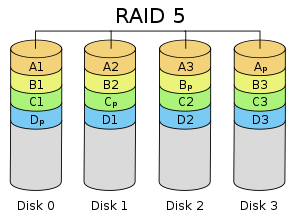
Nope, parity is striped across all disks
300px-RAID_5.svg.png


Raid6 simply adds another parity block to the stripe.
300px-RAID_6.svg.png


Source: http://en.wikipedia.org/wiki/Raid5
 
I had a RAID5 fail on me once - but forced the failing disk online, and it's been fine ever since. Requested for, and got a replacement server. SCSI disks are on their way out anyway, cheaper to buy a new server than to get hold of SCSI hard drives and taking a chance whether the old server will support the newer hard drives or not...

YMMV though.

But know this - best to have a large, external USB hard drive at the ready, and as soon as the RAID have been mounted successfully, copy everything off first thing... do not play around, just copy everything off.
 
I had a RAID5 fail on me once - but forced the failing disk online, and it's been fine ever since. Requested for, and got a replacement server. SCSI disks are on their way out anyway, cheaper to buy a new server than to get hold of SCSI hard drives and taking a chance whether the old server will support the newer hard drives or not...

YMMV though.

But know this - best to have a large, external USB hard drive at the ready, and as soon as the RAID have been mounted successfully, copy everything off first thing... do not play around, just copy everything off.

Problem is that two drives failed ... first thought it might be the controller, and replaced this with another unit, but didn't change anything :(
 
If you loose 2 discs in RAID 5 then the integrity of the volume is lost. If you can determine which drive failed last you could try and force it online and then hope like hell the volume is in tact when you boot.

Hope your backups are current and well tested!

What will happen if I force the 1st failed drive online ... mess up everything?
 
What will happen if I force the 1st failed drive online ... mess up everything?

Drive 1 fails, box keeps running, files keep changing and thus parity updates are made
Drive 2 fails, usually box dies immediately and thus hopefully the volume has not changed

So if you force drive 2 back online the volume could still be in tact. If however you force drive 1 back online it will be out of sync and mess up your volume. When you force a drive online you are telling the RAID controller it's wrong and the disc is fine. Thus when the disc comes up it will try to do its part in the volume as it did before, so this should always be done with care.
 
Last edited:
What morkhans said

Problem now is to determine which drive failed first... and exclude that drive from the forced online...
 
Quick update:

So things are not making sense to me at all anymore:

Drives 4&5 on the 2850 is indicating failure, drive lights flashing amber
If I take drives 4&5 and swap them over with drives 2&3, everything stays green.

So, if the drives were really faulty, they would stay faulty in the different bays?
If the controller was going bust, the drives now in 4&5's bays should also go amber?

Am I missing something here.

Oh, when you try to go into the RAID config manager, drives 4&5 fail as soon as it is trying to read the config.
 
Hi

If a drive is faulty, it will be indicated by a flashing light. Should it be replaced by a good drive, the flashing will stop. (should stop).

If the controller is faulty, the flashing will continue even if you replace the supposedly bad hard drive with a good hard drive.

Best to take it in to a data recovery company. RAID's are tricky stuff.
 
Hi

If a drive is faulty, it will be indicated by a flashing light. Should it be replaced by a good drive, the flashing will stop. (should stop).

If the controller is faulty, the flashing will continue even if you replace the supposedly bad hard drive with a good hard drive.

Best to take it in to a data recovery company. RAID's are tricky stuff.

Exactly my point ... if the drives were faulty, they would remain amber, even in different bays. If the controller is faulty, the "good" drives would also go amber.

Data recovery company: Odd R40k to recover :(
 
Data recovery company: Odd R40k to recover :(

What is you data worth?

Is there a log file on the RAID controller that would indicate what the problem might be? Do the RAID controller have the latest firmware installed, as buggy firmware might also cause these kind of problems?
 
Ouch - R40k...

...and to add to that the cost of a new server with RAID... (or the replacement of all the HDD's...)

:sick:
 
Last edited:
Ouch - R40k...

...and to add to that the cost of a new server with RAID... (or the replacement of all the HDD's...)

:sick:

Luckily we already have new blades in place (all the 2850s need to me migrated to the blades) ... problem is there won't be much to migrate with no data :D
 
Top
Sign up to the MyBroadband newsletter
X