Recommendations for Geyser controller(s) - HK or HB capable

neoprema

Honorary Master
Joined
Jan 12, 2016
Messages
19,832
Reaction score
18,890
I need to get 3 Geysers setup on smart switches.

What do you guys who've done it recommend?

Requirements:

1. Native Homekit Support OR Homebridge plugin
2. Controllable temperature setting [optional]
3. Either built-in timers, or timers i can set on HomeKit.
3. I don't really want a specific/custom app apart from initial setup - I want to control via Siri/HomeKit.

Thx!
 
CBI Astute is Tuya based so should work via homebridge

For temperature control you'll need something more integrated (and expensive) like geyserwise, unless you willing to diy a temperature probe.
 
CBI Astute is Tuya based so should work via homebridge

For temperature control you'll need something more integrated (and expensive) like geyserwise, unless you willing to diy a temperature probe.
Hmm ok cool

I suppose the temp range is not that important… I mean once set it just does its thing
 
Yes a timer / smart switch basically controls temperature anyway, in an blind open loop, and the thermostat becomes a sort of safety cut out.

The Astute also has power and energy monitoring.
 
I need to get 3 Geysers setup on smart switches.

What do you guys who've done it recommend?

Requirements:

1. Native Homekit Support OR Homebridge plugin
2. Controllable temperature setting [optional]
3. Either built-in timers, or timers i can set on HomeKit.
3. I don't really want a specific/custom app apart from initial setup - I want to control via Siri/HomeKit.

Thx!
Please note that in this setup, if the geyser loses power when it's scheduled to turn off or on, it won't execute the automation, (possibly leaving you with a cold shower). This issue can be resolved with Home Assistant.
 
Please note that in this setup, if the geyser loses power when it's scheduled to turn off or on, it won't execute the automation, (possibly leaving you with a cold shower). This issue can be resolved with Home Assistant.
I'm also looking at a suitable smart switch for geyser control but have run into the loadshedding issue. Can you share the YAML that you use to get around this? I have the ESP integration running on HA.
 
I'm also looking at a suitable smart switch for geyser control but have run into the loadshedding issue. Can you share the YAML that you use to get around this? I have the ESP integration running on HA.
Just set an automation to turn the switch on every 5 minutes during the on period, and off every 5 during off
 
I'm also looking at a suitable smart switch for geyser control but have run into the loadshedding issue. Can you share the YAML that you use to get around this? I have the ESP integration running on HA.
This automation manages the geyser based on electricity availability and time of day. It turns the geyser on when electricity returns during daylight hours and turns it off at night when electricity comes back. Additionally, a Tuya app scheduler is used to control the geyser’s on/off times at specific hours. The Tuya app is configured to return to its previous state when electricity is restored.

alias: Geyser Automation
description: "Automation to manage geyser based on electricity availability and time of day."
trigger:
- platform: state
entity_id:
- {your inverter state entity}
from: "off"
to: "on"
for:
seconds: 1
condition: []
action:
- choose:
- conditions:
- condition: sun
after: sunrise
before: sunset
sequence:
- service: switch.turn_on
target:
entity_id: {your geyser switch}
- conditions:
- condition: sun
after: sunset
before: sunrise
sequence:
- service: switch.turn_off
target:
entity_id: {your geyser switch}
mode: single
 
Just set an automation to turn the switch on every 5 minutes during the on period, and off every 5 during off
Hmmm. I think I get it. So this will deal with the scenario where loadshedding interrupts a scheduled geyser on period, but cannot compensate for reduced heating during a scheduled geyser on period that is interrupted by load shedding?
 
Please note that in this setup, if the geyser loses power when it's scheduled to turn off or on, it won't execute the automation, (possibly leaving you with a cold shower). This issue can be resolved with Home Assistant.
They wanted to put Home Assistant in and i said no - i already have HomeKit - my official and only smart home system - and then I begrudgingly put in HomeBridge because some existing stuff i had did not work on Homekit.

I don't know if i want to put Home Asst in as well? However i will give me Sunsynk capability too so... i guess i might just give in. Just means another system to manage lol
 
This automation manages the geyser based on electricity availability and time of day. It turns the geyser on when electricity returns during daylight hours and turns it off at night when electricity comes back. Additionally, a Tuya app scheduler is used to control the geyser’s on/off times at specific hours. The Tuya app is configured to return to its previous state when electricity is restored.

alias: Geyser Automation
description: "Automation to manage geyser based on electricity availability and time of day."
trigger:
- platform: state
entity_id:
- {your inverter state entity}
from: "off"
to: "on"
for:
seconds: 1
condition: []
action:
- choose:
- conditions:
- condition: sun
after: sunrise
before: sunset
sequence:
- service: switch.turn_on
target:
entity_id: {your geyser switch}
- conditions:
- condition: sun
after: sunset
before: sunrise
sequence:
- service: switch.turn_off
target:
entity_id: {your geyser switch}
mode: single
I assume this also assumes i'm running Home Asst?
 
Hmmm. I think I get it. So this will deal with the scenario where loadshedding interrupts a scheduled geyser on period, but cannot compensate for reduced heating during a scheduled geyser on period that is interrupted by load shedding?

They wanted to put Home Assistant in and i said no - i already have HomeKit - my official and only smart home system - and then I begrudgingly put in HomeBridge because some existing stuff i had did not work on Homekit.

I don't know if i want to put Home Asst in as well? However i will give me Sunsynk capability too so... i guess i might just give in. Just means another system to manage lol
By replacing Homebridge with the HomeKit integration in Home Assistant, you can achieve the same functionality while gaining much more flexibility. Home Assistant not only simplifies your smart home setup but also allows for greater customization and adaptability. This is particularly beneficial for creating automations based on conditions like load shedding or inverter status, opening up a world of possibilities for a more responsive and integrated smart home.

The best system is to use home assistant for your automations (backend) and add the homebridge integration in home assistant to allow control via HomeKit (frontedn, user). Its the best of both worlds.

 
Last edited:
I assume this also assumes i'm running Home Asst?
Yes.
If you prefer not to use Home Assistant, here's a method to ensure that your geyser isn't accidentally turned on or off at the wrong times due to offline issues. In the geyser app, you can set multiple timers to control when it turns on and off, aligning with your schedule. For example, you could set the geyser to turn on at 9 AM, 10 AM, 11 AM, and so on, depending on how precise you want the control to be.
 
By replacing Homebridge with the HomeKit integration in Home Assistant, you can achieve the same functionality while gaining much more flexibility. Home Assistant not only simplifies your smart home setup but also allows for greater customization and adaptability. This is particularly beneficial for creating automations based on conditions like load shedding or inverter status, opening up a world of possibilities for a more responsive and integrated smart home.

The best system is to use home assistant for your automations (backend) and add the homebridge integration in home assistant to allow control via HomeKit (frontedn, user). Its the best of both worlds.

There’s a home bridge built into home asst that can expose home assistant devices? Or is it still a completely different system just running on the same platform.

I.e can I go device->home asst->homebridge->homekit?
 
They wanted to put Home Assistant in and i said no - i already have HomeKit - my official and only smart home system - and then I begrudgingly put in HomeBridge because some existing stuff i had did not work on Homekit.

I don't know if i want to put Home Asst in as well? However i will give me Sunsynk capability too so... i guess i might just give in. Just means another system to manage lol

Home Assistant literally incorporates Home Bridge but supports far more devices on the other side of it.

However don’t expect Sunsynk to make it into your HomeKit setup unless Apple come to the party with iOS18.

You know me, I’m a die hard Apple fan and if HomeKit alone could do the job I would be doing that.

But it can’t. It’s severely lacking on many levels when running stand alone.

It is however the best and most open front end for Home Assistant and as such I would highly recommend to pivoting like that and make Home Assistanr the backend that runs your house and HomeKit only as the “controller” in front.
 
Home Assistant literally incorporates Home Bridge but supports far more devices on the other side of it.

However don’t expect Sunsynk to make it into your HomeKit setup unless Apple come to the party with iOS18.

You know me, I’m a die hard Apple fan and if HomeKit alone could do the job I would be doing that.

But it can’t. It’s severely lacking on many levels when running stand alone.

It is however the best and most open front end for Home Assistant and as such I would highly recommend to pivoting like that and make Home Assistanr the backend that runs your house and HomeKit only as the “controller” in front.
Screenshot 2024-04-29 at 12.12.42.pngSo you're saying something like this (see picture)

Would that even work - like will Homekit see even non-Homekit devices connected to the Home Assistant?

PS - I have a lot of timers and automations on Home Kit, would you keep those there or move them to Home Asst?
 
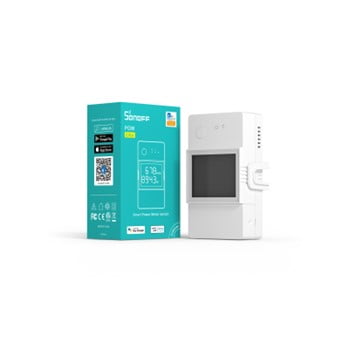
PS - Either the CBI Astute or Sonoff Geyser controller - Or if anyone else recommends one, pref single-slot in the DB board but maybe thats not possible given the electronics required for being "smart"
 
View attachment 1700043So you're saying something like this (see picture)

Would that even work - like will Homekit see even non-Homekit devices connected to the Home Assistant?

Yes you add a "virtual bridge" for Home Assistant exactly like you do with Homebridge (it's literally running Homebridge for you in HA) and any devices you then push to that virtual bridge that are supported by Homekit will show up. (See screenshot I have 56 devices in Homekit that come from Home Assistant).

My Sunsunk talks directly to Home Assistant via a cable, but others here have Solar Assistant in the middle that does the same thing I believe.

CBI and other Tuya stuff all chat to HA with the official Tuya integration and I then forward some of them to HomeKit.

Lights I have a mixed bag of Tuya switches, Yeelight, Sonoff, Xiaomi and Alexa...all of them except for the idiotic Alexa kak talks to HA no problem. Ironically the Alexa stuff in many ways isn't even supported in its own ecosystem...you can't use it as a trigger for an automation for instance.

Shelly's I have directly in HA with their own integration but you can also do it via MQTT.

Don't have Meross so don't know what protocol they use but likely it's quite generic as well. I have Shelly's in my Gate/Garage Door which is configured as a Cover and shows up like that in HomeKit with the only limitation being that HomeKit itself doesn't support something as simple as a sliding ****ing gate and therefore it needs to appear as a Garage Door...or a blind which is dumb as hell. WTF Apple?

b3c575c2af5697c884d697668e8f7578.jpg


PS - I have a lot of timers and automations on Home Kit, would you keep those there or move them to Home Asst?

You could leave them there or you could move them, choice is really yours at the end of the day. If Homekit can see the device it can action all the usual stuff on it.

You'll find Home Assistant has far more extensibility in this regard and can add many conditions to things that make your life easier once you figure it out as there is a bit of a learning curve.

Example for instance is I have an automation that will run my Geyser for only an hour if I turn it on after dark. This is impossible to setup in HomeKit.

I also couldn't trust Homekit with my presence-based automations for my Garage Door / Gate / Alarm when I get home because even though it KNOWS the status it will still trigger it, so I would have my garage door closing on me when I got home because it was open which is of course a big safety risk etc. Home Assistant is not this stupid and checks if the door is open and only if it's closed will trigger it to open otherwise leave it alone. Similarly with the alarm and so on.
 
Last edited:
PS - Either the CBI Astute or Sonoff Geyser controller - Or if anyone else recommends one, pref single-slot in the DB board but maybe thats not possible given the electronics required for being "smart"

I've been quite happy with the CBI Astute.

Haven't used the Sonoff one myself but generally been moving away from their somewhat too cheap approach to things in favour of others.
 
Top
Sign up to the MyBroadband newsletter
X