"Security Tool" rogue antivirus application removal HELP!

BigBear

Expert Member
Joined
Apr 24, 2008
Messages
2,197
2-spyware.com Remove Security Tool
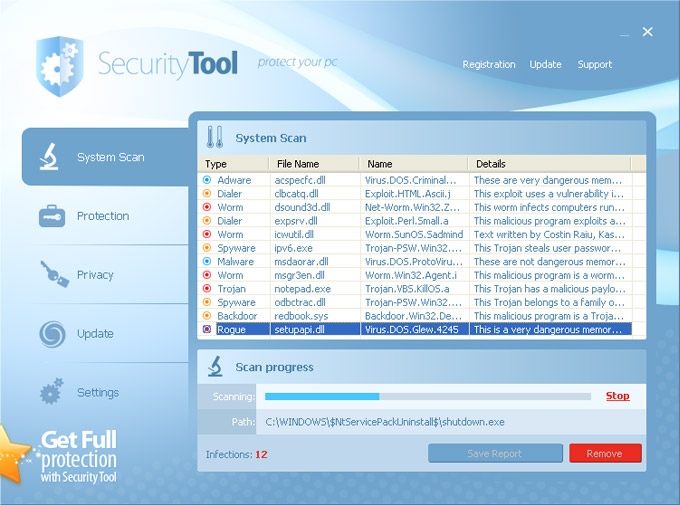
Security Tool is a rogue antivirus application that deliberately gives reports of false system security threats on your computer and displays fake security alerts or notifications to make you think your PC is infected with malware. The misleading application is from the same family as Total security 2009 and System Security. When installed, SecurityTool will be configured to start automatically when you log on into Windows. Then it will imitate system scan and display a variety of infections that can't be removed unless you purchase the program. The files detected during the scan are either harmless or legitimate system files and can't cause any damage to your computer.

Security Tool is pushed through the use of Trojans, fake online anti-malware scanners and other malicious software. It is installed along with Trojans FakeAV that display fake security warnings and promote SecurityTool malware. Once running, the bogus program will block legit programs and especially anti-virus software. Another interesting thing is that if you click on Updates button, you will see "Updating", but actually there is no network activity. It's just another argument why Security Tool is classified as a rogue security application. What is more, this parasite will impersonate Windows Security Center and constantly display warnings/notifications about serious security threats and privacy issues. It may claim that your computer is under attack by an Internet virus or that private data can be stolen. For example:

"Security Tool Warning
Spyware.IEMonster activity detected. This is spyware that attempts to steal passwords from Internet Explorer, Mozilla Firefox, Outlook and other programs. Click here to remove it immediately with SecurityTool."

To make things worse, SecurityTool will hijack web browsers and block certain security websites obviously to protect itself from being deleted. It should be already obvious that this program is a scam. Do not purchase it. Instead, please use the removal guide below to remove Security Tool from your PC manually for free.
SecurityTool.jpg


Any Advice on Removing this?

PC Running Vista Home Basic and had Norman Security Suite.

Have tried stopping this process:
Kill processes:
4946550101.exe

Delete registry values:
HKEY_CURRENT_USER\Software\Security Tool
HKEY_LOCAL_MACHINE\SOFTWARE\Microsoft\Windows\CurrentVersion\Run "4946550101"

Delete files:
4946550101.bat 4946550101.cfg 4946550101.exe Security Tool.lnk Security Tool.lnk

Delete directories:
%UserProfile%\Application Data\4946550101
 
Last edited:

medicnick83

Paramedic
Joined
Aug 23, 2006
Messages
21,005
There is a removal tool for this... but for the life of me, I can't find it at the moment!! :(
 

BigBear

Expert Member
Joined
Apr 24, 2008
Messages
2,197
They do list one on the website, but not sure.
If i should download it..
 

BigBear

Expert Member
Joined
Apr 24, 2008
Messages
2,197
# Print out these instructions as we may need to close every window that is open later in the fix.

# It is possible that the infection you are trying to remove will not allow you to download files on the infected computer. If you find this is the case when following these instructions, then you will need to download the requested files in this guide to another computer and then transfer them to the infected computer. You can transfer the files via a CD/DVD, external drive, or USB flash drive.

# Before we can do anything we must first end the processes that belong to Security Tool so that it does not interfere with the cleaning procedure. To do this, download the following file to your Desktop.

rkill.com Download Link

# As this infection hides the Windows desktop, we need to open up a window that allows us to see the icons.

If you are using Windows XP perform the following steps:

Click on the Start button and then click on the Run menu item. When the Run box opens, type %UserProfile%\desktop in the Open: field and then press Enter on your keyboard.

If you are in Windows Vista or Windows 7 perform the following steps.

Click on the Start button and type %UserProfile%\desktop in the Search field at the bottom of the start menu. Then press Enter on your keyboard.

# You should now see a window that shows all of your desktop icons, including the rkill.com program. Now double-click on the rkill.com in order to automatically attempt to stop any processes associated with Security Tool and other Rogue programs. Please be patient while the program looks for various malware programs and ends them. When it has finished, the black window will automatically close and you can continue with the next step. If you get a message that rkill is an infection, do not be concerned. This message is just a fake warning given by Security Tool when it terminates programs that may potentially remove it. If you run into these infections warnings that close Rkill, a trick is to leave the warning on the screen and then run Rkill again. By not closing the warning, this typically will allow you to bypass the malware trying to protect itself so that rkill can terminate Security Tool . So, please try running Rkill until malware is no longer running. You will then be able to proceed with the rest of the guide.

Do not reboot your computer after running rkill as the malware programs will start again.
Downloaded RKILL on my PC
Copied to Infected PC, executed from Desktop.
Doesnt seem to end the Process and still can't run
TSKMNGR from Taskbar or CTRL+ALT+DLT
or CMD etc.
Or any other Setup APP, blocks it all
 
Last edited:

auriga1000

Expert Member
Joined
Feb 28, 2008
Messages
1,281
had a similar infection on a friends pc. restarted in safe mode and ran eset. i disabled system restore temporarily before doing all this. when i restarted, the infection was gone.
 

bwana

MyBroadband
Super Moderator
Joined
Feb 23, 2005
Messages
89,382
Download UBCD4win and use it to run one of the anti spyware apps included.
 

BigBear

Expert Member
Joined
Apr 24, 2008
Messages
2,197
had a similar infection on a friends pc. restarted in safe mode and ran eset. i disabled system restore temporarily before doing all this. when i restarted, the infection was gone.

Will try that, Stupidly uninstalled Norman Security Suite ... doh
 

garyb01

Senior Member
Joined
Dec 11, 2006
Messages
590
Will try that, Stupidly uninstalled Norman Security Suite ... doh

My son had exactly the same on his PC on Thursday evening and this is how we resolved it: Rebooted into safe mode (Win 7), installed Glary Utilities (Free download on the web, have to do it in safe mode as this "Security Tool" program will not let you install anything in normal mode). Once Glary Utilities installed, ran a check for "Dangerous start-up programs" and it deleted the problem. Rebooted into normal mode, ran Glary again, (All-in-one module) and it then automatically deleted all the registry entries etc related to this program. Haven't had the problem again. Hope this helps.
 

BigBear

Expert Member
Joined
Apr 24, 2008
Messages
2,197
My son had exactly the same on his PC on Thursday evening and this is how we resolved it: Rebooted into safe mode (Win 7), installed Glary Utilities (Free download on the web, have to do it in safe mode as this "Security Tool" program will not let you install anything in normal mode). Once Glary Utilities installed, ran a check for "Dangerous start-up programs" and it deleted the problem. Rebooted into normal mode, ran Glary again, (All-in-one module) and it then automatically deleted all the registry entries etc related to this program. Haven't had the problem again. Hope this helps.

glary-utilities/

Cool, Thx.
Downloading it and some other tools now.
Will c what works later.
 

peanutville

Well-Known Member
Joined
Feb 29, 2008
Messages
141
Experienced this on a clients machine a few months ago, it's quite well documented on the net. Follow the removal tips above & you should be fine.
 
Top