Server vs. Custom Build

Sl33py

Well-Known Member
Joined
Mar 11, 2009
Messages
262
Reaction score
0
Location
East London
I bought a HP Server Tower ProLiant ML110 G5 because I needed a PC to store files and run a few things on my network and the supplier sold it for next to nothing. (6 PC on network)

Except for the oversized heat sink and a Westen digital SATA that says Enterprise storage I cant see much difference compared to a normal PC. Now I know with the bigger servers they run on the Xeon CPU

Spec on server is Pentium 2160 (1.80Ghz), 1GB (1x1GB); 1x250GB NHP SATA; DVD-RW;

So what makes a server different from a high spec “workstation” Why would I spend money on a server
 
I know with Dell that servers go on a different assembly line so the QC is a lot stricter then on normal pcs.
 
Keep in mind that the components you add will need to be compatible with your machine. For instance you can't just add desktop ram, it would have to be ECC server ram which costs a lot more.

The key difference is that server hardware is built with business usage in mind, i.e. redundancy, fault tolerance, hardware raid etc. I suppose there's nothing stopping you from installing a desktop OS on it - but that's sort of like jacking off when you have a hot, naked blonde in front of you telling you that she wants it. It's just a waste.
 
HP ML110 is not really a server is it? Servers usually support more memory, multiple processors and are build for reliability and therefore do not have things such as onboard sound, overclocking etc....
 
I bought a HP Server Tower ProLiant ML110 G5 because I needed a PC to store files and run a few things on my network and the supplier sold it for next to nothing. (6 PC on network)

Except for the oversized heat sink and a Westen digital SATA that says Enterprise storage I cant see much difference compared to a normal PC. Now I know with the bigger servers they run on the Xeon CPU

Spec on server is Pentium 2160 (1.80Ghz), 1GB (1x1GB); 1x250GB NHP SATA; DVD-RW;

So what makes a server different from a high spec “workstation” Why would I spend money on a server

It's a server motherboard, with server technology. Meant to run Server 2003/2008/Foundation. Tried to install Windows XP - was one EPIC FAIL - onboard GFX is so lame it failed horribly. Bought Windows 7 basic and it worked hundreds.

We bought 4 of them for the office, actually using them as desktops with window 7 basic on it. For my sales staff. Work reasonable well, considering we paid R1350 each without OS :D (but 2 get 2 free special that was running)
 
It's a server motherboard, with server technology. Meant to run Server 2003/2008/Foundation. Tried to install Windows XP - was one EPIC FAIL - onboard GFX is so lame it failed horribly. Bought Windows 7 basic and it worked hundreds.

We bought 4 of them for the office, actually using them as desktops with window 7 basic on it. For my sales staff. Work reasonable well, considering we paid R1350 each without OS :D (but 2 get 2 free special that was running)

Hiya.

With the fact that you tried to install XP. What is it you are running? Why just opt for Linux.

Flojo
 
The ML110 G5 is really only meant for small offices, file storage, nfs, printserver etc. Especially the E2160 model cpu.

You can get a better specced one, with a better CPU (that supports VT) and since its got alot of ram slots you can fill it up with normal desktop ram. I have 2 of these, with 8gb ram each running Vmware ESX in my lab. Works pretty neat for what i paid for it so no complaints from me :-)

If you try and build a server yourself just bear in mind that you will be paying through your arse for a decent board with a serverchipset. These are optimized for typical server duties whereas desktop/consumer boards are optimized for total different things.

at the end of the day it will only be compatibility issues that will hinder you from using consumer stuff for server tasks.

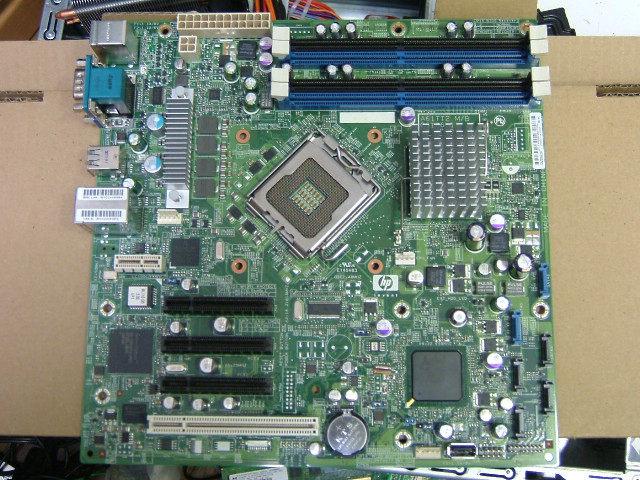
As you can see in the below image, the layout is completely different to a typical consumer board. No AGP/PCIe or flashy/fancy expansions.

DSCF3626.JPG
 
Last edited:
Keep in mind that the components you add will need to be compatible with your machine. For instance you can't just add desktop ram, it would have to be ECC server ram which costs a lot more.

The key difference is that server hardware is built with business usage in mind, i.e. redundancy, fault tolerance, hardware raid etc. I suppose there's nothing stopping you from installing a desktop OS on it - but that's sort of like jacking off when you have a hot, naked blonde in front of you telling you that she wants it. It's just a waste.

ECC Memory isn't that much more expensive than standard RAM, Unregistered ECC costs about the same amount as regular desktop memory, registered ECC costs slightly more.
 
Hiya.

With the fact that you tried to install XP. What is it you are running? Why just opt for Linux.

Flojo

We got the default spec, DualCore, 1gb, 250Gb - but we installed Windows 7 - it runs LIKE A CHARM - but I can tell you it still only displays well on a 1024x768 rez - the crap onboard card doesnt work/ allow anything higher.

Peace
 
Hi
Thanks for all the comments so far, most of you commented om the server I bought the reason for my post was more to asnwer the following. So what makes a server different from a high spec “workstation” Why would I spend money on a server. Look at it this way. I have to sell a server to a customer what will my selling points be to convince them to buy server hardware instead of a high spec workstation. Forget about the one I bought, thats just for me to use as a file server and learn Server software.
 
There is no real difference between a server and workstation WRT to hardware, in that a high spec workstation = low spec server. For example, a workstation can have Dual Xeon CPUs, Dual PSU, ECC RAM and dual NIC, much like a server would. In this case it would be no different from a "server". However a server could also have 16 CPUs and 256GB RAM.... A "workstation" to make Shrek 4 could however also have 16 CPUs and 256 GB ram.... So rather think about the difference between Workstation and Server being the role, rather than the hardware.

If a server and a workstation are the same thing, then it is important to differentiate between a Server/workstation and a PC. A PC is built with consumer grade parts, with an emphasis on affordability, performance or enthusiast requirements such as over-clocking. Some of the things that come to mind that usually differ between a PC and Server:

On-board sound on PC - non on server.
Consumer orientated functions found on a PC include media players on BIOS, overclocking options, tweaks, etc.
Single CPU on most PC motherboards
Support for SATA disks on PC boards

If you want to convince a customer that they should buy a server, then it is easy. Brand name servers have a lower industry failure rate, better support options (such as Dell same day support), higher reliability (failure rate and because all components are built by single OEM provider), and you spending money on hardware that you need. If your server does not require sound, then why pay for a motherboard with 7.1?

Having said all that, the line is blurry at best, and non-existent at worst.....
 
Servers hardware is also optimised for I/O operations from what I recall. So disk access & network performance should be better. Then there is the reliability issues, they are built to higher standards.
 
I also have two ML110's, I need to add more RAM and setup RAID..

Which type of RAM should I get and do you have any links to guides on setting up RAID.

Running Server 2003 on the one, the other is currently a spare.
 
Hi
Do you have the G5 or G6? G5 worrks with normal desktop, althoug I dont think you can mix the two RAM types in the Server.The G6 you will have to get ECC RAM. It would be beter to get ECC even if you have a G5. The G7 dont know.

For the RAID boot in the BIOS enable the RAID controller, Create the RAID in the RAID utility. Some server CD will come with setup programs for the Server OS and load the RAID Drivers for you otherwise you will have to check HP website for them.

Hope it helped i am no expert on this but have played a bit with them, my new toy now is a ML150
 
Hi
Do you have the G5 or G6? G5 worrks with normal desktop, althoug I dont think you can mix the two RAM types in the Server.The G6 you will have to get ECC RAM. It would be beter to get ECC even if you have a G5. The G7 dont know.

For the RAID boot in the BIOS enable the RAID controller, Create the RAID in the RAID utility. Some server CD will come with setup programs for the Server OS and load the RAID Drivers for you otherwise you will have to check HP website for them.

Hope it helped i am no expert on this but have played a bit with them, my new toy now is a ML150


Thanks :) I just tested and it works... I did try before but I left the original RAM module alongside the Desktop RAM so it didnt work, this morning I removed the original module and placed just the desktop RAM and it works..

It's a G5, I bought about 3 years ago, only used 1 so far. I also have Some Microserver's, using freenas on the one..

For the RAID setup, any recommendations on which type I should go for ? Also can I setup RAID on my current system or will I have to re-install windows ?
 
The G5 support RAID 0 and 1 so i will go with 1.

ProLiant ML110 Generation 3 Server CAUTION: Back up any data stored on the hard drives before proceeding. The configuration process erases all data on the hard drives.
website

I know in Windows 7 you can create a Software RAID1 without losing data, I had to do it once for a company that did not want to spend money, have 5 people working on Pastel and 10 pulling files of it without a problem, not ideal but it works. Not sure about 2003
 
Top
Sign up to the MyBroadband newsletter
X