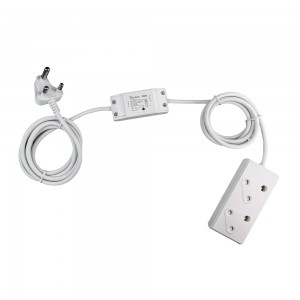
SONOFF device for delayed power on

LandyMan

Honorary Master
Joined
Feb 28, 2005
Messages
13,357
Reaction score
3,183
Location
Centurion
Hi all

I am looking for a solution to delay the "Power-on" to a specific wall plug when power comes on after loadshedding. Preferably SONOFF as I have a switch on the Pool already, so want to try and keep it a homogenous environment.

I have been looking at the SONOFF devices, but I am not sure which one will actually work :)

Thank you
 
You can use Sonoff Loadshedding detector to determine if load shedding or not. Then based off this you could look at adding a delay to a secondary switch.

Not sure how much of a delay you need or what’s possible but that would be the process I would follow.
 
You can use Sonoff Loadshedding detector to determine if load shedding or not. Then based off this you could look at adding a delay to a secondary switch.

Not sure how much of a delay you need or what’s possible but that would be the process I would follow.
Yeah, was looking at the loadshedding detector, but seems like a bit of overkill. I want to keep it as simple as possible:

Eskom Power Restored -> SONOFF switch "feels" the power on input line -> Delays power to output line with x amount of time
 
I have a standard sonoff ( 10A ) one on an extension with sensitive devices. Then have schedules programmed into e-welink that turn devices off 2 mins before and restore power 5 mins after. Works well, protects TV and others from surges too.
 
I have a standard sonoff ( 10A ) one on an extension with sensitive devices. Then have schedules programmed into e-welink that turn devices off 2 mins before and restore power 5 mins after. Works well, protects TV and others from surges too.
Programmed how, manual schedules from the likes of ESP?
 
Hi all

I am looking for a solution to delay the "Power-on" to a specific wall plug when power comes on after loadshedding. Preferably SONOFF as I have a switch on the Pool already, so want to try and keep it a homogenous environment.

I have been looking at the SONOFF devices, but I am not sure which one will actually work :)

Thank you

If the plug is alone on a circuit breaker you can put in an on delay timer in the DB for that circuit. It will delay set amount when power is restored.
 
If the plug is alone on a circuit breaker you can put in an on delay timer in the DB for that circuit. It will delay set amount when power is restored.
Unfortunately it is not, hence looking for a solution closer to the plug
 
Programmed how, manual schedules from the likes of ESP?
Examples:

Below is a example of the per instance ie: a actions to do.

Screenshot_20230314-102133_eWeLink.jpg
Sample of whats in a action

Screenshot_20230314-102304_eWeLink.jpg
You can group actions by large scenes, so for me I have two "buttons" that lets me turn my home to a LoadShedding On mode and a LoadShedding Off mode, all that does is enable/disable the respective actions that are grouped under the "button". Also things like goodnight that switches the homes ligh off or a Away that triggers lights on while we are out so we come back to a lit house. You could even have one that emulates movement if you really want to.


Screenshot_20230314-102206_eWeLink.jpg
 
Last edited:
Make/buy a short extension with a Sonoff Basic in the middle, then set a loop timer via eWeLink and done.

 
Last edited:
Make/buy a short extension with a Sonoff Basic in the middle, then set a loop timer via eWeLink and done.

This one doesn't have inching, so won't work
 
Make/buy a short extension with a Sonoff Basic in the middle, then set a loop timer via eWeLink and done.

That might be the best option, I have cable left from my trolley build, and a BASIC R3 has inching, so that will probably be the easiest
 
This one doesn't have inching, so won't work
All my Basics have inching facility, but in this case (delayed power on) you'll want to use the loop timer. Set Power On state to Off, then set up a loop timer:
Loop method: Repeat
Start time: current time and date
Repeat: 0h5Minute (or whatever you prefer)
Add action: On
Enable: slide to On

I'm not sure whether the Basic starts timing from when it first gets Eskom power or whether the timer starts from when it syncs with your router, so you may need to fiddle with the Repeat time to get the desired result.
 
Last edited:
All my Basics have inching facility, but in this case (delayed power on) you'll want to use the loop timer. Set Power On state to Off, then set up a loop timer:
Loop method: Repeat
Start time: current time and date
Repeat: 0h5Minute (or whatever you prefer)
Add action: On
Enable: slide to On

I'm not sure whether the Basic starts timing from when it first gets Eskom power or whether the timer starts from when it syncs with your router, so you may need to fiddle with the Repeat time to get the desired result.
Just checked my original Basic, and inching is there ... thanks for making me go look :)
I am not too phased about exact timing, as it will be used to stabilise load after loadshedding, before giving power to the inverter trolley, so 3 minutes give or take a couple of seconds to connect will be fine
 
Just checked my original Basic, and inching is there ... thanks for making me go look :)
I am not too phased about exact timing, as it will be used to stabilise load after loadshedding, before giving power to the inverter trolley, so 3 minutes give or take a couple of seconds to connect will be fine
Thanks for heads-up on the inching method, I tried it unsuccesfully before so I'll have to try it this way.
 
on the SmartLife app, you can change the relay status per device to react to restored power in the following manner:
OFF​
ON​
Remember Last Status​

As an option you could always set this to 'OFF' and start it up manually until you can find a more automated way to do this
 
on the SmartLife app, you can change the relay status per device to react to restored power in the following manner:
OFF​
ON​
Remember Last Status​

As an option you could always set this to 'OFF' and start it up manually until you can find a more automated way to do this
Yeah, but my current one is utilised on the pool pump, this is for a different use, so need to get one and then configure for delay from the start in any case
 
Top
Sign up to the MyBroadband newsletter
X