Sunsynk + Home Assistant

It should use the background setting from whatever is set in your theme. Have you tried applying a theme that's sets the card background to transparent?

It only takes the color and not the transparency like the rest of the cards. Below is an example, power flow card on left, and right sunsynk card.

1683537838358.png1683537845365.png
 
@Slip , because in your card you suggest LoadFreq, should this figure not be in the inverter bubble?

I wonder if one shouldn't add the load V as well. Because I know both my GridV and LoadV are differant and freq can be too.


View attachment 1520621
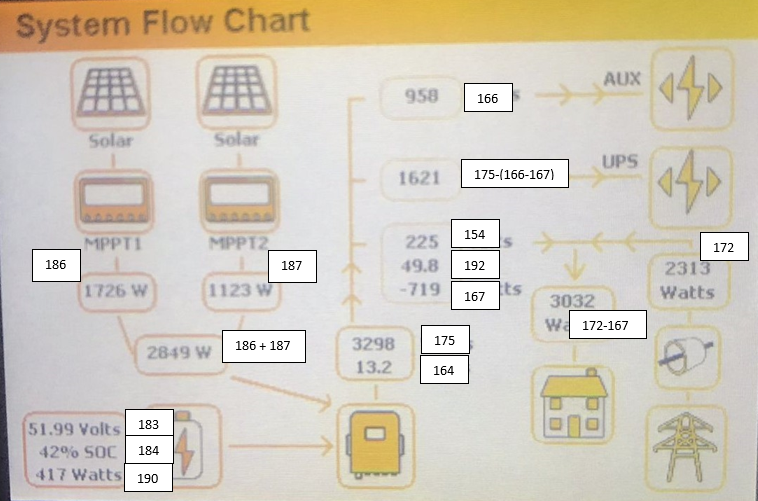
Well the card was built to emulate the system flow chart below that shown on the Sunsynk Inverter. I just used the register values others had checked and provided.

234937410-07846015-2b88-4aa9-b6e0-fbcfd026226d.png
 
Well the card was built to emulate the system flow chart below that shown on the Sunsynk Inverter. I just used the register values others had checked and provided.

234937410-07846015-2b88-4aa9-b6e0-fbcfd026226d.png
Yeah but 192 is load freq so its the output from the inverter? Oh ok, this is confusing

192
load frequency
R0.01Hz
193
Inverter output frequency
R0.01Hz

Maybe 193 is the one I mean because its inverter but load is actually grid , load to me is normally post inverter but looking at those registers, its differant.
 
Yeah but 192 is load freq so its the output from the inverter? Oh ok, this is confusing

192
load frequency
R0.01Hz
193
Inverter output frequency
R0.01Hz

Maybe 193 is the one I mean because its inverter but load is actually grid , load to me is normally post inverter but looking at those registers, its differant.
It is a bit confusing and the docs are all translated from Chinese. Where the exact measurement points are I'm not sure, and there may also be some translation issues. Unless there are obvious errors in the sensor data I'm inclined to just leave as is.
 
I hate wifi repeaters.

Never had this issue before but the damn solarman seems to take on the MAC on the repeater so my router keeps issuing a differant ip. Even if I mac lock it , it doesnt help because sometimes its the one and then its the other :(
 
I hate wifi repeaters.

Never had this issue before but the damn solarman seems to take on the MAC on the repeater so my router keeps issuing a differant ip. Even if I mac lock it , it doesnt help because sometimes its the one and then its the other :(

Use a Static IP on Solarman dongle?
 
It is a bit confusing and the docs are all translated from Chinese. Where the exact measurement points are I'm not sure, and there may also be some translation issues. Unless there are obvious errors in the sensor data I'm inclined to just leave as is.
I'm actually not sure about these. I don't have anything connected to non-essential but I've seen that 169 (Total power of grid side L1L2) > 172 (Grid external Total Power) when charging the batteries and load which does not make sense. I need to investigate more but I'm not sure about 172

1683566440815.png

If you look at the docs

1683567351637.png

It seems 169 = 167+168 and 172 = 170+172 which is Limiter Grid power :confused:

1683569012915.png
 
Last edited:
I use external ct 1 instead of 172 and internal ct1 for the other.

It matches the deye portal figures.

Screenshot_20230508-201914_Deye Cloud.jpg

Screenshot_20230508-201926_Home Assistant.jpg
 
New Release

This release contains breaking changes. See the README for additional required card attributes
v1.3.0 Updates

  • Display up to four mppts through new solar configuration attribute mppts (one, two, three, four).
  • Add option to hide non-essential from full card and reposition daily grid when enabled.
  • The simple card has been removed. This view can be created using the full card and setting show_aux: no and show_nonessential: no.
  • Add option to invert AUX power. Set to yes if your sensor provides a positive number for AUX input and negative number for AUX output.

1683703859190.png 1683703918896.png
 
Last edited:
Nice addon, I was building something similar myself for my own home automation platform I'm building. Now i can steal your SVG :p

Edit: With credit of course :P
 
@Slip maybe a arb request , and I have no idea where you can put it. But Daily Total COnsumption? Ie: Load + Non essentials?

I think the formulae is probably something like this

Grid Purchase + (( Daily Load - Daily Solar - ( Daily Charge - Daily Discharge ))

Doesnt seem right.

I suppose a more basic answer is just Daily Solar Prouction + Daily Purchased? Thats all the inputs technically.

Like in the space at the top between DailyLoad and Daily Solar.

1683703918896-png.1521751
 
Top
Sign up to the MyBroadband newsletter
X