-
- News
-
Categories
- 5G
- ADSL
- AI
- Banking
- Black Friday
- Broadband
- Broadcasting
- Business
- Business Telecoms
- Cellular
- Cloud and Hosting
- Columns
- Cryptocurrency
- Energy
- Enterprise
- Fibre
- Gadgets
- Gaming
- Government
- Hardware
- Industry News
- Internet
- Internet of Things
- Investing
- IT Services
- Motoring
- Reviews
- Science
- Security
- Smartphones
- Software
- Technology
- Telecoms
- Trending
- Wireless
- Press Office
- Forum
- Industry News
- What's Next
- Company hub
- Speed Test
- About us
- Advertise with us
- Contact
- Careers


-
Join the MyBroadband community
South Africa’s biggest forum. Discuss, discover, and connect with thousands of members.
-
Question of the Day: How much would you be willing to pay for a next-generation gaming console?

You are using an out of date browser. It may not display this or other websites correctly.
You should upgrade or use an alternative browser.
You should upgrade or use an alternative browser.
Sunsynk + Home Assistant
- Thread starter SauRoNZA
- Start date

Which update version?Hey guys. Just a headsup - the sensor names have changed on the new solcast update.

Speedster
Honorary Master
Changes are in 4.0.2Which update version?
Hi All
2.5.1 has been released. The card can now be configured to hide all battery information if you don't have any energy storage. I've also fixed the display of additional essential loads when show_solar and/or show_battery attributes are set to false. The can be configured for both the lite and full version of the card. Some pics below.
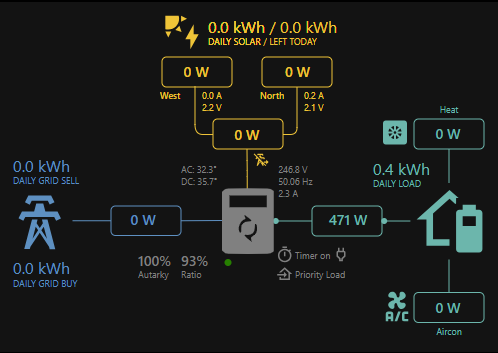
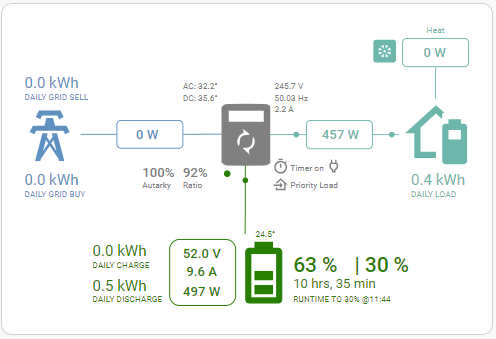

2.5.1 has been released. The card can now be configured to hide all battery information if you don't have any energy storage. I've also fixed the display of additional essential loads when show_solar and/or show_battery attributes are set to false. The can be configured for both the lite and full version of the card. Some pics below.


Mike Hoxbig
Honorary Master
So I just scored a Pi. Just the device and power, no sd card.
Without going through the whole thread, is there a quick dummy's guide? The part about loading home assistant onto the pi seems straightforward. What's the next steps?
Without going through the whole thread, is there a quick dummy's guide? The part about loading home assistant onto the pi seems straightforward. What's the next steps?

SauRoNZA
Honorary Master
Pretty much everything on the website is all you need to do, not much else.So I just scored a Pi. Just the device and power, no sd card.
Without going through the whole thread, is there a quick dummy's guide? The part about loading home assistant onto the pi seems straightforward. What's the next steps?
Unless you meant specifically for the Sunsynk add-on?
SauRoNZA
Honorary Master
Did something change with regards to the daily solar/left today? For some reason mine isn't showing any more and everything appears to be in order according to the docs.2.6.0 lets you add an optional card title and set the font colour and size
YAML:title: Sunsynk Inverter title_colour: Grey title_size: 32px
View attachment 1586026
I'm NOT using Solarman however, just the built-in HA Forecast.
Mike Hoxbig
Honorary Master
Yeah which add-ons are people using, how do you get that package onto HA etc...Pretty much everything on the website is all you need to do, not much else.
Unless you meant specifically for the Sunsynk add-on?
SauRoNZA
Honorary Master
So if you are doing the standard Pi install then you'll get the Home Assistant Add-on Store (HACS) built right in and in most cases you can just search for stuff there to add them or in the odd case you need to add a custom repo, which is usually documented pretty well on Github for the relevant things.Yeah which add-ons are people using, how do you get that package onto HA etc...
Off top of my head things in my installation that are bare minimum...
Sonoff LAN (locally controls Sonoff devices on original firmware)
Frigate (Manages cameras but NOT going to work on you Pi)
Aqara Gateway (probably irrelevant if you aren't using their stuff)
Temperature Feels Like
Load Shedding
Dual-Mode Generic Thermostat (the default doesn't talk to both hot and cold stuff)
Front end there are a million things you can install but I would say stick to Vanilla as far as you can go and not to worry about making it pretty just yet.
Then Add-ons are a separate thing and basically Dockers and there I have...
Adguard Home
Advanced SSH & Web Terminal
Duck DNS
File Editor
Frigate
Home Assistant Google Drive Backup
MariaDB
Mosquito Broker
Nginx Proxy Manager
Studio Code Server
Sunsynk/Deye Inverter Add-on (Multi)
TasmoAdmin (Using Tasmota less and less and unlikely to flash new things with it)
Zigbee2MQTT (Also phasing this out slowly but surely in favour of Aqara)
Then there's a built-in ones....
Apple TV
Forecast Solar
Generic Camera
Homekit Bridge
LG Soundbar
LG webOS Smat TV
MQTT
OpenWeatherMap
Samsung Smart TV
Shelly
Sonoff
Tasmota
Transmission
Tuya
UniFI Network
UPnp/IGD
Waze Travel Time
Workday
Yeelight
I'd say get it up and running and then poke around and in time it will kind of answer itself depending on devices you have and things you want to do.
Mike Hoxbig
Honorary Master
Thanks for this. It's probably going to be primarily inverter related for now, and putting rules into place for the geyser based on LS schedules...So if you are doing the standard Pi install then you'll get the Home Assistant Add-on Store (HACS) built right in and in most cases you can just search for stuff there to add them or in the odd case you need to add a custom repo, which is usually documented pretty well on Github for the relevant things.
Off top of my head things in my installation that are bare minimum...
Sonoff LAN (locally controls Sonoff devices on original firmware)
Frigate (Manages cameras but NOT going to work on you Pi)
Aqara Gateway (probably irrelevant if you aren't using their stuff)
Temperature Feels Like
Load Shedding
Dual-Mode Generic Thermostat (the default doesn't talk to both hot and cold stuff)
Front end there are a million things you can install but I would say stick to Vanilla as far as you can go and not to worry about making it pretty just yet.
Then Add-ons are a separate thing and basically Dockers and there I have...
Adguard Home
Advanced SSH & Web Terminal
Duck DNS
File Editor
Frigate
Home Assistant Google Drive Backup
MariaDB
Mosquito Broker
Nginx Proxy Manager
Studio Code Server
Sunsynk/Deye Inverter Add-on (Multi)
TasmoAdmin (Using Tasmota less and less and unlikely to flash new things with it)
Zigbee2MQTT (Also phasing this out slowly but surely in favour of Aqara)
Then there's a built-in ones....
Apple TV
Forecast Solar
Generic Camera
Homekit Bridge
LG Soundbar
LG webOS Smat TV
MQTT
OpenWeatherMap
Samsung Smart TV
Shelly
Sonoff
Tasmota
Transmission
Tuya
UniFI Network
UPnp/IGD
Waze Travel Time
Workday
Yeelight
I'd say get it up and running and then poke around and in time it will kind of answer itself depending on devices you have and things you want to do.
No changes. What's not displaying?Did something change with regards to the daily solar/left today? For some reason mine isn't showing any more and everything appears to be in order according to the docs.
I'm NOT using Solarman however, just the built-in HA Forecast.
Maybe check that the sensor you are using for remaining_solar: is correct?
SauRoNZA
Honorary Master
No changes. What's not displaying?
Maybe check that the sensor you are using for remaining_solar: is correct?
Always used my PV Forecast Today value and it worked it out by itself, presumably subtracting Production from that value.
remaining_solar: sensor.energy_production_today

Changing it to energy_production_today_remaining which is from the Forecast still shows blank.
Code:
type: custom:sunsynk-power-flow-card
cardstyle: lite
panel_mode: 'false'
show_solar: 'true'
inverter:
  modern: 'true'
  colour: black
battery:
  energy: 19200
  shutdown_soc: 15
  invert_power: 'false'
  colour: red
  show_daily: 'true'
solar:
  colour: orange
  show_daily: 'true'
  mppts: 2
load:
  colour: green
  show_daily: 'true'
  show_aux: 'false'
  invert_aux: 'false'
grid:
  colour: blue
  no_grid_colour: '#a40013'
  show_daily_buy: 'true'
  show_daily_sell: 'false'
  show_nonessential: 'false'
entities:
  essential_power: sensor.load_power
  use_timer_248: switch.toggle_system_timer
  priority_load_243: switch.toggle_priority_load
  inverter_grid_voltage_154: sensor.ss_inverter_voltage
  inverter_load_freq_192: sensor.ss_inverter_frequency
  inverter_out_164: sensor.ss_inverter_current
  inverter_out_175: sensor.inverter_power
  grid_connected_status_194: binary_sensor.grid_online
  inverter_status_59: sensor.overall_state
  day_battery_charge_70: sensor.ss_day_battery_charge
  day_battery_discharge_71: sensor.ss_day_battery_discharge
  battery_voltage_183: sensor.battery_voltage
  battery_soc_184: sensor.battery_soc
  battery_power_190: sensor.battery_power
  battery_current_191: sensor.ss_battery_current
  inverter_load_grid_169: sensor.grid_inverter_loadf
  day_grid_import_76: sensor.ss_day_grid_import
  day_grid_export_77: sensor.ss_day_grid_export
  grid_ct_power_172: sensor.grid_power
  day_load_energy_84: sensor.ss_day_load_energy
  day_pv_energy_108: sensor.ss_day_pv_energy
  pv1_power_186: sensor.pv1_power
  pv2_power_187: sensor.pv2_power
  pv1_voltage_109: sensor.ss_pv1_voltage
  pv1_current_110: sensor.ss_pv1_current
  pv2_voltage_111: sensor.ss_pv2_voltage
  pv2_current_112: sensor.ss_pv2_current
  remaining_solar: sensor.energy_production_today_remaining
  battery_temp_182: sensor.battery_temperature
  radiator_temp_91: sensor.ss_radiator_temperature
  dc_transformer_temp_90: sensor.ss_dc_transformer_temperature
sensor.ss_day_pv_energy : 31.1
sensor.energy_production_today_remaining : 8.835
Are the three decimals maybe an issue?
*****
For a moment thought it was HA's new stupid logic of removing sensor. from entities when copying manually but it's not that.
But actually just noticed the Grid and Battery daily parts are missing as well.
Solution : Single quotes were deprecated, just remove them from config.
Last edited:
SauRoNZA
Honorary Master
Aaah just found it about 5 second before hitting refresh.You need to remove all the backticks ' from your true and false. e.g.
YAML:type: custom:sunsynk-power-flow-card cardstyle: lite panel_mode: false show_solar: true inverter: modern: true colour: black
Seems to be all sorted now Thanks!

What inverter do you have ?Thanks for this. It's probably going to be primarily inverter related for now, and putting rules into place for the geyser based on LS schedules...

semaphore
Honorary Master
- Joined
- Nov 13, 2007
- Messages
- 18,658
- Reaction score
- 9,745

That's by design. 169 is only used on the full card to calculate non-essential power/essential power. Not grid power.Anyone with an updated kellerza config for the flow card?
@Slip Seems to be a bug with the the grid power, if I update the :
grid_ct_power_172: sensor.ss_grid_power
to that i see the power from the grid like:
View attachment 1587018
grid_power_169:
does nothing from what I can see.
nonessential = grid_ct_power_172 - grid_power_169
essential = inverter_power_175 + grid_power_169 - aux_power_166
I've just pushed 2.6.1. Battery power and current are now displayed as reported by the sensor. If you prefer the absolute values you can use the `show_absolute: true` battery setting.
Mike Hoxbig
Honorary Master
Which integration does @Slip's dashboard use for all the cards?

 github.com
I'm pulling through the data using kellerza's integration but the naming convention is slightly different so I'd have to manually do a search and replace. But there also seems to be some sensors missing from the cards...
GitHub - slipx06/Sunsynk-Home-Assistant-Dash: Home Assistant Dashboard to display Inverter information. ESPHome configuration to collect inverter sensor data via modbus
Home Assistant Dashboard to display Inverter information. ESPHome configuration to collect inverter sensor data via modbus - slipx06/Sunsynk-Home-Assistant-Dash
github.com
I'm pulling through the data using kellerza's integration but the naming convention is slightly different so I'd have to manually do a search and replace. But there also seems to be some sensors missing from the cards...
There is an example here. https://kellerza.github.io/sunsynk/examples/lovelace.
I'm using ESPHome to collect the data so if you use my config the Dashboard should work as is. I have tried to align sensor names with the kellerza integration so it should be an easy mapping
I'm using ESPHome to collect the data so if you use my config the Dashboard should work as is. I have tried to align sensor names with the kellerza integration so it should be an easy mapping