The Bubbles challenge round three

r00igev@@r

Honorary Master
Joined
Dec 14, 2009
Messages
15,639
Reaction score
14,157
Location
Draadloos Bantha poo doo in 4ways
Monthly giveaway of a Mikrotik RB750's.

All you have to do to claim the giveaway is to post your uptime on your iBurst connection during the last day of the month.

Bubbles will verify your uptime to win the giveaway by PM'ing myself.

Good luck (and not power failures, please Eskom) (i have my UTW and Linksys on a entry level UPS)
 
Last edited:
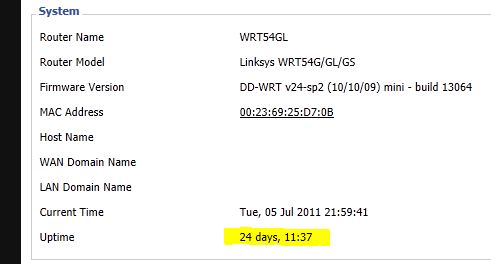
The only way I can think of seeing this is how long my router has been running.

routeruptime.JPG


But in those 24 days uptime the iburst tower has died at least once.
 
My connection has been up for a whole 19 hours :P

I'll be sitting this one out as I reboot my pc and web server at least once a week.
 
I am going to give away a couple of Mikrotik RB750's.

All you have to do to claim the giveaway is to post your uptime on your iBurst connection. You can post your time now but to win you still need to be connected up to midnight 30 July.

Bubbles will verify your uptime to win the giveaway by PM'ing myself.

Good luck (and not power failures, please Eskom) (i have my UTW and Linksys on a entry level UPS)

Is it the longest stretch of uptime, or total uptime for the month?

My usb router is plugged into a laptop that never turns off, uses battery when power goes out. Only time it every disconnects is when iburst (for some reason) disconnects - then is then set to attempt to auto reconnect 10x (once every 60 seconds). In theory, my uptime should be the highest unless iburst signal goes to 0 for a day.

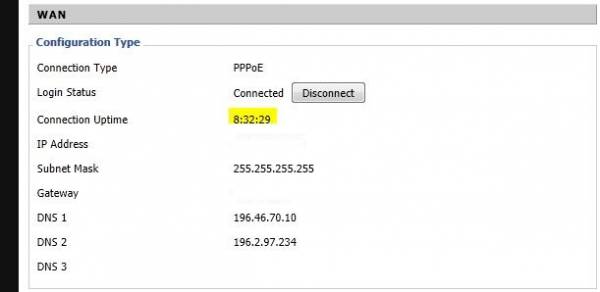
Can I have my router now? :D [ last auto reconnect was 1day 12hr and 15mins ago]
 
Last edited:
Is it the longest stretch of uptime, or total uptime for the month?

My usb router is plugged into a laptop that never turns off, uses battery when power goes out. Only time it every disconnects is when iburst (for some reason) disconnects - then is then set to attempt to auto reconnect 10x (once every 60 seconds). In theory, my uptime should be the highest unless iburst signal goes to 0 for a day.

Can I have my router now? :D [ last auto reconnect was 1day 12hr and 15mins ago]

Longest stretch of uptime as at 30 July (so it can be longer than a month)

We had the challenge to see how much we can download on iBurst (with silence from the other providers), now we going to see how long we can keep connections up. - this challenge doesn't need a VAS!
 
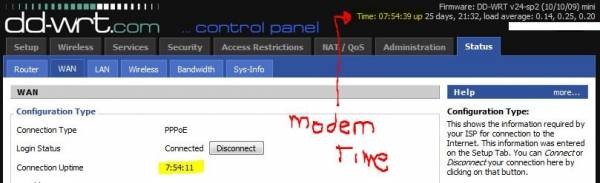
Well I had another look at my router and found the connection up time

routeruptime2.JPG


So according to this my modem lost connection at exactly 12am..... will see what happens today, but I suspect that this happens fairly often.
 
Was hoping the WebGUI had something not sure if Mikrotik devices have a connection status timer? I can tell you the Mikrotik itself has some serious uptime, wouldn't mind swapping out the RB112 with a 750 :)
 
Ummm think mine has an uptime of 40 days +, but then I am already on a 750G so sitting this one out :) a 750 will be a downgrade for me in network speed.

750 = 10Mb/s
750G = 100Mb/s
 
Was hoping the WebGUI had something not sure if Mikrotik devices have a connection status timer? I can tell you the Mikrotik itself has some serious uptime, wouldn't mind swapping out the RB112 with a 750 :)
From a ROS terminal you can get the uptime of your PPPoE connection as follows:
/interface pppoe-client monitor pppoe-out1
status: connected
uptime: 2w4d21h56m17s
idle-time: 25s
active-links: 1
service-name:
ac-name: 00:C0:EE:C8:5C:82
ac-mac: 00:C0:EE:C8:5C:82
mtu: 1392
mru: 1392
Where pppoe-out1 is the name of your PPPoE connection.
 
Was hoping the WebGUI had something not sure if Mikrotik devices have a connection status timer? I can tell you the Mikrotik itself has some serious uptime, wouldn't mind swapping out the RB112 with a 750 :)

Of course the mikrotik has an uptime for the ppoe :)

Go to the specific ppoe connection (where you setup your username/login) you will see a top tab named Status, think the uptime is the second entry from the top. this is through the winbox tool
 
From a ROS terminal you can get the uptime of your PPPoE connection as follows:

Where pppoe-out1 is the name of your PPPoE connection.

Thanks :)

yeah i have one running. just saving up money for my additional modem and antenna installation.

Please post your experience when you get another modem, I'm interested to see how efficient it is...
 
Top
Sign up to the MyBroadband newsletter
X