The Huawei E5186 LTE-A discussion thread

Repost: original (04/09/2015) accidentally deleted

Just a quick update wrt E5186 fall back in non-LTE-A areas...
Signed up to a SmartBroadband Wireless 50Gb LTE-A contract today (migrating from Internet 10 + 10 Promo purchased 2 years ago; at no stage have I ever been a Prepaid customer at Telkom). I am NOT in an area with LTE-A coverage (LTE only) and can confirm that the router modem falls back to LTE (4G).

It seems the device differs from Telkom store to Telkom store.
I have only LTE in my area. When I took out the package was given the previous model E593-601.
I did ask about the newer model and reply was given "Telkom Future Hood" , they will receive the E5186.
Some guys are lucky then others. LTE vs. LTE-A is speed. 100mbps vs. 150mbps. The question I ask I have not seen anybody on this forum to achieve more than 100mbps speed test results.
 
Last edited:
The question I ask I have not seen anybody on this forum to achieve more than 100mbps speed test results.

While downloading I once got 120Mb/s but never again and also as far as I can tell never connected to LTE-A again...

And as for an actual speed test, my fastest was 72Mb/s.
 
Any specific reason why you recommend that one?
It is 2300MHz only (improves your LTE signal) and cheaper than two LPDA-0092s (next best option)

Is there any way in getting an exact location to point to?
You will have to turn it in small steps until you get a good signal because information on towers is just not available or outdated.
 
It is 2300MHz only (improves your LTE signal) and cheaper than two LPDA-0092s (next best option)


You will have to turn it in small steps until you get a good signal because information on towers is just not available or outdated.

Awesome thanks man!
 
Sorry if I missed it guys, but what are the signal values I should be looking at in the router and what is better, a higher or lower number?
 
Sorry if I missed it guys, but what are the signal values I should be looking at in the router and what is better, a higher or lower number?

RSSI-RSRP= <25, ideal value of 20 is excellent. Both RRSI and RSRP should be low as possible.
RRSI value approx. 70
RSRP value aprrox. 90
RSRQ value approx. 6

If you install antenna it might bring down RSSI and RSRP, RSRQ will stay the same.
I have been through the exercise.
My typical values RSSI approx. +/- 50, RSRP approx. +/- 70 and RSRP 6.

Signal from router without antenna 4 bars and with antenna 5 bars.

Hope this will help you.
 
Last edited:
While downloading I once got 120Mb/s but never again and also as far as I can tell never connected to LTE-A again...

And as for an actual speed test, my fastest was 72Mb/s.

LTE-A is pretty fast then again LTE is also fast. I get speeds from 65mbps up to 83mbps. So how fast do you want to go.?
 
RSSI-RSRP= <25, ideal value of 20 is excellent. Both RRSI and RSRP should be low as possible.
RRSI value approx. 70
RSRP value aprrox. 90
RSRQ value approx. 6

If you install antenna it might bring down RSSI and RSRP, RSRQ will stay the same.
I have been through the exercise.
My typical values RSSI approx. +/- 50, RSRP approx. +/- 70 and RSRP 6.

Signal from router without antenna 4 bars and with antenna 5 bars.

Hope this will help you.

Great, thank you. I've just bought myself the XPOL-006 antenna yesterday, need to play around with it this weekend. When fiddling with the finding the best signal, should I move the antenna and wait a minute or so for the router to settle, or will the values update immediately?
 
If your RSRQ is less than -6dB you will have speed problems. Even a RSRQ of -7dB will most of the time cap your download to about 25Mb/s
 
Great, thank you. I've just bought myself the XPOL-006 antenna yesterday, need to play around with it this weekend. When fiddling with the finding the best signal, should I move the antenna and wait a minute or so for the router to settle, or will the values update immediately?

Hi, I made myself mobile. Meaning DC-AC convertor, plugs into the 12VDC outlet of the car. Took along DC-AC convertor, Router and Laptop. Leave the external antennas of router.
Then you have to set the router up from within the car surroundings. Then you have to see which tower you are located to.
I only had 2 towers in our area. For me it was easy. Then you can see what the RSSI etc. numbers are and download speed.
If you are at the correct tower I received 5 bar signal, other one only 4 bars
 
Last edited:
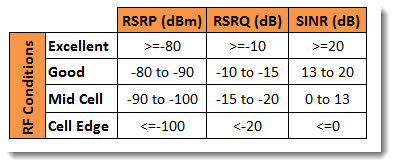
RF+Conditions.png
 
Currently these are my stats, so getting Excellent for all stats :

<rsrq>-5dB</rsrq>
<rsrp>-79dBm</rsrp>
<rssi>-57dBm</rssi>
<sinr>17dB</sinr>

Will test them at our new place on the weekend.
 
Currently these are my stats, so getting Excellent for all stats :

<rsrq>-5dB</rsrq>
<rsrp>-79dBm</rsrp>
<rssi>-57dBm</rssi>
<sinr>17dB</sinr>

Will test them at our new place on the weekend.

If your RSRQ is less than -6dB you will have speed problems. Even a RSRQ of -7dB will most of the time cap your download to about 25Mb/s
this is quoted from above post.

Getting back what is your download / upload speeds. Numbers look good, rsrq of 5?
Mine has always been at 6. Only my RSRS and RSRP varies a bit.

It seems you on a different router model, don't have same on mine? (B593s-601 my model)
 
Last edited:
this is quoted from above post.

Getting back what is your download / upload speeds. Numbers look good, rsrq of 5?
Mine has always been at 6. Only my RSRS and RSRP varies a bit.

It seems you on a different router model, don't have sinr on mine? (B593s-601 my model)

Get download speed of around 62Mbps and upload of around 8Mbps.

I'm using the E5186 router.
 
LTE or LTE-A connection ?

<rsrq>-5dB</rsrq>
<rsrp>-79dBm</rsrp>
<rssi>-57dBm</rssi>
<sinr>17dB</sinr>

Numbers look good, rsrq of 5?
Mine has always been at 6. Only my RSRS and RSRP varies a bit.

It seems you on a different router model, don't have sinr on mine? (B593s-601 my model)

The definition of RSRQ includes the bandwidth in use, which on LTE-A is double what it is for LTE.
With the B593, we have seen that RSRQ seems to max out at -6dB, the LTE "best".
Logically, the corresponding "best possible" figure for LTE-A should be -3dB.

Assuming that the B593 and E5186 report RSSI, RSRP and RSRQ the same way, I suspect we will find (as the LTE-A footprint (hopefully) grows) that RSRQ > -6dB (ie anywhere up to -3dB) may be an indicator for an LTE-A connection.

MtnUser gave his impression that any decrease in RSRQ below -6dB has a marked effect on performance (on LTE). Whilst I don't have the E5186, I have had much the same impression with my B593.

Interestingly, I also think that the "signal bar" display on the B593 includes a dependence on RSRQ. On my own device, I have seen situations where even with high signal strength (RSSI > -50dBm), an RSRQ below -6dB (eg -7dB) on LTE shows only 4 bars. I'm interested to see if the E5186 shows the same behaviour.


Another idea : The firmware on some B593 models reported the actual LTE bandwidth in use on the 'Wireless status' screen, as in the example below (20MHz) :
B593u-12 wireless screen.jpg
On the B593s-601, the feature was unfortunately removed.
Is there perhaps a comparable screen anywhere on the E5186 UI ?
It would hopefully show '40MHz' when an LTE-A connection is in use.
 
Last edited:
Is there perhaps a comparable screen anywhere on the E5186 UI ?
It would hopefully show '40MHz' when an LTE-A connection is in use.

Unfortunately not. And I also used all the API commands I could find but none gave me the bandwidth.
 
Top
Sign up to the MyBroadband newsletter
X