


Neoprod
Honorary Master
Get the 3600 and call it a day.So I go for 3200? You are speaking Japanese to me.
South Africa’s biggest forum. Discuss, discover, and connect with thousands of members.
Get the 3600 and call it a day.So I go for 3200? You are speaking Japanese to me.

I get pc crashes (black screen/no input signal/reboots) running my 3600mhz at that speed with XMP enabled on my b450 board with an R5 3600. Had to drop down to 3200mhz without XMP to get it to stop crashing like that. Infact I'm still testing but seems stable enough for everyday use now. Doing all kinds of tests at 3600, everything passed saying it's okay(Memtest86/OCCT/AIDA64), but running any sort of app other than testing apps would just black screen randomly xD. For laughs I ran every single test, including the stress test on OCCT that says it tests MB and PSU but came back clean.
I thought about changing the MB but for a bump in speed so miniscule, I figured I'd live with it at 3200mhz
Let XMP handle everything. I got to a point where I reset everything to default, set XMP and saved it. I got random black screen crashes which I thought was a faulty GPU. Changed the GPU and it still happened. Thought it could be my PSU, borrowed one to test and it still happened. I think it even happened while I was in the BIOS menu at one point, so all I had left to test was MB, CPU and RAM. When I set everything back to stock it seemed fine so I figured ram was the culprit. Changing to XMP brought the black screen problem backDid you let xmp handle things or use manual custom timings you entered manually?
Let XMP handle everything. I got to a point where I reset everything to default, set XMP and saved it. I got random black screen crashes which I thought was a faulty GPU. Changed the GPU and it still happened. Thought it could be my PSU, borrowed one to test and it still happened. I think it even happened while I was in the BIOS menu at one point, so all I had left to test was MB, CPU and RAM. When I set everything back to stock it seemed fine so I figured ram was the culprit. Changing to XMP brought the black screen problem back

 www.softnology.biz
 www.guru3d.com
 github.com
The memory should be under warranty...if you got it from somewhere decent, they'll take a look at it for you at minimum. I'd return it if they can't get it working.Let XMP handle everything. I got to a point where I reset everything to default, set XMP and saved it. I got random black screen crashes which I thought was a faulty GPU. Changed the GPU and it still happened. Thought it could be my PSU, borrowed one to test and it still happened. I think it even happened while I was in the BIOS menu at one point, so all I had left to test was MB, CPU and RAM. When I set everything back to stock it seemed fine so I figured ram was the culprit. Changing to XMP brought the black screen problem back
First fault is to buy from evetech, just use evetech to configure the oc then buy from wootware. The cpu is good just not sure if inboard gpu is good enoughHey guys, I'm looking to get a Budget PC from evetech to run Blackmagic Fusion for compositing and Davinci Resolve for editing.
I'm looking at this build. Please let me know if this is even worth it and if its Future proof.
Gamdias KRATOS M1-750B RGB 750W Power Supply
AMD RYZEN 5 5600G With Radeon Vega Graphics
Standard Heatsink & CPU Fan
MSI B550-A PRO AMD Ryzen ATX Motherboard
32GB DDR4 2666Mhz High Performance Gaming RAM
Integrated GPU Share Up to 2GB Graphics
512GB Ultra-Fast NVME SSD Upto 2000MB/s+ Speed
Thanks so much for any feed back
Hey guys, I'm looking to get a Budget PC from evetech to run Blackmagic Fusion for compositing and Davinci Resolve for editing.
I'm looking at this build. Please let me know if this is even worth it and if its Future proof.
Gamdias KRATOS M1-750B RGB 750W Power Supply
AMD RYZEN 5 5600G With Radeon Vega Graphics
Standard Heatsink & CPU Fan
MSI B550-A PRO AMD Ryzen ATX Motherboard
32GB DDR4 2666Mhz High Performance Gaming RAM
Integrated GPU Share Up to 2GB Graphics
512GB Ultra-Fast NVME SSD Upto 2000MB/s+ Speed
Thanks so much for any feed back
For Resolve I'd probably try nudge the GPU up a bit, preferably something nvidia. Unless your plan is to upgrade that later.Hey guys, I'm looking to get a Budget PC from evetech to run Blackmagic Fusion for compositing and Davinci Resolve for editing.
I'm looking at this build. Please let me know if this is even worth it and if its Future proof.
Gamdias KRATOS M1-750B RGB 750W Power Supply
AMD RYZEN 5 5600G With Radeon Vega Graphics
Standard Heatsink & CPU Fan
MSI B550-A PRO AMD Ryzen ATX Motherboard
32GB DDR4 2666Mhz High Performance Gaming RAM
Integrated GPU Share Up to 2GB Graphics
512GB Ultra-Fast NVME SSD Upto 2000MB/s+ Speed
Thanks so much for any feed back

Hey guys, I'm looking to get a Budget PC from evetech to run Blackmagic Fusion for compositing and Davinci Resolve for editing.
I'm looking at this build. Please let me know if this is even worth it and if its Future proof.
Gamdias KRATOS M1-750B RGB 750W Power Supply
AMD RYZEN 5 5600G With Radeon Vega Graphics
Standard Heatsink & CPU Fan
MSI B550-A PRO AMD Ryzen ATX Motherboard
32GB DDR4 2666Mhz High Performance Gaming RAM
Integrated GPU Share Up to 2GB Graphics
512GB Ultra-Fast NVME SSD Upto 2000MB/s+ Speed
Thanks so much for any feed back
I am definitely going upgrade in the future. I just have a opportunity for some freelance work at the moment and I'm hoping with the money I get from this job I can pay off the PC and upgrade it before the end of the year. The best I might be able to get is GeForce GT 710 2GB Dedicated DirectX 12 Graphics Card but that might just be a waste of money because I want to get something like a GeForce RTX 2060 SUPER 8GB GDDR6 Gaming GPUFor Resolve I'd probably try nudge the GPU up a bit, preferably something nvidia. Unless your plan is to upgrade that later.
+1 to using wootware instead.
would KLEVV BOLT X 32GB 3200MHz DDR4 Desktop Gaming Memory be a better choice? If I drop my power supply to a 600 then its within my budgetThat RAM is very slow. Don't know how much impact it would have for your workload, but look at how much more 3200Mhz would cost.
Search the forum for the Evetech thread before you buy from them and decide for yourself.
Gamdias PSU... sounds suspect.
I would suggest at least going 3200MHhz RAMHey guys, I'm looking to get a Budget PC from evetech to run Blackmagic Fusion for compositing and Davinci Resolve for editing.
I'm looking at this build. Please let me know if this is even worth it and if its Future proof.
Gamdias KRATOS M1-750B RGB 750W Power Supply
AMD RYZEN 5 5600G With Radeon Vega Graphics
Standard Heatsink & CPU Fan
MSI B550-A PRO AMD Ryzen ATX Motherboard
32GB DDR4 2666Mhz High Performance Gaming RAM
Integrated GPU Share Up to 2GB Graphics
512GB Ultra-Fast NVME SSD Upto 2000MB/s+ Speed
Thanks so much for any feed back

Never heard of that brand, but if you're going Ryzen then your RAM needs to be as fast as possible, so 3200Mhz is fine.would KLEVV BOLT X 32GB 3200MHz DDR4 Desktop Gaming Memory be a better choice? If I drop my power supply to a 600 then its within my budget
would KLEVV BOLT X 32GB 3200MHz DDR4 Desktop Gaming Memory be a better choice? If I drop my power supply to a 600 then its within my budget
Thanks I'll check it out. Might have the patience to test it again when it doesn't irritate me from all the previous crashes I'm still recovering fromสล็อตเว็บตรง รับทรูวอเลทไม่มีขั้นต่ำ เว็บสล็อตแท้ 2024 ไม่ผ่านเอเย่นต์
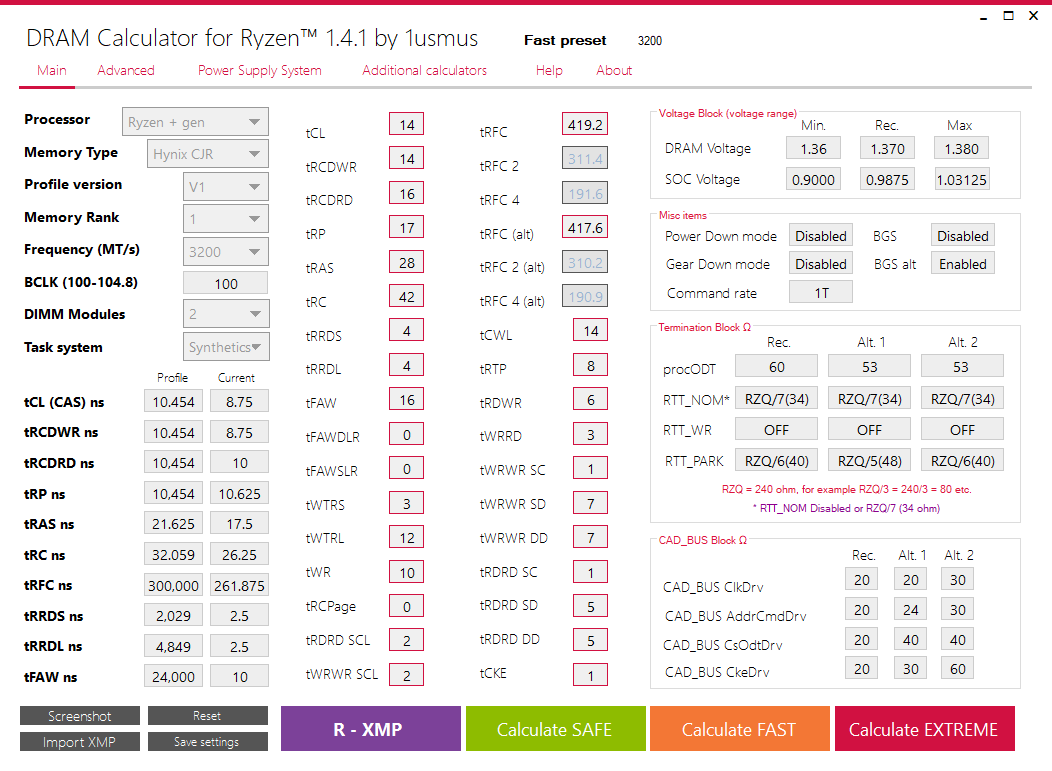
เว็บตรงสล็อต ไม่ผ่านเอเย่นต์ รองรับทรูวอเลทไม่มีขั้นต่ำ สล็อตเว็บตรง ที่มาแรงที่สุดในตอนนี้ รวมสล็อตชั้นนำ ครบทุกค่ายจบในที่เดียวเท่านั้นDownload DRAM Calculator for Ryzen v1.7.3
You can download Ryzen DRAM calculator helps with overclocking your memory on the AMD Ryzen platform. It is a calculator that will make it easier to overclock the memory. It works with all kinds of m...
MemTestHelper/DDR4 OC Guide.md at master · integralfx/MemTestHelper
C# WPF to automate HCI MemTest. Contribute to integralfx/MemTestHelper development by creating an account on GitHub.
I got it at Wootware not too long ago so definitely still under warranty. Thing is even on the 3600mhz profile it wasn't crashing all the time. I let memtest run all night and it came back saying no issues. I have spare ram I could use at default 2133, I'm not sure if they'd experience the same issue as I did thoughThe memory should be under warranty...if you got it from somewhere decent, they'll take a look at it for you at minimum. I'd return it if they can't get it working.
I think it might be something basic like the motherboard pushing too much SOC voltage when 3600 XMP is enabled. Mine does that but not to the point of crashing.
It's not exactly what I was suggesting but it's something to look into. Are you on the latest bios for your motherboard? A low load voltage crash is something the motherboard manufacturer would have patched out with a new BIOS revision by now, you'd assume.You post got me thinking it could be SOC related as well
Found a post with exactly the same issues I get, however I can't apply the fix that they suggested because AsRock for some reason doesn't display offset values like that. If I change CPU Core voltage from auto, I press +/- and it jumps in increments of 6.25


