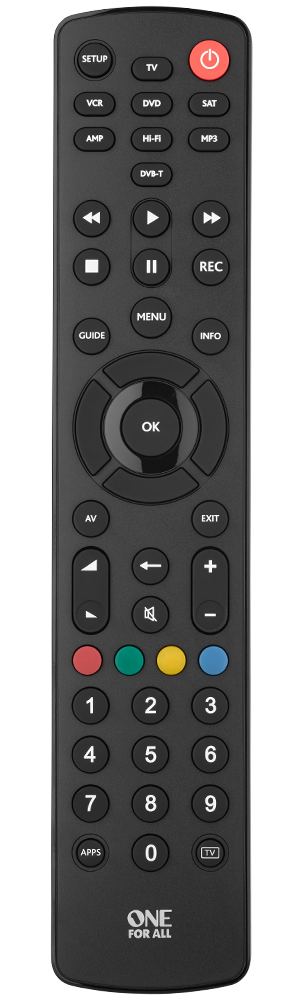
Universal remote

Jean Claude Vaaldamme

Honorary Master
Joined
Jan 18, 2020
Messages
10,048
Reaction score
10,941
So how do these universal remotes work?
I have an old Sony amp with surround and if the tv sound go through that its like a million times better experience. But I don't have a remote for the amp so I very rarely use the amp as I then have to switch it on and adjust volume manually.
Can any universal remote work or do you buy specific ones? Will the new ones even work on old systems?
I read on a few of them that you need to set it up with the old remote, which sound funny as most people probably buy them as they don't have the old one anymore.
 
I have one of these for my setups and it works great:
It says it is compatible with Sony Amps. I think the website can check models as well.
 
Does the Sony support HDMI? Because then there is no need for a universal remote and you just use HDMI-CEC and whatever remote you use now for other stuff.

Your Apple TV remote can also actually learn codes, so there is no reason at all for a third party universal remote.


They are all based on infrared codes so some you need to use the existing one to scan the codes and others you can literally enter them from the manual. Usually there is a process that just rotates codes until they work if you don't have the old remote handy, it just saves you time if you do.
 
Does the Sony support HDMI? Because then there is no need for a universal remote and you just use HDMI-CEC and whatever remote you use now for other stuff.

Your Apple TV remote can also actually learn codes, so there is no reason at all for a third party universal remote.


They are all based on infrared codes so some you need to use the existing one to scan the codes and others you can literally enter them from the manual. Usually there is a process that just rotates codes until they work if you don't have the old remote handy, it just saves you time if you do.
But this amp is old, I dont think it is HDMI CEC compatible. Searched on google and don't see anything. Also not ARC compatible.
Don't know how the Apple tv will learn the remote if I don't have old one
 
But this amp is old, I dont think it is HDMI CEC compatible. Searched on google and don't see anything. Also not ARC compatible.
Don't know how the Apple tv will learn the remote if I don't have old one

You basically point it at the thing and keep pushing the button until it responds and then you say yes that worked.

These codes work in sets and there’s only so many of them.

If it has HDMI it will almost certainly have CEC.

But even if it doesn’t you just use IR.
 
You basically point it at the thing and keep pushing the button until it responds and then you say yes that worked.

These codes work in sets and there’s only so many of them.

If it has HDMI it will almost certainly have CEC.

But even if it doesn’t you just use IR.
The Apple tv remote? And what button do I push, the volume?
 
The Apple tv remote? And what button do I push, the volume?

You just go to Remotes and Devices and Turn On “Control TV’s and Receivers” and it will run you through a process.

It can either control via HDMI or Infrared.

HDMI would help first prize as it’s more reliable and you don’t need to point the remote at stuff.

What’s the model of the receiver?
 
You just go to Remotes and Devices and Turn On “Control TV’s and Receivers” and it will run you through a process.

It can either control via HDMI or Infrared.

HDMI would help first prize as it’s more reliable and you don’t need to point the remote at stuff.

What’s the model of the receiver?
Its a Sony STR-K1600
It has a HDMI input on the amp but I havent use it as it is so old I was scared it probably cant handle a 4k signal. So HDNI goes from Apple tv to the tv and then a SPdif cable from tv to the amp for the sound.
 
You basically point it at the thing and keep pushing the button until it responds and then you say yes that worked.

These codes work in sets and there’s only so many of them.

If it has HDMI it will almost certainly have CEC.

But even if it doesn’t you just use IR.
Well I tried now every possible way. Everywhere when you try setup a remote it says use the other remote and hold close to Apple tv. No option to use Apple tv remote on the receiver.
I tried control via IR and then learn remote, but it seems its just for the Apple tv to learn the IR remote(that I dont have)
 
Its a Sony STR-K1600
It has a HDMI input on the amp but I havent use it as it is so old I was scared it probably cant handle a 4k signal. So HDNI goes from Apple tv to the tv and then a SPdif cable from tv to the amp for the sound.

Connect the Amp to the ARC connection on your TV and the OUT connection on the Sony receiver.

Connect all the other devices to the TV directly.

4K is irrelevant as you’ll only pass audio to the amp.

Now everything audio will come through the Sony and you can control it using the Apple TV) or normal TV remote.

Just make sure HDMI-CEC is enabled on the TV as well and the Apple TV will “discover” the receiver.

The manual is however VERY sparse on details, but Sony were at the forefront of HDMI so one would hope it works with ARC but maybe not.

Worth a try though.
 
Last edited:
Well I tried now every possible way. Everywhere when you try setup a remote it says use the other remote and hold close to Apple tv. No option to use Apple tv remote on the receiver.
I tried control via IR and then learn remote, but it seems its just for the Apple tv to learn the IR remote(that I dont have)

Yeah seems either it changed, or mine got the codes via HDMI-CEC because I never specially programmed either my LG or Onkyo system with their remotes but have the option to use IR if I want to.

Sucks though because it’s a standard database to implement and only like a hundred code sets.

I might be conflating the ATV setup with the Xbox as well.
 
That amp does not support ARC.
Look at the Logitech Harmony remotes, very nice.
You can set scenes as well to power on multiple devices with press of one button.
 
That amp does not support ARC.
Look at the Logitech Harmony remotes, very nice.
You can set scenes as well to power on multiple devices with press of one button.
Is that now the remote that cost over 3k. I genuinely just want to switch on the amp and control volume.
 
Top
Sign up to the MyBroadband newsletter
X