Update E220 Firmware?

Lope

Well-Known Member
Joined
Apr 19, 2007
Messages
478
Reaction score
8
Got a Huawei E220 with Vodafone firmware running on it VMCLite 3.2.1.156_standard
It runs fine at 7.2Mbps
I've just got a bit of an addiction to firmware updates.
The update I have is UTPS11.300.05.00.03.B409
Should I do it?
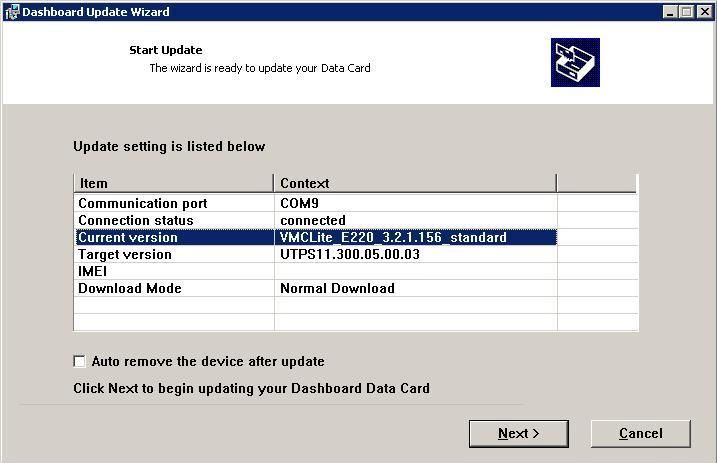
e220firmware-1.jpg


Wow, the drivers that are on this device are from 2007, I've just updated to downloaded drivers from late 2009.

I just installed MDMA, f*ing awesome :) I love how u get a proper signal strength, and can check balance. It doesn't show cellphone tower messages with my E220 though.

Okay, seeing my firmware version makes me confident enough to proceed
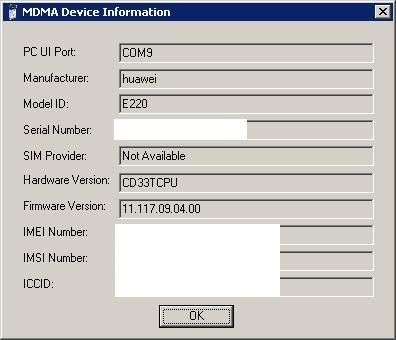
E220info.jpg


I've also got E220Update_11.313.02.00.01.B268.exe from some random contributor on a site "mobile rocks co uk" etc. I don't trust it.
(MD5 sum d8e3f3dc865de93589538308d589c18c)

Firmware Update Error:
I got some error saying "Its not dashboard" and it can't install the update... :/
How are you meant to do it? (XP32, sim card out, double USB cable)

Wow that was scary, after the firmware update attempt it wouldn't show the modem device anymore, even running the new modem driver install didn't help. I had to run the old driver install that comes on the device, then the newer drivers automatically loaded.
Eh, my firmware is pretty decent, so I'm gonna leave it. I found out its what MTN and vodacom provide, and it works on MAC, W7 & XP. I read some other firmwares are less compatible. If it works don't fix it :)
 
Last edited:
What kind of lame update software does not check and say "please remove the sim and try again"?
 
I have only had one fall over during a power outage!

Even that one was recovered with the Forced Download option.

If you are concerned then just install a PC installed copy of Mobile Partner:

http://www.dc-unlocker.com/downloads/get/LihV26NW

This will also install the latest drivers etc. The only drawback with a PC installed copy is that if you remove and replug your modem when the PC is operating, the old dashboard will try to load... You simply cancel the operation and all is fine... Its a minor irritation that's all...

Firmware for E220: http://www.dc-unlocker.com/downloads/get/dXwG4FaC
 
Last edited:
Cool, My E220 is running that firmware already.
You should disable autorun, it will prevent you getting viruses from infected USB sticks and HDDs.
Alternatively you can remove the drive letter from the E220's virtual ROM in Disk management (right click my computer>manage>disk management).
 
I'm loving the E220 BTW. Its way better than my Sony Ericsson P990i 3G via USB ever was.
Even on EDGE its quick. It works driving around in the car.... it just works.
Same SIM (unrestricted vodacom APN).
 
*quickly burns a virus to a cd*
:) kidding. yeah its a good compromise.
 
I recently did the 11.117.10.03.99 upgrade (For the 3.6 -> 7.2 Upgrade on a Huawei E220)- Here are a few hints

(Mostly leeched from the net, but edited by me)

Ok for all the people having problems, here are some detailed instructions for updating the firmware of your E220 modem correctly and then getting it to work on Vista or 7:

Steps:

1) Plug in the modem into a USB port on your computer.
2) Disconnect it from the internet, and CLOSE ALL DASHBOARD SOFTWARE, like vodafone mobile connect or Maxis. Make sure it is totally closed and not just minimized (Check task manager - This is important!!!).
2.b) Remove your SIM card, and plug the white thingy back in.
3) Run the firmware update exe file, click next, next etc and finally start.
5) Your modem-light will now start flashing green crazily - Do not touch the modem or computer *.
6) IMPORTANT: After the update is complete, click "Finish" to close the updater, remove the modem, count to 10 slowly, and plug the modem in again.

* You may get an error at the end when it is restoring settings, something about "firmware response", do not worry about that.

After completion of the update, do the following to get it to work on Vista or 7:

1) Remove all USB mass storage devices like flash drives or memory sticks from your computer.
2) Go to control panel (make sure it is in small icon view!!), then to device manager, then at the bottom, expand the "Universal serial bus controllers" tree, if you did what I said in step 1 there will only be one "USB mass storage device".
3) Right click on that "USB mass storage device" and click on "Update driver software...".
4) Choose "browse my computer for driver software".
5) Choose "let me pick from a list of device drivers on my computer".
6) Now untick the box that says "Show compatible hardware".
7) On the left scroll box, scroll up and select "Standard USB host controller"
8) On the right scroll box, scroll down and select "USB composite device", then CLICK NEXT.
9) You will get a warning, just click yes.
10) Wait until the baloon at the bottom right vanishes.
11) Put your SIM card back in (I forgot this part -_- (Reelix))
12) Connect as normal.

After this procedure the modem will be installed properly. The Problem lies in the fact that Vista and Windows 7 only detects the mass storage part of the modem and not the modem part.


http://www.mobilebroadbandrocks.com/download/huawei-e220-firmware-v11117100399

Before (3.6): http://img267.imageshack.us/img267/5166/ss20110111232346d.png
After (7.2): http://img87.imageshack.us/img87/5283/ss20110111234228.png

Tell me how the 11.3* upgrade goes :)
 
I've also got E220Update_11.313.02.00.01.B268.exe from some random contributor on a site "mobile rocks co uk" etc. I don't trust it.
I've found the USSD is buggy on the 11.313.02.00.01 firmware.
I recently did the 11.117.10.03.99 upgrade (For the 3.6 -> 7.2 Upgrade on a Huawei E220)- Here are a few hints
Thanks for sharing!
The 11.117.10.03.99 firmware doesn't report the RNC ID, the firmware I have on my E220 is 11.117.10.02.00.
 
Top
Sign up to the MyBroadband newsletter
X