Visual Studio - What reporting software?

Solarion

Honorary Master
Joined
Nov 14, 2012
Messages
28,050
Reaction score
17,804
I've been fighting with Crystal and Microsoft Reportiewer for 3 days now and none of them work for me. Microsoft have made it as extremely difficult as possible to use those technologies now so I am abandoning them all together.. I'm on VS 2017 Community. What are my other alternatives? What do you guys use?
 
I've been fighting with Crystal and Microsoft Reportiewer for 3 days now and none of them work for me. Microsoft have made it as extremely difficult as possible to use those technologies now so I am abandoning them all together.. I'm on VS 2017 Community. What are my other alternatives? What do you guys use?
We use SSRS and report builder mainly. Have you tried going to 2019? Microsoft report projects in vs are a pain as they always seen to lag report versions vs visual studio versions but I think this was finally resolved in 2019. You have to add a specific project type though, I think it's under the data/bi project types when you install vs.
 
We use SSRS and report builder mainly. Have you tried going to 2019? Microsoft report projects in vs are a pain as they always seen to lag report versions vs visual studio versions but I think this was finally resolved in 2019. You have to add a specific project type though, I think it's under the data/bi project types when you install vs.

Looks like it is time to go 2019. Thanks a million Kosmik.

Afaik SSRS reports only run on a server? I was hoping to just have a standalone project with a couple of reports that I can demo for a client. Anyway cool beans!

Edit: Yes there is a lag in versions and even now Crystal has yet to catch up with their versioning, from what I've read over other forums it has caused a bit of havoc with the Crystal guys. Even the usual Microsoft.Reportviewer puts up such a fight when trying to implement it, downloading this and that and adding this reference and another download that it becomes not worth it.
 
Looks like it is time to go 2019. Thanks a million Kosmik.

Afaik SSRS reports only run on a server? I was hoping to just have a standalone project with a couple of reports that I can demo for a client. Anyway cool beans!

Edit: Yes there is a lag in versions and even now Crystal has yet to catch up with their versioning, from what I've read over other forums it has caused a bit of havoc with the Crystal guys. Even the usual Microsoft.Reportviewer puts up such a fight when trying to implement it, downloading this and that and adding this reference and another download that it becomes not worth it.

No, you can run it in "local" mode. If I recall, the property on the control is called "processing". All a report is, is a rdl file which is just a fancy extension for an xml file, open one in notepad++ and you'll see what I mean.

The rdl is added to your local project and you just have the viewer reference the file locally on the project.
 
Some links


I've been fighting with Crystal and Microsoft Reportiewer for 3 days now and none of them work for me. Microsoft have made it as extremely difficult as possible to use those technologies now so I am abandoning them all together.. I'm on VS 2017 Community. What are my other alternatives? What do you guys use?


Why not go with data visualization software?
Save to a SQL server then show using Qlik, Tableau, Power BI
 
Why not go with data visualization software?
Save to a SQL server then show using Qlik, Tableau, Power BI
Cost would be a huge factor and overkill for basic reporting. PowerBi is a very nice option for users who are looking to manipulate or browse data but hard to beat a flat report for basic data consumers.
 

I used the others a bit more, so decided to try out PBI this year
Blue Screens of Death before Power BI - 0 in 4 years
Blue Screens of Death after installing Power BI - 6 in 1 month
Blue Screens of Death after uninstalling Power BI - 0
coincidence?

I struggle with it, but because of Microsoft's $$$ and position it gains a lot of traction with industries
 
Cost would be a huge factor and overkill for basic reporting. PowerBi is a very nice option for users who are looking to manipulate or browse data but hard to beat a flat report for basic data consumers.

That is true, costs are quite a big factor with this.

I've had a look at the opensource ones for myself....they are not quite at the same level admittedly.
For example BIRT had backing from IBM but looks about the same level as SSRS
and Python's DASH seems like a LOT of work
Google analytics is also an option, which for me is a nice option, just a bit of javascript and then its cloud
 
Some links


I still need to configure SSRS correct? I managed to finally come right with some of the information, actually got to design an SSRS report in VS now. It's just running it I'm getting the error "Insufficient permissions granted to the PC for running this report" so I'm assuming it still needs SSRS set up correctly.
 
I still need to configure SSRS correct? I managed to finally come right with some of the information, actually got to design an SSRS report in VS now. It's just running it I'm getting the error "Insufficient permissions granted to the PC for running this report" so I'm assuming it still needs SSRS set up correctly.
You shouldn't. Running locally is independant of a SSRS server. How are you using it exactly?

*edit* Possibly there is a service account missing? A sql installation uses its own but maybe you need to configure your project account?
 
Last edited:
You shouldn't. Running locally is independant of a SSRS server. How are you using it exactly?

*edit* Possibly there is a service account missing? A sql installation uses its own but maybe you need to configure your project account?

This is too difficult :X3:

When I hook up the report to ReportViewer and run the project, it tells me my own PC does not have the required permissions.

The permissions granted to user 'DESKTOP-P00MUM\DevPC' are insufficient for performing this operation.
 
PowerBi if there is lots of data.

Could always go crystal reports or telerik
 
You shouldn't. Running locally is independant of a SSRS server. How are you using it exactly?

*edit* Possibly there is a service account missing? A sql installation uses its own but maybe you need to configure your project account?

Got it I think.

Followed this article. See from No.35 down - https://thecodeattic.wordpress.com/2010/06/27/howtoinstallsqlserver2008r2/

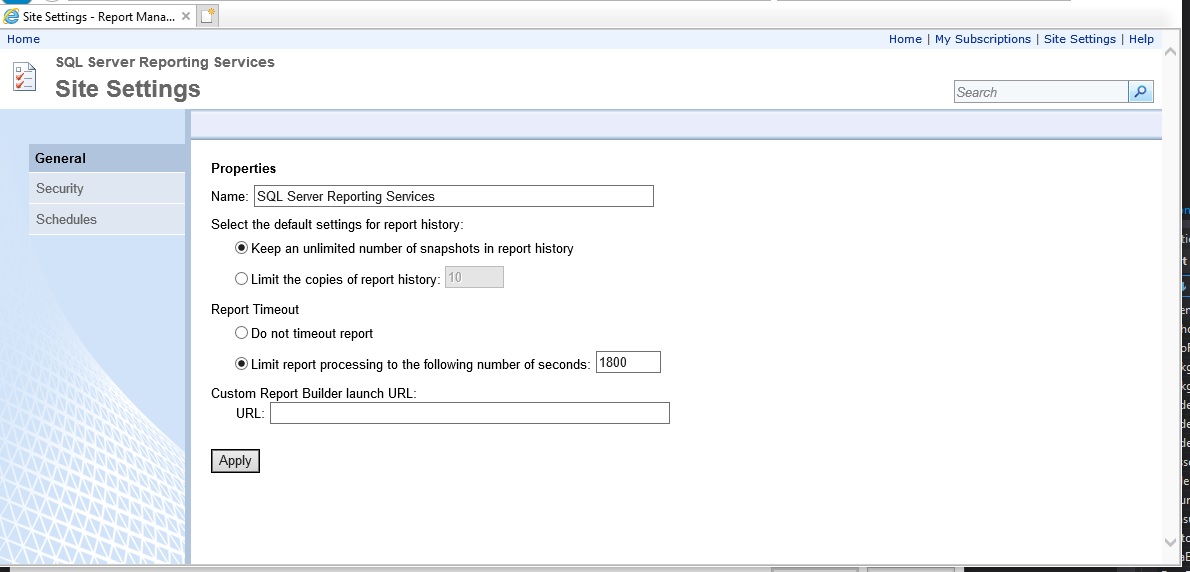
Have to set up an account in here under the Security tab.

sitesettings.jpg
 
If you are calling the report from the server then yes. I thought you were running the rdl locally.

I am trying to yes, but figured I'd knock two birds with one stone and just set up SSRS while I'm at it. I can design a report now and run it through SSRS, but still to figure out how to run it locally.
 
I am trying to yes, but figured I'd knock two birds with one stone and just set up SSRS while I'm at it. I can design a report now and run it through SSRS, but still to figure out how to run it locally.
Its better to run it on the server. Namely that the engine and the databases are closer to each other and you are handling processing to a box that's dedicated for data handling. Running locally, your machine retries the data and then build the report using local resources.
 
Microsoft is pushing people to Azure and Power BI. You can't use ReportViewer but have to use Reporting Services as SQL Server team never migrated the ReportViewer to asp.net core. I think there is an unsupported version created by the community but don't know how good it is.
Same with Crystal Reports Viewer. It only works on webforms so is not compatible with asp.net core.
 
Top
Sign up to the MyBroadband newsletter
X