Why does win10 use HDD 100% these days?

Had the freezing problem this morning again.... fired up task manager and process hacker right after it passed.

100% disk usage and the main culprit was skype memory decompressing. With the indexing service trying to keep up.

The problem might be memory compression..... gonna look for a way to disable that.
 
Looks like memory compression really is the culprit but no fix works forever or for everyone.


Now at least we know why it happens it seems. (which was the reason for this thread) .This leaves the "fixes" which are not actual fixes of either getting an HDD or waiting for M$ to fix the bugs..... I suspect the latter might not be forthcoming.

As an aside I have noticed that Linux never figured out how to fix pagefile performance either, the fix usually implemented is to put the pagefile on a SSD or to simply eliminate bloat.

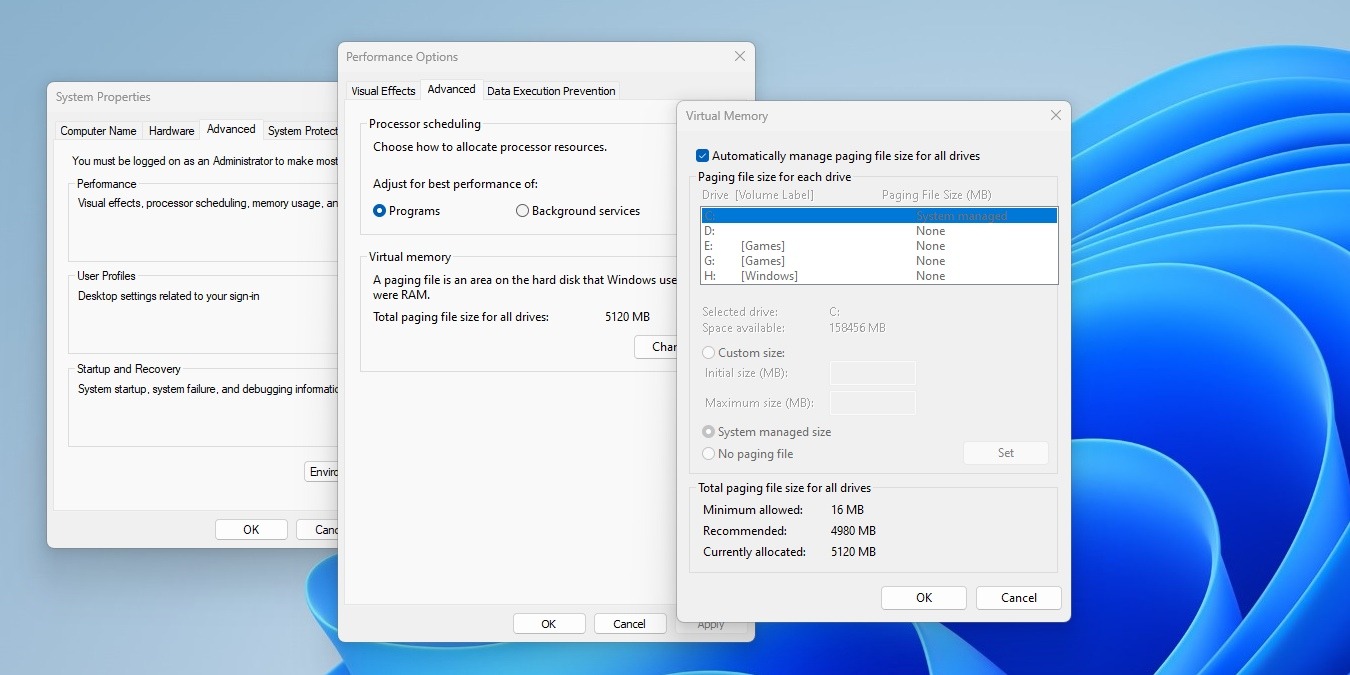
This leads to an interesting thought that M$ likely won't implement, an option to add a small SSD solely for the pagefile or at least point the system to put the pagefile on something other than C:\.....

EDIT: seems this is actually possible even if a bit odd in implementation.

EDIT2: this does not eliminate the freezing bug though.... but this I am sure M$ will eventually fix as it affects SSD installs as well.
 
This leads to an interesting thought that M$ likely won't implement, an option to add a small SSD solely for the pagefile or at least point the system to put the pagefile on something other than C:\.....
It’s called ReadyBoost, RTFM.
 
I had this issue yesterday for first time, 100% disk usage with the laptop getting less and less responsive, task manager just showed the process as System. Restarted and it was fine again.
 
I have seen cases of a monthly update taking all day to download, install and fully restart because of this.
Seem to be taking forever right now, on the last day of the month ... even on a PC with SSD, but 32-bit Win10 - usually significantly faster for me compared to my 64-bit laptop, though that has a HDD.
 
I had this issue yesterday for first time, 100% disk usage with the laptop getting less and less responsive, task manager just showed the process as System. Restarted and it was fine again.

Once it starts it never goes away, it will be back :laugh:
 
Seem to be taking forever right now, on the last day of the month ... even on a PC with SSD, but 32-bit Win10 - usually significantly faster for me compared to my 64-bit laptop, though that has a HDD.
At this point they want to forget 32bit even exists. You get almost no new drivers for those OS's from anyone anymore it seems.
 
At this point they want to forget 32bit even exists. You get almost no new drivers for those OS's from anyone anymore it seems.
I can't help it - this PC won't die :)

Truth be told, if & when they stop all support for 32-bit, if this thing's still going & I'm still using it, I'll probably put this on : https://www.linuxmint.com/download_lmde.php ... assuming Linux Mint make a 32-bit themselves, then, based on the Debian 32-bit base.


EDIT : back to the Win10 updates, this - 2021-06 Cumulative Update for Windows 10 Version 21H1 for x86-based Systems (KB5003637) - is stuck at 62%, even after a reboot & attempt at starting updates again.

"sudo apt update && sudo apt upgrade" is so much faster at these things than Windows is .... about 2 weeks ago, tried setting up the Win10 updates in both the normal CLI and PowerShell, and both failed with the setup itself, so just gave up.
 
Last edited:
I can't help it - this PC won't die :)

Truth be told, if & when they stop all support for 32-bit, if this thing's still going & I'm still using it, I'll probably put this on : https://www.linuxmint.com/download_lmde.php ... assuming Linux Mint make a 32-bit themselves, then, based on the Debian 32-bit base.
The linux world is also starting to abandon it. You are going to be left with a few fringe distro's.

Sad to say but everyone want's 32-bit to die..... even I agree it's probably time.
 
  • Sad
Reactions: BCR
"sudo apt update && sudo apt upgrade" is so much faster at these things than Windows is .... about 2 weeks ago, tried setting up the Win10 updates in both the normal CLI and PowerShell, and both failed with the setup itself, so just gave up.
The last linux update I ran on a PC with a slow HDD..... lasted 3-5hours. Still faster than slow windows updates though.

Though to be fair I think that HDD might be failing.
 
The last linux update I ran on a PC with a slow HDD..... lasted 3-5hours. Still faster than slow windows updates though.

Though to be fair I think that HDD might be failing.
Sometimes it's the distro's mirrors your machine's connecting to.

I noticed Ubuntu's were very slow over a few days very recently ; was trying to install some software & do updates on a 2nd laptop which has Peppermint OS on it - just switched to a mirror in Ireland from the Main one in the UK, and was plain-sailing after that.
 
Sometimes it's the distro's mirrors your machine's connecting to.

I noticed Ubuntu's were very slow over a few days very recently ; was trying to install some software & do updates on a 2nd laptop which has Peppermint OS on it - just switched to a mirror in Ireland from the Main one in the UK, and was plain-sailing after that.
No the download itself is fine.... the actual install though takes forever.

But like I said I have been having odd problems with the drive anyway, just don't have the money to replace it any time in the future.
 
  • Like
Reactions: BCR
If it's memory compression, still doesn't explain why it affects some PC's more than others with the same hardware and sometimes even on fresh installs?

But perhaps clearing pagefile on shutdown might be worth a shot? Or might just make things worse lol.
 
All the ****ing time!

Windows Modules Installer Worker is a common culprit...
 
If it's memory compression, still doesn't explain why it affects some PC's more than others with the same hardware and sometimes even on fresh installs?

But perhaps clearing pagefile on shutdown might be worth a shot? Or might just make things worse lol.
Could be because not everyone is on the same feature update at the same time or it could be specific apps that cause it..... I never use skype so I'm gonna uninstall it anyway and see what happens.

It could also be smaller than anticipated by the OS pagefiles.
 
Had it again yesterday afternoon at around 17:00 after a long day on on work laptop, same system file again, but as I had work to do, so restarted and went on.
 
No the download itself is fine.... the actual install though takes forever.

But like I said I have been having odd problems with the drive anyway, just don't have the money to replace it any time in the future.

Odd problems with drive - yeah, have the same with an old machine - drive needs replacing - I can't blame Win 10 for that
 
Funny thing, had it happen in a VM running win10 this weekend.... no AV installed and no alterations made to defender. It slowed down to un-usable, had to wait it out.
 
Funny thing, had it happen in a VM running win10 this weekend.... no AV installed and no alterations made to defender. It slowed down to un-usable, had to wait it out.

Try Process Monitor, it gives a bit more detail and it's a standalone app.
 
Top
Sign up to the MyBroadband newsletter
X