


FiestaST
Honorary Master
I knew this was coming!Do you need help to get to the MacOS thread, cause you seem lost.


South Africa’s biggest forum. Discuss, discover, and connect with thousands of members.
I knew this was coming!Do you need help to get to the MacOS thread, cause you seem lost.

Microsoft shared a temporary workaround for customers experiencing Outlook freezes after installing this month's Windows security updates.
As explained one week ago, when Microsoft acknowledged the issue, the bug causes the classic Outlook desktop client to hang for users with POP email accounts who have deployed the KB5074109 security update on Windows 11 25H2 and 24H2 systems.
Other symptoms include the inability to reopen Outlook without ending the process via Task Manager or restarting the device, Outlook redownloading emails, and emails not appearing in the Sent Items folder even though they were sent.
In a Tuesday update, it added on the Windows health dashboard that any app may "become unresponsive or experience unexpected errors when opening files from or saving files to cloud-backed storage, such as OneDrive or Dropbox."
"For example, in some configurations of Outlook that store PST files on OneDrive, Outlook might become unresponsive and fail to reopen unless its process is terminated in Task Manager, or the system is restarted," Microsoft explained. "In addition, sent emails might not appear in the Sent Items folder, and previously downloaded might be downloaded again."
It also said that these problems also affect Windows 10 users and multiple Windows Server platforms, including Windows Server 2025, Windows Server 2022, and Windows Server 2019.
Microsoft's Windows and Outlook teams are investigating the issues, but the company has yet to provide a timeline for a fix or workaround. However, until a permanent fix is available, Microsoft advised affected customers to access their email accounts via webmail or to move their Outlook PST files out of OneDrive.
Affected users can also work around the issue by uninstalling the KB5074109 or KB5073724 updates. This requires them to open the Settings app, go to Windows Update > Update history > Uninstall updates, and click the "Uninstall" link next to their entry.
However, as Microsoft also warns, removing security updates may leave your Windows devices exposed to malware and other threats, since they patch security vulnerabilities that are often exploited in attacks.
Over the weekend, Microsoft released emergency out-of-band updates for Windows 10, Windows 11, and Windows Server to fix credential prompt failures impacting remote connection applications and preventing devices with Secure Launch enabled from shutting down or entering hibernation.
On Patch Tuesday, it also resolved another known issue causing security applications to flag a core Windows component as vulnerable to memory corruption attacks.

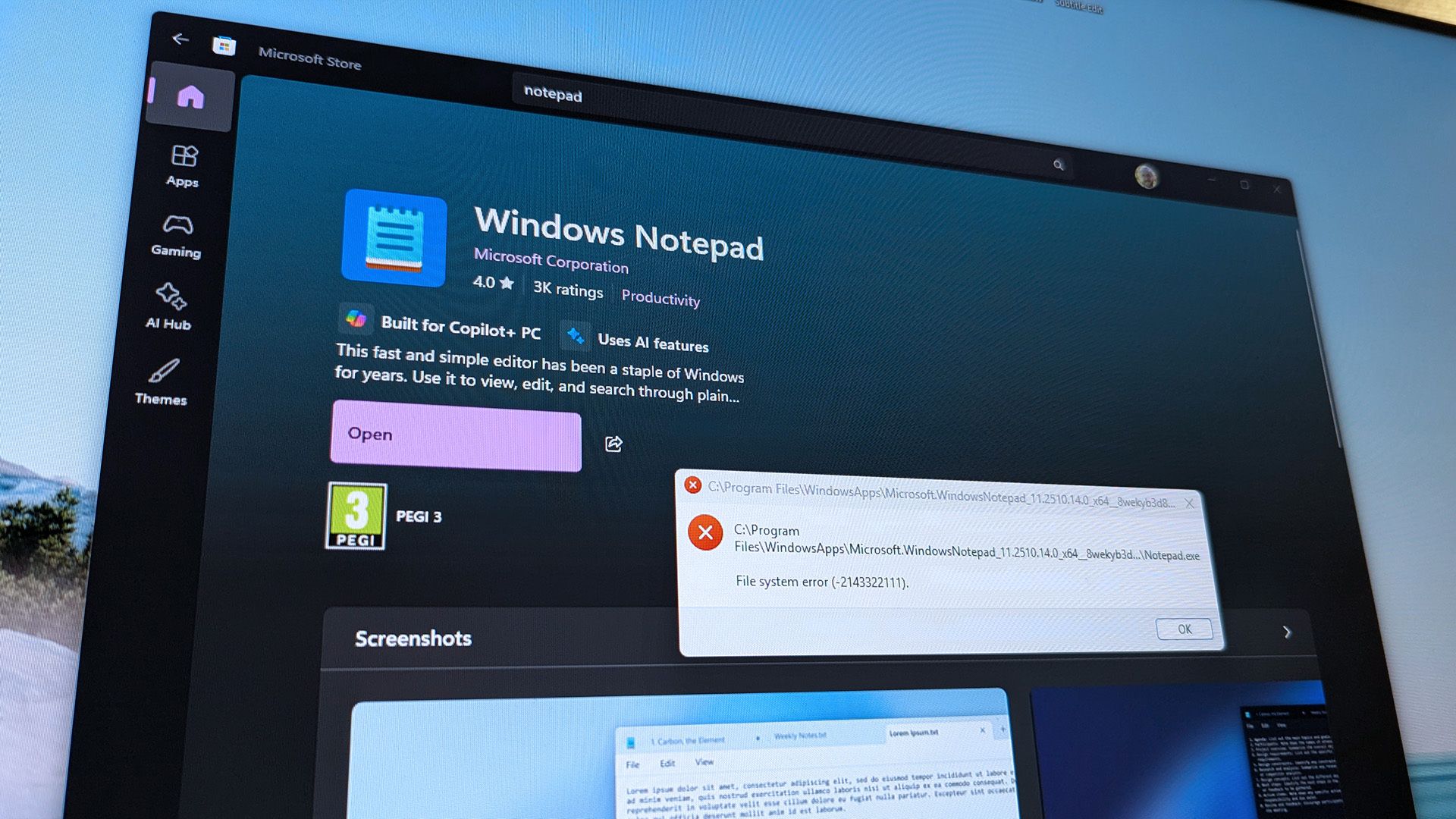
Windows 11 users are having a nightmarish start to their day. The error code 0x803f8001 is appearing for many trying to open apps on their PC. File system error (-2143322111) also appears on affected systems.
We've run into the issue when trying to open Armory Crate, Notepad, and Snipping Tool. It seems like the issue affects a wider range of apps. I'll update this piece as more information becomes available.
Our team is trying to remedy the issue on our respective PCs, but we have not found success yet.
Specifically, we have tried resetting the Microsoft Store app on a PC, but to no avail.
 www.windowscentral.com

Do you need help to get to the MacOS thread, cause you seem lost.

Shitshow......Windows 11 apps like Notepad aren't loading — what is error code 0x803f8001 and how do I fix it? - Windows Central
Armoury Crate, Notepad, and Snipping Tool are just a few apps affected by an ongoing issue.
View attachment 1880249
Windows 11 apps won't ppen. What is error code 0x803f8001?
Many Windows 11 users are unable to open apps on their PCs and are running into error code 0x803f8001.

 ... it's quick and easy
^ I still rock that start menu
"The Good Old Days" - BEFORE "The End of an Era (MyBB"The good old days" = A simpler time.
 )"...
)"... 

After recent comments from Microsoft CEO Satya Nadella about the company maintaining its AI-centric course in an increasingly skeptical industry (and politely asking you not to refer to AI content as ‘slop’), many in the wider computing industry shrugged, snorted in something approaching derision, then went back to bemoaning Windows’ increasing focus on AI.
Customers have long complained about Copilot, with some leaning further into ChatGPT instead, as Microsoft’s AI feels like it’s clogging up the core pillars of what a computer should offer. It’s no wonder users are trying to remove it.
So, with Windows needing a shot in the arm, both in terms of performance and public perception, we’re sad to report that Microsoft isn’t off to the best start in either regard in 2026.
Last week, Microsoft released Windows 11 update numbers KB5073455 and KB5074109, intended to resolve a series of issues (114 in total, apparently).
Sadly, as has often been the case with Microsoft in recent years, the patch actually caused plenty of issues, too. It caused some black screen issues (notably with ever-popular Nvidia GPUs), as well as a bizarre Outlook Classic bug that essentially locked up the company’s email app if you were using a POP account.
Windows 11 Enterprise builds reportedly restarted when users clicked ‘Shut Down’, which probably isn’t great for anyone’s electricity bills, and actually required users to enter a Command Prompt to, you know, turn their PC off.
That’s pretty wild for a company that owns a sizeable piece of the PC pie, and prompted Microsoft to push out additional patches in recent days.
Update KB5077797 landed on January 17 to fix the bug pushing computers to restart, while another emergency patch was released on Saturday to “restore access to Azure Virtual Desktop and Windows 365”, according to Extreme Tech.
The rub? That Outlook bug still isn’t fixed, and if your work PC can’t get emails right now, you’ll undoubtedly be cursing Nadella’s recent comments that we suggest we need to embrace AI.
“For this not to be a bubble by definition, it requires that the benefits of this are much more evenly spread,” Nadella said on Tuesday (thanks, Irish Times).
“I’m much more confident that this is a technology that will, in fact, build on the rails of cloud and mobile, diffuse faster, bend the productivity curve, and bring local surplus and economic growth all around the world,” he added.
‘Bending the productivity curve’ probably isn’t what those without a working email app were thinking about, Mr Nadella.
Still, this tone deafness has been building and not just in Microsoft’s computing department.
Last year, the company laid off more than 9,000 employees, many in itsXbox division. Microsoft’s gaming brand was decimated, with studios shut “to position the company and teams for success in a dynamic marketplace” (via Eurogamer).
In a memo to staff in June last year, Xbox boss Phil Spencer said, “I recognize that these changes come at a time when we have more players, games, and gaming hours than ever before. Our platform, hardware, and game roadmap have never looked stronger. The success we're seeing currently is based on tough decisions we've made previously.”
As if the company’s successes being paraded in front of the employees being let go wasn’t enough, one executive producer at Xbox Game Studios Publishing said, "I know these types of tools engender strong feelings in people, but I'd be remiss in not trying to offer the best advice I can under the circumstances. I've been experimenting with ways to use LLM AI tools (like ChatGPT or Copilot) to help reduce the emotional and cognitive load that comes with job loss."
Thankfully, that post was deleted, but given Microsoft’s continued investment in AI at the cost of not just its humanity but now its most defining product, Windows, it really does feel like the worm is turning, and public perception couldn’t be lower.

2026 is well and truly here, which means it's time to look ahead and prepare for what's to come this year for Windows 11. Microsoft is currently cooking up a number of new experiences, changes, and features for Windows 11 users that are expected to debut in the coming months, and we've gone hands-on to check out as many of them as we can.
Some of these features have already been announced and are confirmed to be coming soon, and others are yet to be announced and may be canceled at any time. Either way, we've tried to make this as all encompassing as possible, though there's likely even more features to come that we're yet to know about.
Microsoft is also expected to launch two new versions of Windows 11 this year, version 26H1, which will be available exclusively on new PCs with a Snapdragon X2 SoC this spring, and version 26H2, which is expected to come to everybody this fall.
 www.windowscentral.com



AI this. AI that. 'tsek man.What's next for Windows 11 in 2026? First look at new features arriving in the coming months - Windows Central
View attachment 1880687
Microsoft has more features, enhancements, and AI planned for Windows 11 users this year. Here's a first look at all the upcoming features we know are in the works.
What's next for Windows 11 in 2026? First look at new features coming soon
Microsoft has more features, enhancements, and AI planned for Windows 11 users this year. Here's a first look at all the upcoming features we know are in the works.
Microsoft confirmed today that Outlook mobile may crash or freeze when launched on iPad devices due to a coding error.
While this known issue may affect all users of Outlook for iOS version 5.2602.0 on an iPad, Microsoft says that they can work around it by launching Outlook after enabling Airplane Mode.
"The latest Outlook for iOS update contains a code error related to a change meant to refresh rather than restart tabs when feature flags are updated, which is resulting in this impact," Microsoft said in an incident report (tracked under EX1220516).
"Affected users can launch Outlook mobile while in Airplane Mode and then re-enable Wi-Fi and/or cellular data as a way to circumvent impact while we work towards mitigation."
Microsoft added that it has already developed a fix for this bug, but the fixed app version may take up to 24 hours to reach the App Store due to Apple's review and release processes.
While Microsoft has yet to detail how many users are impacted by this ongoing issue, it has been flagged as an incident in the Microsoft 365 admin center, a tag commonly applied to critical service issues with noticeable user impact.
This week, it also shared a temporary workaround for users experiencing Outlook freezes after installing the January 2026 security updates on Windows 11, Windows 10, and multiple Windows Server platforms (including Windows Server 2025, Windows Server 2022, and Windows Server 2019).
Over the weekend, Microsoft released emergency out-of-band updates for Windows 10, Windows 11, and Windows Server to fix credential prompt failures affecting remote connection apps and preventing devices with Secure Launch enabled from shutting down or entering hibernation.
Microsoft is also actively working to mitigate another known issue (EX1221742) that prevents Exchange Online customers in the United States, France, and the United Kingdom from accessing their email accounts via Outlook on the web.

The good old days.


