Windows 11 Support Thread

I acquired a new laptop (i3) in August 2024 with Windows 11 installed. I managed to get rid of most Big Brother built in software trying to force one using Bling or Microsoft Edge sorted out. Using Chrome browser now.
Current issue; I can not get my laptop to show up as a device on my Google account. When in Google Play, my cellphone and MI box comes up as devices, no Windows computor?
All the Google and Youtube fixes have different menus to what comes up in my "Settings".
Any ideas?
 
I acquired a new laptop (i3) in August 2024 with Windows 11 installed. I managed to get rid of most Big Brother built in software trying to force one using Bling or Microsoft Edge sorted out. Using Chrome browser now.
Current issue; I can not get my laptop to show up as a device on my Google account. When in Google Play, my cellphone and MI box comes up as devices, no Windows computor?
All the Google and Youtube fixes have different menus to what comes up in my "Settings".
Any ideas?

You may have been overzealous in your removal of Edge related items. Some of those libraries are tightly coupled to/required for basic system functions.

As for ‘Big Brother’ - eish, if you really are that paranoid, rather look into blocking that stuff via a independent firewall or better yet, switch to the penguin os
 
Thanks I know there are no apps, but it still does not show the Windows 11 laptop as a device when I want to send adocument from my android phone to my laptop.
Isn't that where the new Phone link comes in ??
Screenshot_4.jpg

I actually find it easier to upload what I want to share to Google Drive and then access it on the PC from the same location.
Alternatively share it with myself on whatsapp and then open the whatsapp desktop app to get the file on the PC

there's plenty of ways to actually accomplish what you want to do ;)
 
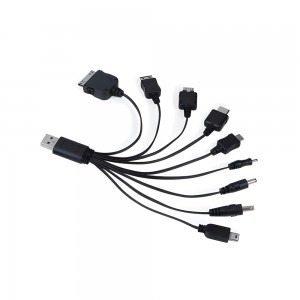
**USB to multi-cable phone / tablet adaptor enters the chat...**
1727170630912.png

 
I've updated to 24H2
2 issues so far:
Spotlight not working on login screen (it defaults back to picture and none of the online fixes work)
Wallpaper Engine (3rd party app)(Video as a wallpaper) no longer works (also defaults back to picture)

Taskbar was also messed up (as in default W11 style), but a new setting in Explorerpatcher fixed that thankfully :thumbsup:

Will do a clean install towards the end of year.
 
Last edited:
Today, Microsoft announced the release of Windows 11, version 24H2, the next feature update for its operating system (also known as the Windows 11 2024 Update).

Windows 11 24H2 started rolling out in May to enterprise customers enrolled in the Release Preview Channel of the Windows Insider Program for Business.

It has also been available on Copilot+ PCs since June when customers unexpectedly found it installed on their devices.

"Starting today, we begin to release the Windows 11 2024 Update, also referred to as Windows 11, version 24H2."

"This update is a full operating system (OS) swap that contains new foundational elements required to deliver transformational AI experiences and exceptional performance," said Microsoft VP of Windows Servicing and Delivery John Cable.

 
Windows 11 Sucks continues.

I am now on a brand new laptop and the same issues persist.

Whenever the laptop comes back from sleep / hibernate or screen off the windows taskbar is unresponsive (start doesn't work and application icons become invisible) and Microsoft Edge also becomes unresponsive. I have to restart explorer and I have to End Task Microsoft Edge and open again.

Same issue on previous machine.

Same issue on another machine.

Windows suck 🫏 ⚽⚽
 
Windows 11 Sucks continues.

I am now on a brand new laptop and the same issues persist.

Whenever the laptop comes back from sleep / hibernate or screen off the windows taskbar is unresponsive (start doesn't work and application icons become invisible) and Microsoft Edge also becomes unresponsive. I have to restart explorer and I have to End Task Microsoft Edge and open again.

Same issue on previous machine.

Same issue on another machine.

Windows suck 🫏
We have 3 Win 11 machines - one of them is patched due to an old CPU not natively compatible. We have NEVER had that problem...
 
Windows 11 Sucks continues.

I am now on a brand new laptop and the same issues persist.

Whenever the laptop comes back from sleep / hibernate or screen off the windows taskbar is unresponsive (start doesn't work and application icons become invisible) and Microsoft Edge also becomes unresponsive. I have to restart explorer and I have to End Task Microsoft Edge and open again.

Same issue on previous machine.

Same issue on another machine.

Windows suck 🫏 ⚽⚽

Nope, no problems like that with my Surface Pro.

Sounds like a you problem, Red…
 
Windows 11 Sucks continues.

I am now on a brand new laptop and the same issues persist.

Whenever the laptop comes back from sleep / hibernate or screen off the windows taskbar is unresponsive (start doesn't work and application icons become invisible) and Microsoft Edge also becomes unresponsive. I have to restart explorer and I have to End Task Microsoft Edge and open again.

Same issue on previous machine.

Same issue on another machine.

Windows suck 🫏 ⚽⚽

Sleep on windows have always sucked, so I disable it for all machines while they are connected to power. I let them hibernate when I close the lid.
I've never had that issue, though, and to be honest, it does sound like it's something specific to the apps you run.
 
Windows 11 Sucks continues.

I am now on a brand new laptop and the same issues persist.

Whenever the laptop comes back from sleep / hibernate or screen off the windows taskbar is unresponsive (start doesn't work and application icons become invisible) and Microsoft Edge also becomes unresponsive. I have to restart explorer and I have to End Task Microsoft Edge and open again.

Same issue on previous machine.

Same issue on another machine.

Windows suck 🫏 ⚽⚽
Does anything odd or errors show up in windows event log, application specific even?

Could be worse the last version of Windows that could successfully wake from sleep or hibernate for me was win 7, 11 just refuses after the logo, doesn't even initialize the keyboard, nor display, nothing.

Edit: yes I know my hardware is so old its nearly at going to high school, but, other older hardware works fine, hell I've even tested on a 775 Pentium dual core with both sleep and different suspend power settings working.
 
Sleep on windows have always sucked, so I disable it for all machines while they are connected to power. I let them hibernate when I close the lid.
I've never had that issue, though, and to be honest, it does sound like it's something specific to the apps you run.
If that's the case I'm going to start #DellSucks :p

Eish, okay I will have to troubleshoot
 
Nope, no problems like that with my Surface Pro.

Sounds like a you problem, Red…
That sucks. I am not sure what to do anymore.

I had a Dell Precision 5550. Since upgrading to Windows 11 it had endless issues (Dell Issues aside).
It then got replaced with a Dell Precision 5690. Windows Taskbar and Edge has the same issue.
Is it possible that whatever the issue get synced through my account? I do always say set up as a new machine when I start windows for the first time. Where do I even begin to troubleshoot. I can contact Dell, but all they do is swap parts and doesn't really get to the bottom of it.
 
Does anything odd or errors show up in windows event log, application specific even?

Could be worse the last version of Windows that could successfully wake from sleep or hibernate for me was win 7, 11 just refuses after the logo, doesn't even initialize the keyboard, nor display, nothing.

Edit: yes I know my hardware is so old its nearly at going to high school, but, other older hardware works fine, hell I've even tested on a 775 Pentium dual core with both sleep and different suspend power settings working.
Event viewer always have a ton of errors on every machine. I would not know where to start. It happens on both sleep and hibernate.

I will try keep an eye on event viewer around the time it happens and see if I can spot something odd.
 
Top
Sign up to the MyBroadband newsletter
X