Your Raspberry Pi Projects

I use it with Mame on Raspberry Pi not PC.
That looks very similar to the Hori fighting stick.
I have this as well:

Mame on Raspberry Pi will work too (have a RPi3 lying around) - do you have a pic of the wireless controller you referred to?

Yes, that's the one I actually want, but dang, 150 USD, that's eina to play retro games.
 
They own the site that you access the data via as well as the code base. Some of those servers are resident in the US. They can middle-man that any time they want and law enforcement can demand access. Unfortunately their end-to-end encryption is pointless. It's marketing hype.
Their site says they don't have any servers based in the US. That could be marketing hype but it's unlikely. Given that the Americans tried to arrest (did arrest?) the founder (Kim Dotcom) and one of the reasons he based the company in NZ was due to their strict non-extradition and data privacy laws.
i.e. the site was initially setup to be hard-to-get-data-out-of-for-law-enforcement

Anyway, that's the least of my concerns. 50GB free and accessible by well supported apps and api's. That's the good stuff.
 
Interesting. I don't trust Forbes on technical stuff, but I will look into this. Maybe I'll stop using them for sensitive data.
Also don't trust any American main stream news site to report reliably on anything non-American.
Especially with Mega being anti-American.
 
Which USB controllers did you get? The SNES ones?

If so, have you tried them with MAME games on the Pi?
Sorry, just saw this. I haven't really played any Mame games yet, although I got wired controllers, so I don't anticipate any lag issues.
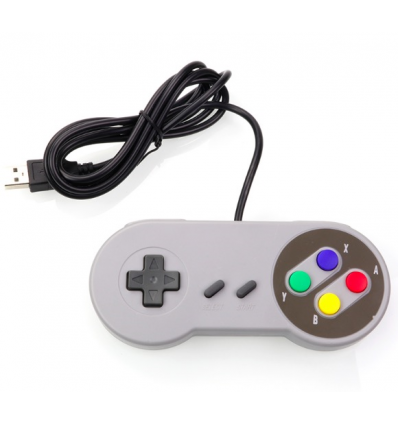
I just got these generics. Perfect as my son's hands are too small for an Xbox controller:

 
I think a few people here may also be interested in this. X-post from Emulator thread:
(Rpi 4 beta of Retropie tested).
 
Ah I see there's a beta 64 bit Pi OS https://www.raspberrypi.org/forums/viewtopic.php?f=117&t=275370.

How can it be so hard to get it working. Every time it's a problem. Ridiculous they're taking so long to fix it!
Video drivers are notoriously tricky. This applies to all new chipsets, incl. the big boys (nVidia, AMD). It's been like this since the beginning of (computer) time. As the chipset matures, features and optimisations get very good, but in the first year or so, very few things work well.
 
add-on. That way those who don't need / want that option don't need to pay for it. Same way extras for the Pi have always worked. Eg. the camera modules. Would be nice to have, but I don't want to pay for them for all the projects that don't need them.

Makes sense. Just though I could have it standard as I want to have it in my switch cabinet without having to use a power source from the wall.
 
Have just ordered the 8g model from PiShop.co.za
Will be useful for me to move some of my current stuff to a lower powered machine.
My docker house infrastructure will be happier with 8G vs 4G...

POE hat out of stock, but not the end of the world for now.

Winter is coming, and I need less equipment running to tide me over with the days of low solar :)
 
With a raspberry pi 4, can you boot or run off SSD?

I want to consolidate my pi3bs into one that runs hass.io and via that , my ubiquiti controller and Plex server as a minimum.

Looks like the pi 4 with 8 GB will do the job but I need to be on more stable SSD? I recall reading of a way to do on 3b but at that time it said 4 was still unsupported
 
With a raspberry pi 4, can you boot or run off SSD?

I want to consolidate my pi3bs into one that runs hass.io and via that , my ubiquiti controller and Plex server as a minimum.

Looks like the pi 4 with 8 GB will do the job but I need to be on more stable SSD? I recall reading of a way to do on 3b but at that time it said 4 was still unsupported
Yes theres a guy on YouTube that's done it recently. No more need for SD card
 
With a raspberry pi 4, can you boot or run off SSD?

I want to consolidate my pi3bs into one that runs hass.io and via that , my ubiquiti controller and Plex server as a minimum.

Looks like the pi 4 with 8 GB will do the job but I need to be on more stable SSD? I recall reading of a way to do on 3b but at that time it said 4 was still unsupported
The beta software release a few weeks ago allowed booting off SSD

The recent OS for the pi4 8gb (64 bit) broke it again.

There are instructions for booting off SSD , but most files on SSD. I think it's on Tom's hardware
 
With a raspberry pi 4, can you boot or run off SSD?

I want to consolidate my pi3bs into one that runs hass.io and via that , my ubiquiti controller and Plex server as a minimum.

Looks like the pi 4 with 8 GB will do the job but I need to be on more stable SSD? I recall reading of a way to do on 3b but at that time it said 4 was still unsupported
So I'm in the same boat.

I tried this tutorial but was giving an error. So going to try again.

Still use the SD card to boot.

I won't holds thumbs for USB boot for a while yet.


the meantime I have tested the following procedure today and it works. This is for Raspberry Pi 4, 32-bit HassOS, booting from SD card but with hassos-data (e.g. all the Docker images and data) on SSD.

Install HassOS to SD card rpi4 32-bit, as per documented instructions.

Boot up HassOS, login to shell ("root" then "login" command), set your network configuration according to documented instructions.

Reboot device, HassOS will then connect ethernet and install Home Assistant (wait ~20 mins).

Login to check Home Assistant is working, set username, apply any updates etc. Now you have a clean HassOS ready to go on your SD card.

Shutdown device, take out the SD card, and plug in to a separate Linux machine. Also plug in your SSD to that separate Linux machine.

Prepare your SSD partition if required, I personally used MBR partition type and filled the disk with one partition of type 83 (Linux).

Clone the hassos-data partition from SD card to SSD (assume sda8 is SD card, sdb1 is SSD):
sudo dd if=/dev/sda8 of=/dev/sdb1 bs=10000000

This takes time. Once completed, change the partition label of the SD card partition (your new SSD partition will have been cloned with the name "hassos-data")
sudo e2label /dev/sda8 hassos-data-old

I think HassOS might do this anyway, but I chose to resize my new SSD filesystem to fill the partition:
sudo resize2fs /dev/sdb1

Plug SD card and SSD back into your Raspberry Pi and start up HassOS.
 
is the 8GB version only available at the pishop at the moment?
Always great service ordering from them....but rather save the R100 delivery fee if possible.....
 
Top
Sign up to the MyBroadband newsletter
X