


newby_investor
Executive Member
I run bitwarden_rs, pihole and trilium notes all in dockers on my Pi 2.Anyone wanna share some great containers worth having?
Deep diving into docker
South Africa’s biggest forum. Discuss, discover, and connect with thousands of members.
I run bitwarden_rs, pihole and trilium notes all in dockers on my Pi 2.Anyone wanna share some great containers worth having?
Deep diving into docker

Check out this list as well:Anyone wanna share some great containers worth having?
Deep diving into docker
 github.com
While I am definitely pro the awesome-selfhosted list, just note that not all of those projects will work (or at least, not necessarily very easily) on a Pi.Check out this list as well:

GitHub - awesome-selfhosted/awesome-selfhosted: A list of Free Software network services and web applications which can be hosted on your own servers
A list of Free Software network services and web applications which can be hosted on your own servers - awesome-selfhosted/awesome-selfhosted
This is very true. In my experience, the 'major' containers have ARM support and it 's only your more obscure ones that only have amd64 support, but some of them have the option to RYO in terms of compiling it yourself.While I am definitely pro the awesome-selfhosted list, just note that not all of those projects will work (or at least, not necessarily very easily) on a Pi.

I actually almost exactly the same as youThis is very true. In my experience, the 'major' containers have ARM support and it 's only your more obscure ones that only have amd64 support, but some of them have the option to RYO in terms of compiling it yourself.
A good start is to use linuxserver.io's images, as they seem to pretty much be guaranteed to have a ARM-compatible build for their images: https://hub.docker.com/u/linuxserver
EDIT: I have switched back to the Pi3B+ and got rid of the Pi4B 4G, as I got my hands on an HP MicroServer that now runs the majority of my services through the Docker plugin on OpenMediaVault.
I have split them as follows:
N40L MicroServer:
-Watchtower
-Portainer
-Jackett
-Transmission
-Sonarr
-Radarr
-Smokeping-speedtest
-Heimdall
-Plex
Pi3B:
-Watchtower
-Portainer
-PiHole
-Unifi
-CUPS
The MicroServer only has 2GB of RAM which is why I moved Unifi off if it, and I wanted PiHole on a separate device away from my NAS. CUPS is running on there because the 3B lives in my study above my printer, so I have it hooked up to one of the USB ports to turn it into a networked printer.
I have mentioned before but Portainer is just a nice GUI for Docker, and Watchtower automatically updates the containers with the latest images on a set schedule and rebuilds it with your set variables. Watchtower isn't really recommended if you are running critical services, but I am not running production stuff on here and if something goes wrong on my network I can easily fix it if need be, and having the containers update themselves whenever there are newer versions available is a win in my books.

Why are you using traefic on both of them? I was under the impression that traefic could manage an entire cluster.I actually almost exactly the same as you
Have the following:
Synology DS218+ which I got for free from MyBB. It had 2GB memory but was super slow, so bought an additional 8GB laptop DDR3 module which I installed and now it flies with 10GB memory.
Then instead of a Pi I have 3x Minnowboard Turbot boards which I got on special from Ebay as they were testing boards before production but they work fine. Only using 1 for now. It has 2GB memory, runs AMD64 architecture and the main drive is a 120GB WD SSD.
Synology DS218+:
Minnowboard Turbot:
- Watchtower
- Traefik
- (automatic reverse proxy containers to eg. sonarr.heaven.za.net or radarr.heaven.za.net etc)
- Also does letsencrypt automatic built-in
- hydra2
- radarr
- sonarr
- sabnzbd (this was the memory hog that kills the DiskStation on big downloads)
- transmission
- resilio-sync
- smokeping
- mediawiki - my own wiki for notes
- plex
There miniscule stuff I left out as it is very specific to my setup.
- watchtower
- traefik
- adguardhome - same as pihole, I prefer adguardhome
- homeassistant
- influxdb
- grafana
- tasmoadmin
- mosquitto mqtt server
- nodered
- cloudflare-ddns to keep my DynDNS updated using CloudFlare DNS
I actually almost exactly the same as you
Have the following:
Synology DS218+ which I got for free from MyBB. It had 2GB memory but was super slow, so bought an additional 8GB laptop DDR3 module which I installed and now it flies with 10GB memory.
Then instead of a Pi I have 3x Minnowboard Turbot boards which I got on special from Ebay as they were testing boards before production but they work fine. Only using 1 for now. It has 2GB memory, runs AMD64 architecture and the main drive is a 120GB WD SSD.
Synology DS218+:
Minnowboard Turbot:
- Watchtower
- Traefik
- (automatic reverse proxy containers to eg. sonarr.heaven.za.net or radarr.heaven.za.net etc)
- Also does letsencrypt automatic built-in
- hydra2
- radarr
- sonarr
- sabnzbd (this was the memory hog that kills the DiskStation on big downloads)
- transmission
- resilio-sync
- smokeping
- mediawiki - my own wiki for notes
- plex
There miniscule stuff I left out as it is very specific to my setup.
- watchtower
- traefik
- adguardhome - same as pihole, I prefer adguardhome
- homeassistant
- influxdb
- grafana
- tasmoadmin
- mosquitto mqtt server
- nodered
- cloudflare-ddns to keep my DynDNS updated using CloudFlare DNS
/snip
It can manage a whole cluster, but in this case, the docker on each is running as a single standalone system. It is just 2 devices, no reason to cluster it. I wanted it as simple as possible. So the router only forward port 80/443 to a a single device, in my case the minnowboard. The traefik on there will then route to either the containers on it, but I configured a manual fall-through route, so anything else will go to the traefik on the Synology, which then routes to the containers on there, or throw a 404 error.Why are you using traefic on both of them? I was under the impression that traefic could manage an entire cluster.
I'm considering switching over to it from nginx for reverse-proxying.
Thank youThat is very nice. I very nearly bought a Synology instead, but I have always loved the little HP's so it was a natural 'upgrade' path from the Pi 4B. I should start looking at traefik as well, but haven't had the time to sit down and figure it out yet. You are running a nice complement of services on your network
This address is already out there on multiple locations, no difference hiding it. I don't believe in security by obscurity. Thats a false sense of security in my opinion.Dude, don't post your real web address on the internet.
Thanks for the info! This is basically what I want to do. Just haven't gotten 'round to doing it yet...If nginx works for you, nothing wrong with it but I will admit, I like how traefik makes it easy on containers. When I add a new container, I just add a few labels to it and traefik will reconfigure itself in realtime.
Sensor used , will maybe try this later with an esp for our water tanks.Finally - a year later - hooked up an ultrasonic sensor and arduino - and outputing my future water tank water level statistics.
Has anyone installed one of these in a largish, 2500L, water tank - and have any advise on doing so? Wondering where and how to run the cabling.
Thinking of creating a small housing out of a plastic container, drilling holes for the sensor and cabling - and then sealing with marine silicone. Either keeping the Arduino at the power source, or with the sensor in the makeshift housing.

I have not done it , but was thinking of using one or perhaps two of theseHas anyone installed one of these in a largish, 2500L, water tank - and have any advise on doing so? Wondering where and how to run the cabling.
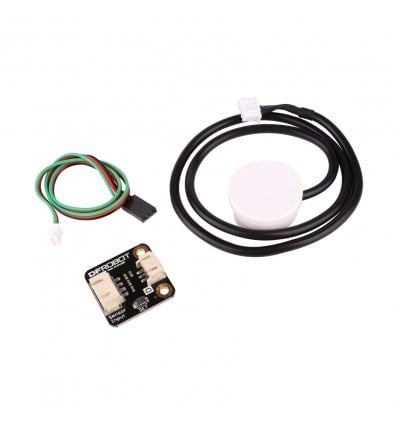 If you would be the guinea pig....
Sensor used , will maybe try this later with an esp for our water tanks.
I have not done it , but was thinking of using one or perhaps two of these
non contact and fits on the outside of the tank.Non-Contact Water Level Sensor | Indirect Capacitance Sensor
This fancy little Non-Contact Digital Water Level Sensor uses clever capacitance to accurately measure water levels from the outside of a container.www.diyelectronics.co.za
Howmuch would it cost to make? if you had to sell such a setup ? Alexa Mirror ?

I'm thinking of getting into this.
Long term, I want to build a Raspberry Pi into a Gameboy Advance shell. You get PCBs that can help with this - Freeplaytech makes boards that use either the Pi0 or CM3. But, I want to do something different. I want to connect a cartridge reader, and then see if I can patch the emulator to load the ROM from the emulator and then write the savefile back to the cartridge. So that it plays like the real thing.
Why? I'm into retro gaming, and it would be cool if this functioned like the real thing as much as possible, while also being able to play other non GBA games.
But first step would be to get the cartridge reader integration working. So I might buy a Pi3 or a Pi4 and the cartridge reader, just to get that working.
Have you seen this?
GPi CASE - Retroflag
Game Boy inspired Raspberry Pi case. As a homage to the 8-bit handheld game console, Game Boy, not only does it carry the same looks, it also includes additional features like X/Y buttons Compatible with Raspberry Pi ZERO, ZERO Wretroflag.com
A friend got me one. REALLY cool!
That looks fantasticCost me around R4k absolutely all in ( Pi, pre-loved monitor, actual mirror, 3mm glass with mirror film, wood, cables, sundries ).
You could do it for less. Mine was a little more involved ( read expensive ). I put conduits in the wall for the long cables as the Pi sits hidden in a cupboard. This was to keep the mirror super thin and still look like a regular mirror and not a box frame mirror


