
Apps to avoid endless password resets

South African online users will find many apps available to help them store and retrieve large collections of passwords for their apps and website accounts.
Security researchers have long emphasised the importance of using unique, long, and complex passwords with multiple types of characters to minimise the risk of an attacker cracking them.
Aside from breaking into company systems and phishing users for their details, cyberattackers use a method called “brute force” to work out passwords.
As explained by cybersecurity company Fortinet, this involves a process of trial and error where an attacker runs multiple usernames and passwords through a computer until they come up with the right login credentials.
To simplify the process, hackers often use people’s leaked email addresses or usernames exposed in data breaches, so they only have to work out the password.
They also use dictionaries of common words and passwords to speed up the attack.
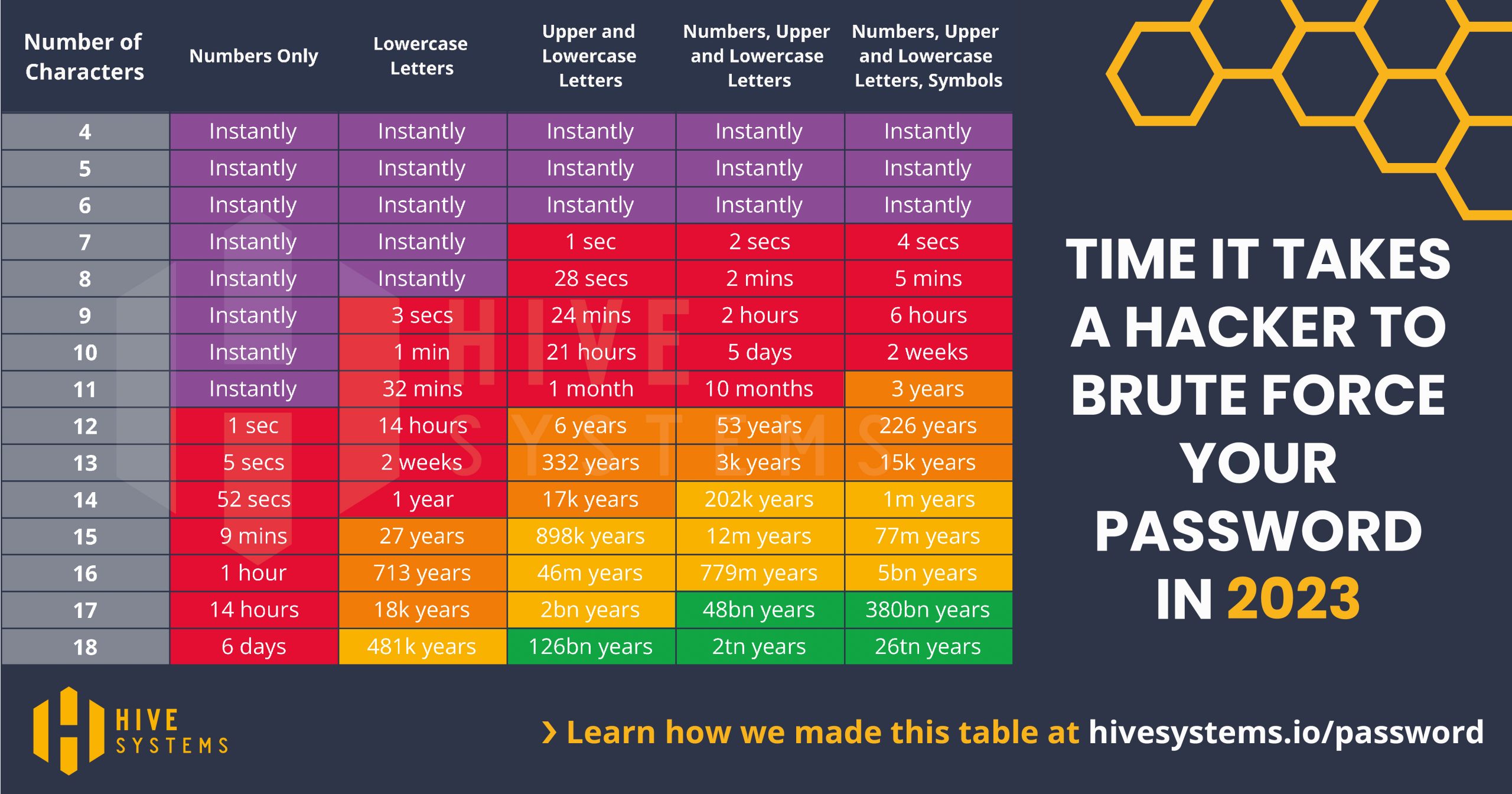
Hive Systems has published a table showing how long an attacker would take to brute force your password based on the number and complexity of characters.
Credit: https://www.hivesystems.io/password
The data above shows that you should have at least a 12-character password using a combination of numbers and uppercase and lowercase letters.
Using current computer processing power and techniques, that password should take at least 53 years to crack.
However, this assumes an attacker using twelve high-budget Nvidia GeForce RTX 4090 consumer graphics cards. Attackers with a bigger hardware budget could crack such passwords in less time.
When it comes to most passwords, a good rule of thumb is that they should be so advanced that even if a criminal were to point a gun at your head and demand to know them, you shouldn’t be able to do so.
However, the problem with having a very complex password is that it would also be much harder to remember.
This is where password managers come into the picture.
Reputable password managers use encryption to securely store your credentials for multiple websites and apps in a digital “vault”.
With zero-knowledge architecture, not even password managers know the information stored in your vault.
Instead of remembering numerous passwords, you will only have to remember one — the master password for the manager.

Editorial credit: T. Schneider / Shutterstock.com
Alongside the information you store in your vault, your password is encrypted on your device before being sent to the particular service’s server.
That means that even if an attacker breached your vault, it could take them trillions of years to decipher it.
Certain managers also feature additional security layers like two-factor authentication (2FA) and biometric access.
Password managers can also feature tools that check whether your credentials may have been compromised in a data breach and warn users to change their passwords if this is the case.
Another new feature that password managers are gradually adopting is passkeys.
This relatively new form of login credential ties the user’s account to specific devices.
Generating new passkeys for additional devices requires scanning a QR code on an authenticated device and providing registered biometrics like a fingerprint or facial scan for approval.
Several solid options to choose from
We have assembled a list of eight reputable password managers to help securely store your credentials, avoiding the need to write them down or constantly having to reset forgotten passwords.
One of the popular providers we have excluded from this list is LastPass.
The company suffered two data breaches in 2022, highlighting concerns over its security practices.
Many browsers — including Chrome — also offer free built-in password managers that you can consider. Apple also offers a password manager across its ecosystem, including Mac and iOS.
However, that will lock you into an operating system or browser, whereas third-party password managers usually support a wide range of browsers and platforms.
Below are some of the leading password managers on the market.
1Password
- Vault encryption type: 256-bit AES
- Individual price: $35.88 per year
- Family price: $59.88 per year for 5 members
- Free option: No, 14-day trial only
- Supported browser extensions: Chromium (Brave, Chrome, Edge), Firefox, Safari
- Supported platforms: Android, iOS, Linux, MacOS, Windows
- Biometric support: Yes
- 2FA support: Yes
- Passkeys: Yes (in beta)

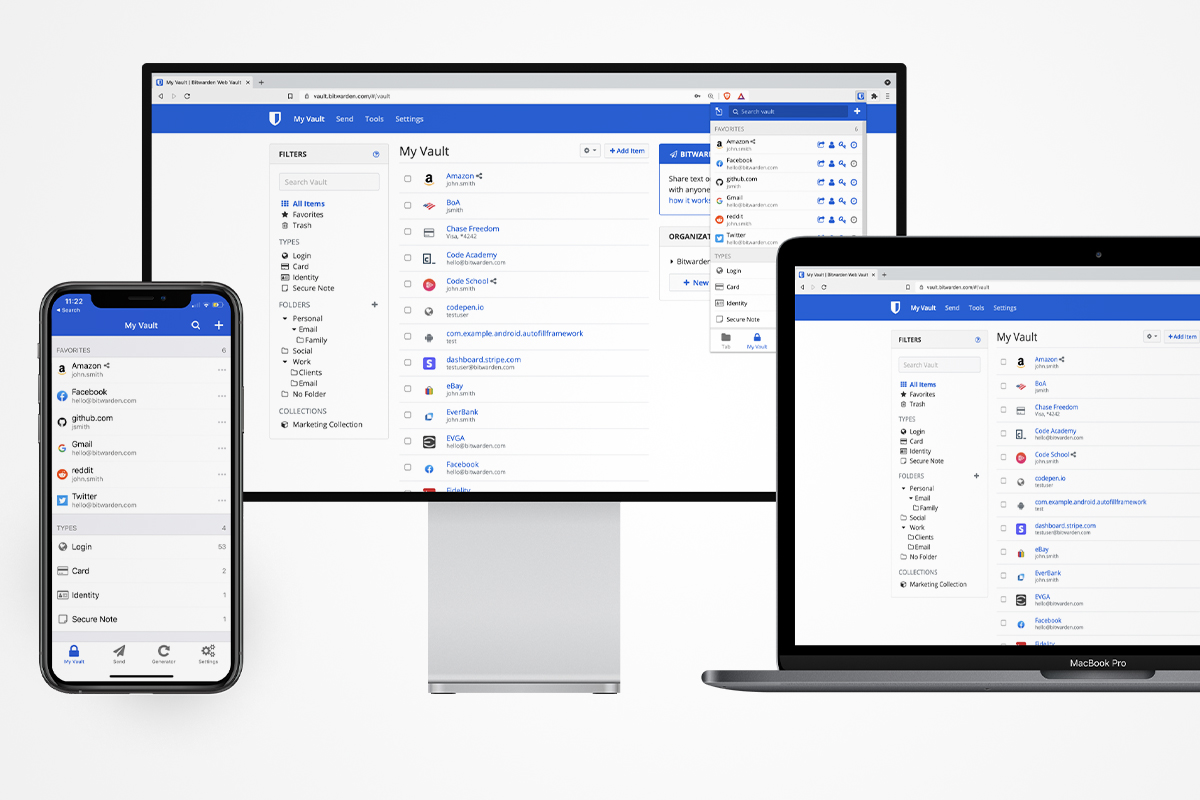
Bitwarden
- Vault encryption type: 256-bit AES
- Individual price: $10 per year
- Family price: $40 per year for 6 members
- Free option: Yes (also open source)
- Supported browser extensions: Chromium (Brave, Chrome, Edge, Opera, Vivaldi), DuckDuckGo, Firefox, Safari, Tor
- Supported device platforms: Android, iOS, Linux, MacOS, Windows
- Biometric support: Yes
- 2FA support: Yes
- Passkeys: No (promises coming soon)
Dashlane
- Encryption type: 256-bit AES
- Individual price: $33 per year (no VPN) or $39.96 (with VPN)
- Family price: $59.88 per year
- Free option: Yes
- Supported browser extensions: Chromium (Brave, Chrome, Edge, Opera, Vivaldi), Firefox, Safari
- Supported device platforms: Android, iOS, MacOS, Windows
- Biometric support: Yes
- 2FA support: Yes
- Passkeys: No (promised coming soon)

Keeper
- Encryption type: 256-bit AES
- Individual price: $35 per year
- Family price: $75 per year for 5 members
- Free option: No, only 30-day trial
- Supported browser extensions: Chromium (Brave, Chrome, Edge, Opera), Firefox, Safari
- Supported device platforms: Android, ChromeOS, iOS, Linux, MacOS, Windows
- Biometric support: Yes
- 2FA support: Yes
- Passkeys: Only in browser extensions

LogMeOnce
- Encryption type: 256-bit AES
- Individual price: Profession — $30 per year | Ultimate — $39 per year
- Family price: $59.88 per year
- Free option: Yes, plus free 7-day trials on Ultimate and Family plans
- Supported browser extensions: Chromium (Chrome, Edge), Firefox, Safari
- Supported device platforms: Android, iOS, MacOS, Linux, Windows
- Biometric support: Yes
- 2FA support: Yes
- Passkeys: No

Nordpass
- Encryption type: XChaCha20
- Individual price: $42.96 per two years
- Family price: $66.69 per two years for 6 members
- Free option: Yes
- Supported browsers: Chromium (Brave, Chrome, Edge, Opera), Firefox, Safari
- Supported device platforms: Android, iOS, Linux, MacOS, Windows
- Biometric support: Yes
- 2FA support: Yes
- Passkeys: Yes

Password Boss
- Encryption type: 256-bit AES
- Individual price: $29.99 per year
- Family price:$48.00 per year for 5 members
- Free option: Yes
- Supported browser extensions: Chromium (Brave, Chrome, Edge, Vivaldi), Firefox, Safari, Password Boss Secure Browser
- Supported device platforms: Android, iOS, MacOS, Windows
- Biometric support: Yes
- 2FA support: Yes
- Passkeys: No

Zoho Vault
- Encryption type: 256-bit AES
- Individual price: R162 per year
- Family price: None
- Free option: Yes
- Supported browser extensions: Chromium (Brave, Chrome, Edge, Vivaldi), Firefox, Safari
- Supported device platforms: Android, iOS, Windows
- Biometric support: Yes
- 2FA support: Yes
- Passkeys: No

Now read: Apple fixes zero-day flaws used to install triangulation spyware on iPhones


 Loading ...