AC Ryan Playon HD!

extract from the AC RYAN FORUM's - you can revert to the stable firmware should a beta release prove to be too buggy.

Follow the instructions below to update your Firmware for the Playon!HD:

Standard updating of firmware
Download the latest firmware from our download section or our latest beta version from our forums.
Unzip your downloaded zip onto an empty USB stick. Make sure that the files within the zip are unzipped within the root of the USB stick.
Put your USB stick into one of the USB ports of the Playon!HD.
Startup your Playon!HD if it not already on.
In the menu, go to Setup, choose System, then go to System Update and select the option System Upgrade.
Your Firmware Update will now be progressed. Do not shup down your Playon!HD while the Playon!HD is processing your Firmware Update. The Playon!HD will reboot automatically.
After the Playon!HD has rebooted, your new Firmware is installed.

If you are unable to access your main menu, please proceed as follows (this also installs the extensions):

Safe-Mode Reflash
Download the latest firmware from our download section or our latest beta version from our forums, also download the extensions.
Unzip your downloaded zips onto an empty USB stick. Make sure that the files within the zips are unzipped within the root of the USB stick.
Disconnect the power cable from the Playon!HD.
Put your USB stick into one of the USB ports of the Playon!HD.
Push the power button and hold it pushed.
Connect your power cable again.
Hold the power button pushed until you get a screen which says that the firmware is updating.
Do not release the power button between the time of connecting the power cable and the appearing of the screen.
After firmware update the Playon!HD will reboot itself, with the extensions installed and you're done.
 
I have connected the POHD to my laptop. The unit is recognised and picks up the internal HDD as 'partition1'

However I cannot copy files to it or delete files from it. I get the following error message:

"error cannot copy file or folder. cannot create or replace file1.avi. Cannot find the specified file."

I have a 500Gb Hitachi HDD installed in the POHD. When I started it up, I had the hdd formatted by the player and then copied files from my external hdd to it using the 'copy files' function.

Any one else have the same problem?
 
I have connected the POHD to my laptop. The unit is recognised and picks up the internal HDD as 'partition1'

However I cannot copy files to it or delete files from it. I get the following error message:

"error cannot copy file or folder. cannot create or replace file1.avi. Cannot find the specified file."

I have a 500Gb Hitachi HDD installed in the POHD. When I started it up, I had the hdd formatted by the player and then copied files from my external hdd to it using the 'copy files' function.

Any one else have the same problem?

UPDATE: Connected the unit to my desktop and it works just fine. Copy, transfer, delete - all runs perfectly.
Dont know what it could be with my laptop that could be causing the error.
 
Anyone having an issue with .flv files? I copied a few and it gives me an 'invalid file' error.
 
Anyone having an issue with .flv files? I copied a few and it gives me an 'invalid file' error.

I sometime get the same with the "mede8er" even with "AVI files"... although everything seems right....same codec...same resolution as the rest .... somehow the file is not recognized :confused:
 
tried the network and upnp function yesterday.

on the network side - shared folders on my pc and picked it up seamlessly on my tv.

tried upnp - downloaded the free version of tversity - and picked up the free channels available. selected a few channels that i subscribed to (free)

worked fine - one problem is that my mweb connection wasnt as stable as I wanted it to be. AC Ryan identified my media server and I was up and running.

other problem arose with some flv files on the server - playon hd reflected these again as invalid.

other than that all good
 
i also bought my Playon HD last week, must say i am very happy, i had a Mvix 6000R, the only reason why i upgraded to the Playon was for mkv playback. i'll always have a soft spot for my Mvix :)

i am very impressed with this unit, a few of my friends have the mede8er, i can't really see any difference, chipset looks the same, even the bodies of the players are the same, the mede8er has extra buttons on the bottom for playback, but i can't remeber when last i used a product that doesn't have a remote, so i can't see the benefit of the buttons on the player.

i wanted an answer to the question, which came first, the chicken or the egg....and it was the Playon, it seems there is a few players out there that uses the same chipset, there are even guys that have loaded mede8er firmware on their playon and vise versa. so in my honest opinion, it is the same player. the only reason y the playon is cheaper is because it has not the name behind it as the mede8er has in S.A. (my opinion)

to LancelotSA or unwired

I want to load the new firmware....is yours still running smoothly after upgrade?? I must say, the new GUI does look awesome.
 
quick question - do these systems run on an operating system like windows or something? is it a Mini-PC basically, running software?
 
to LancelotSA or unwired

I want to load the new firmware....is yours still running smoothly after upgrade?? I must say, the new GUI does look awesome.

Yip, no problems this side. I much prefer the new GUI and the YAMJ link added to the menu.

As mentioned by unwired it appears you can downgrade if you are unhappy. Apparently a new firmware should be out soon sorting out the internet radio issue.
 
quick question - do these systems run on an operating system like windows or something? is it a Mini-PC basically, running software?

I believe that it is run on some version of linux - not sure which though.
 
Yip, no problems this side. I much prefer the new GUI and the YAMJ link added to the menu.

As mentioned by unwired it appears you can downgrade if you are unhappy. Apparently a new firmware should be out soon sorting out the internet radio issue.

I currently dont have any real issues with the firmware that came loaded, which is incidentally r3615 - asian edition. (small issues - like lining up of the menus on my old tv etc).
Therefore I have held back on the firmware upgrade. I have also read the ac ryan forums specifically on f/ware upgrades and everyone has an issue with something or the other. So no unanimous opinion from that source.

Apparently there is another stable firmware out - r3787 (i think) - which makes small changes - but none on the GUI and YAMJ. And users there too have had a bash at it. EDIT - sorry the latest official firmware is r3875 (and not r3787)

Same with the firmware that LancelotSA referred to - apparently that is beta firmware. But it does look so good. I am tempted to upgrade.

Incidentally - I posted a question on the AC Ryan forums re firmware upgrades - and the difference between the asian and european editions. Apparently we can update with the latter firmware even though our POHD's came with the Asian edition. (LancelotSA did it with no issues). The only difference is with the language packs and the internet feeds.
 
Last edited:
Incidentally - I posted a question on the AC Ryan forums re firmware upgrades - and the difference between the asian and european editions. Apparently we can update with the latter firmware even though our POHD's came with the Asian edition. (LancelotSA did it with no issues). The only difference is with the language packs and the internet feeds.

Yip, I used to have that "YouKu", or whatever it is called, feed but now it is gone with the new firmware. I am just the kind of person who wants the latest even if it is in Beta :) The look suits me a lot better and I wanted YAMJ to be easier to use.
 
Yip, I used to have that "YouKu", or whatever it is called, feed but now it is gone with the new firmware. I am just the kind of person who wants the latest even if it is in Beta :) The look suits me a lot better and I wanted YAMJ to be easier to use.

What the heck - I may as well as go on and do it. Let me just download r3615 first or r3875 1st as a contingency plan.

The main reason I am going for it is YAMJ.
I have been reading up on other users posts re tvixie 2 which is similar in function. However it seems that project is still in the hatching phase as there are lots of updates and changes.

So its going to have to be YAMJ for now.
 
LancelotSA would you recomend that i upgrade to the r3875 before upgrading to the beta firmware or did you only load the beta version? Not to sure if the beta contains all the fixes that the r3875 has?
 
just found out that the firmware that came with our POHD's is in fact beta firmware.
yes, r3615 is beta - and I thought it was official.
 
On my original firmware that it came with I had a number of Asian language news feeds. I took a peek at them with the new firmware now that you said this.... and I see they are still there :)

An area I am interested in looking into is the Bit torrent support, well actually the online talk of getting news server support on it... then I can leave those running on the Playon while the laptop gets used for work.

Do you get PeerBlock for the PlayOn :D :p
 
Got my unit and downloaded the beta firmware as per Lancelots earlier post, going to upgrade straight from out the box to the r4xxx beta
 
The main reason I am going for it is YAMJ.

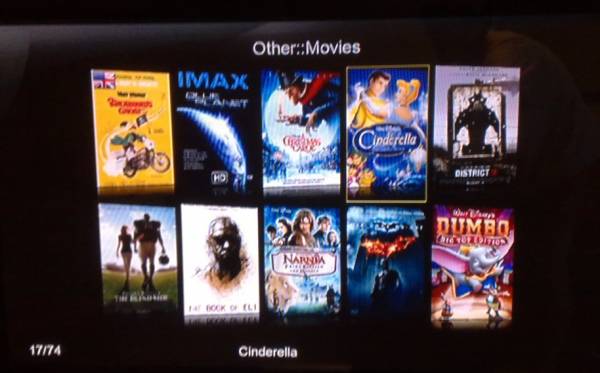
Yeah, YAMJ is cool. It does need some work though as you have to still dig a little deep to get to it. Also I need to work out how to change it to my preferences still but I have it running :

ABCD00022.jpg
 
Top
Sign up to the MyBroadband newsletter
X