Advice on what to get for backup power for pc

Lazy_Steel

Member
Joined
Nov 11, 2017
Messages
29
Reaction score
13
Hi,
With Stage 6 Loadshedding starting to seriously piss me off so I have decided to get an Inverter/UPS to help power my PC and router during loadshedding so that I can at least work or game depending on the situation, but alas I am not really tech savvy with inverters or alternative power sources. So basically I want to know what I should get that requires minimal installation or is basically plug and use.
My PC uses a 450W PSU and I have a 144hz 24" monitor with a max wattage of 35W I suppose the router shouldn't use more than 10W, but I am not sure. Now the question is what is more sensible and for the best price. The total wattage needed I suppose would be 500W, but I have no idea if it's better to get a power station, UPS or an inverter or where to look for good ones. That's where I need my fellow forum users with the know-how to help me out so that I don't get something I'll regret and to keep costs as low as possible while still having a decent product. The required time I suppose I would need is at least 2 hours for use.
 
Best guess

24V inverter (Mecer or other brand)
+ 2 x 12V 100AH LFP batteries in Series
What's the difference between 12V and 24V LFP setups?

I thought you only need to go to 24V when you have bigger loads.
 
What's the difference between 12V and 24V LFP setups?

I thought you only need to go to 24V when you have bigger loads.

Was looking at high usage vs recharge

Sure its the same energy you get out but with Stage 6 and possibly higher it would be better to refill faster.

Esp looking at Mecer as an example. (Where its best to stick to 10A)
10A @ 12V = 120W over 2 batteries
10A @ 24V = 240W over 2 batteries
 
What's the difference between 12V and 24V LFP setups?

I thought you only need to go to 24V when you have bigger loads.
It's imperative to know what your load is before you can spec your system. You might just get away with just using 1 battery and saving yourself R7k.
Killawatt will show watts and Wh with peak load or, a smart wifi plug, which shows only watts and Wh.

Once you have that info, you know whether you need 12V (720W) with 1 (about a 1050Wh with inverter losses and 80% DOD) or 2 batteries, or 24V (1440W) with a balancer. Personally, I would stick to 1 battery as start up costs are lower, and switch to 20A setting if battery is getting too low). 20A should take 1000Wh/240W=4 hours to recharge 1 battery. 24V system @ 20A would take 4 hours to charge 2 batteries.
 
Best guess

24V inverter (Mecer or other brand)
+ 2 x 12V 100AH LFP batteries in Series
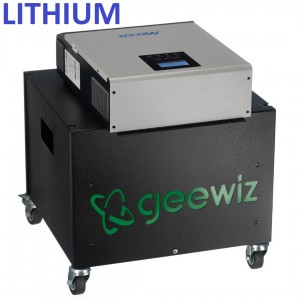
Pardon my ignorance and too tired already to do some search on my own so looking for easy answers. My power requirements are same as OP so if I get this, these trolley units from geewiz can be connected to DB, right ? By a qualified electrician I mean.
 
Pardon my ignorance and too tired already to do some search on my own so looking for easy answers. My power requirements are same as OP so if I get this, these trolley units from geewiz can be connected to DB, right ? By a qualified electrician I mean.

Will not use a trolly for DB.
 
Pardon my ignorance and too tired already to do some search on my own so looking for easy answers. My power requirements are same as OP so if I get this, these trolley units from geewiz can be connected to DB, right ? By a qualified electrician I mean.
Nope, nope don't connect a mecer 1440 or 720 to your DB, it's not really designed for that.
This one has been modified to be a trolley

But it could be made to connect to the grid.
 
Nope, nope don't connect a mecer 1440 or 720 to your DB, it's not really designed for that.
This one has been modified to be a trolley

But it could be made to connect to the grid.

Holy trucker!!
The F happened to all the 3Kw inverters
They use to sell for R3-5K now you lucky if you find one under R6K

Hell I bought my whole kit
1 x 3KW Sunpolo + 1 x 24V 100AH LiFePO4 + 2 x 250W solar panels for R18K back in January.

Think I must sell my 3KW for R8K and make half it back, seeing that I am not using it :D

Edit: Just confirmed with dealer, same Sunpolo alone now cost R11 000!!!
 
Last edited:
Holy trucker!!
The F happened to all the 3Kw inverters
They use to sell for R3-5K now you lucky if you find one under R6K

Hell I bought my whole kit
1 x 3KW Sunpolo + 1 x 24V 100AH LiFePO4 + 2 x 250W solar panels for R18K back in January.

Think I must sell my 3KW for R8K and make half it back, seeing that I am not using it :D

Edit: Just confirmed with dealer, same Sunpolo now cost R11 000!!!
1663748401598.png
 
Holy trucker!!
The F happened to all the 3Kw inverters
They use to sell for R3-5K now you lucky if you find one under R6K

Hell I bought my whole kit
1 x 3KW Sunpolo + 1 x 24V 100AH LiFePO4 + 2 x 250W solar panels for R18K back in January.

Think I must sell my 3KW for R8K and make half it back, seeing that I am not using it :D

Edit: Just confirmed with dealer, same Sunpolo alone now cost R11 000!!!
Dude the 720w Mecer used to go for R1500 about a year or so ago, now it's almost 3k
 
Hi,
With Stage 6 Loadshedding starting to seriously piss me off so I have decided to get an Inverter/UPS to help power my PC and router during loadshedding so that I can at least work or game depending on the situation, but alas I am not really tech savvy with inverters or alternative power sources. So basically I want to know what I should get that requires minimal installation or is basically plug and use.
My PC uses a 450W PSU and I have a 144hz 24" monitor with a max wattage of 35W I suppose the router shouldn't use more than 10W, but I am not sure. Now the question is what is more sensible and for the best price. The total wattage needed I suppose would be 500W, but I have no idea if it's better to get a power station, UPS or an inverter or where to look for good ones. That's where I need my fellow forum users with the know-how to help me out so that I don't get something I'll regret and to keep costs as low as possible while still having a decent product. The required time I suppose I would need is at least 2 hours for use.

For your router, there are many different options. I have an Ultralan Micro UPS. There's also Ratel and Gizzu devices I hear also do that job. They are all +-R1000 and all do the job.

The second requirement of your PC is a bit trickier, but it starts with using a Kill A Watt to see how much juice your PC wants when playing your favourite games. For example, I have a Ryzen 3600, 16 gigs of Ram, and an RX 5700, with a 240hz monitor, but I mostly play League of Legends. When using my setup to play League, I use about 120W of power in total. However, if I play newer/more demanding games, that can easily go up to 220/250 watts (I haven't seen any numbers high than that with the games I play).

The reality is that there's no cheap solution for your computer if, like me, you don't want to take an existing trolley solution and customize it with LI batteries (either yourself, or by paying an electrician). Just over a year ago I settled on an Ecoflow Delta 1300. It cost me about R19k at the time, but it's been worth every penny. With it hooked up to my PC, I can work for 10hrs+ on a single charge, can game for 6hrs+ (depending on the game), and I can recharge the thing in less than 2 hours from the wall socket. It's also light enough to pick up and carry, not that I move it around that much.

If that's within your budget, I would recommend waiting a bit longer if possible. The Ecoflow Delta 2 just came out but it's yet to arrive in SA. Once it does the older Delta units may drop in price, or you may just want to pick up the Delta 2.
 
Can this be used for 22 inch DELL monitor? Sounds ok on paper but not sure after reading reviews. I want monitor to last for 5 hours. Laptop is good for 5 on its own.

 
Can this be used for 22 inch DELL monitor? Sounds ok on paper but not sure after reading reviews. I want monitor to last for 5 hours. Laptop is good for 5 on its own.

No, wrong battery type. Deep cycle or LFP.
 
Can this be used for 22 inch DELL monitor? Sounds ok on paper but not sure after reading reviews. I want monitor to last for 5 hours. Laptop is good for 5 on its own.


I have of those keeping a 5 port hub running. Can bearly keep itself up for 1 LS slot never mind the 5w the hub needs.

I know I know, it was free so bite me.
 
Can this be used for 22 inch DELL monitor? Sounds ok on paper but not sure after reading reviews. I want monitor to last for 5 hours. Laptop is good for 5 on its own.

Nope that's a UPS, it's meant to give you a few minutes to shutdown or too switch to an alternate power supply, not as a backup.
 
Top
Sign up to the MyBroadband newsletter
X