


Dan C
Honorary Master
Seems most of you are happy. I had to cancel due to very bad latency and speed. My normal 3g MTN SIM does way better. Very disappointed 
South Africa’s biggest forum. Discuss, discover, and connect with thousands of members.

Hi guys, and @AfriNatic , can you please help poor soul out on
escalation UY-404-18338
account : 0735736826
Internal Ticket: PMV-830-10705
Story
In my opinion
- I have reported the case on 2nd of June
- Problem start from upgrading 500gb package to uncapped package
- Line speed gone from 60+mb line speed to perfectly 1mb line speed since 1st July after upgrade implemented
- it now 9th, and no one seems to have any idea, everyday says 24 hours for escalation
- told me case was only open on 6th (how? i been reporting since 2nd)
something to do with throttling policy or cap management system, as I have some cap left from 500gb from june, and speed was perfect when cap was still carrying over, only dropped to 1mb line speed after the cap is depleted.
And i suspect the new uncapped policy did not kick in properly, or took previous usage in and hence the throttling speed from 1st of July.
Please help me out.........felt like I am back to stone age, and with covid-19, is not helping with, specially working from home.
Hi guys, and @AfriNatic , can you please help poor soul out on
escalation UY-404-18338
account : 0735736826
Internal Ticket: PMV-830-10705
Story
In my opinion
- I have reported the case on 2nd of June
- Problem start from upgrading 500gb package to uncapped package
- Line speed gone from 60+mb line speed to perfectly 1mb line speed since 1st July after upgrade implemented
- it now 9th, and no one seems to have any idea, everyday says 24 hours for escalation
- told me case was only open on 6th (how? i been reporting since 2nd)
something to do with throttling policy or cap management system, as I have some cap left from 500gb from june, and speed was perfect when cap was still carrying over, only dropped to 1mb line speed after the cap is depleted.
And i suspect the new uncapped policy did not kick in properly, or took previous usage in and hence the throttling speed from 1st of July.
Please help me out.........felt like I am back to stone age, and with covid-19, is not helping with, specially working from home.
hello Afrihostdoes one "Who signs up for MTN Fixed LTE-A" have to put up antennas ?
i would have to fork out 4k for antennas to get strong signal? that sucks. i have very weak MTN signal where i live.
what is the dBi gain on that antenna ?
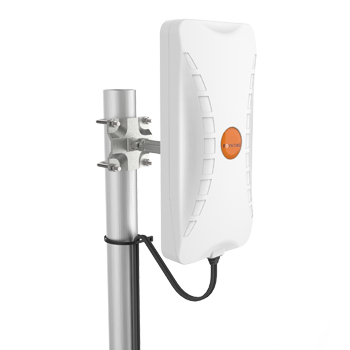
 poynting.tech
Thank you @AfriNatic , got your email and did speed test, wonderful work, back to 80+mb line speed now, and that is my general speed i get, thank for fixing the capped speed (1mb) since start of 1 June, Afrihost support need more real technician like you.What speeds are you generally getting. Does is vary or does it seems capped?

I am with Axxess MTN lte as is a sister company to Afrihost, I contated Axxess support and told them a new mtn tower has been errected near me and they sopposedly said I am now set to the closest tower... no mention of the fixed lock to a specific tower, is there an app that I can use to find the tower I am linked to...The device they recommend is on our website for Afrihost clients. I'm not sure about other ISP's or MTN's LTE unfortunately.
I am with Axxess MTN lte as is a sister company to Afrihost, I contated Axxess support and told them a new mtn tower has been errected near me and they sopposedly said I am now set to the closest tower... no mention of the fixed lock to a specific tower, is there an app that I can use to find the tower I am linked to...
Thanks for this good info, I will give it a goI use to have my router and Poynting Antenna installed at one end of my house. I got speeds between 20 - 30mbps.
I then inserted my sim into my cellphone and walked around the house to see if there was a difference. I noticed that my speed on the opposite side of the house was much better.
I then relocated my Poynting and router to the opposite side of my house and was ecstatic to get speeds of 90 - 100mbps. I noticed that my Cell (tower?) ID changed when I moved the antenna. (I'm assuming this means I connected to a different tower.)
I'm therefore not so sure that you get connected to ONE specific tower. I accept that they lock you into an area, but my experience suggests that an area can include multiple towers.
You can try and determine the tower you are connected to, by looking at the cell ID displayed on your router connection stats. This post shows you how to use the id to locate your tower: https://mybroadband.co.za/forum/threads/rain-tower-location-pm-me-your-cell-ids.919578/ (In my case it wasn't accurate, hence I decided to use a mobile phone to quickly move around and see in which general area I got the best speeds and then "zone" in on the tower using my Poynting antenna.)
EDIT: Some ISPs apparently lock your acount if you put your simcard in a cellphone, so maybe confirm before trying that...
@AfriNatic I'm considering going the uncapped LTE route.
My understanding is that you get throttled to 1mbps if you reach 1TB. Is it possible to "top-up" if you reach this limit and get back to normal speeds? I get 100mbps on average, but I doubt that I will ever use 1TB. I was just curious whether a "top-up" can be used to circumvent this?


Is this normal?View attachment 874243
mtr to google.com
View attachment 874783
My situation the last 2 nights... No loadshedding either. Usually it's 90-100mbps. Router shows full signal, LTE-A.
Drop me a DM please.
Paris, by the VaalSeems way higher that I would think. You in Gauteng? Looks like the latency and loss starts at the tower before it hits our network however maybe test to cloudflare or something else so we can see how that looks.

2K a good price?
Ohh no that doesn't look good. Let me send you a message and see if I can get some feedback from MTN on a possible tower outage or issue?
Hi any updates?
Still extremely unstable my side.. one moment it would be less than 1mbps with packet loss and websites timing out and the next moment 50mbps+.
No loadshedding as we managed to dodge the schedule.