


lkpat
Executive Member
Are your batteries connected via data cable to the inverter CAN bus? Not happy with the installer, pay someone else to fix it.Lol...so what do I do now..?
South Africa’s biggest forum. Discuss, discover, and connect with thousands of members.
Are your batteries connected via data cable to the inverter CAN bus? Not happy with the installer, pay someone else to fix it.Lol...so what do I do now..?

Jip, but I see on my Deye it also has sticker that says SA version and few others that posted about their Deyes.Not sure about SA models (and knock-offs), but the version sold here has EU in the model number:
It's preloaded with SA firmware (less chinglish) and doesn't need tweaking for our grid settings. That's what I've been told.Jip, but I see on my Deye it also has sticker that says SA version and few others that posted about their Deyes.
Overall not really happy with his level of service, so trying to avoid. I'll contact him tomorrow though.

It's preloaded with SA firmware (less chinglish) and doesn't need tweaking for our grid settings. That's what I've been told.
Not seeing this one?Not sure if ours is 'locked' or it's a firmware issue, but I can't see the BMS screen on our inverter. Not a problem since everything else works fine. I just wanted to see the battery voltage limits, etc. P.S. The up/down scroll buttons are also glitchy.

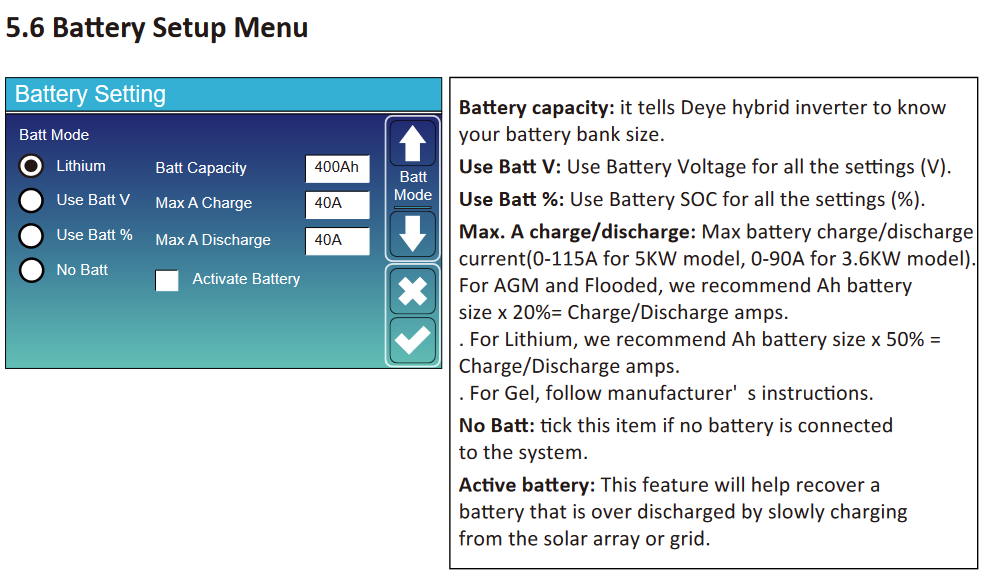
Once you change your batt settings to LI BMS then there is communication between your inverter and batt possible true CAN and the charging is controlled by the BMS. If you want to control the settings then you have to go back to use batt settings and leave it there, no communication with the BMS.


Now you get hold of your installer and ask him why the batteries are not allowing charge nor discharge.Lol...so what do I do now..?


I'm on 97%Speaking of the Li-BMS screen, anybody know if the SOH value there is accurate? Mine still says 100%. Anybody with older batteries showing lower number yet?
I was trying to figure out if I could get that value from the Sunsynk API.
Now you get hold of your installer and ask him why the batteries are not allowing charge nor discharge.
View attachment 1577752
It could be because they are unbalanced, so if you want to DIY, you could try discharging each battery individually to 50%, and then connect them all 3 up and charge to 100%.
Did you try manually setting to 300ah as previously suggested?This means the batteries are connected via the data cable right? I thought I wouldn't need to change settings manually if it's connected like this... But it is still only picking up 200ah and all the battery lights shows as charged to 80%.
How would I go about draining them individually? Unplug them one by one?
Installer said inverter must be reset. If he doesn't come tomorrow then I may need to get someone else.
When the installer comes give him a proper PK. Those batteries should never have been connected like that - absolute rookie error. Positive and negative connections to the inverter should come from opposite sides of the bank.This means the batteries are connected via the data cable right? I thought I wouldn't need to change settings manually if it's connected like this... But it is still only picking up 200ah and all the battery lights shows as charged to 80%.
How would I go about draining them individually? Unplug them one by one?
Installer said inverter must be reset. If he doesn't come tomorrow then I may need to get someone else.
Not in disagreement from me about that. But I assume if the batteries were setup correctly and the comms are connected correct the BMS should negate the issue of not having the cables connected optimally?When the installer comes give him a proper PK. Those batteries should never have been connected like that - absolute rookie error. Positive and negative connections to the inverter should come from opposite sides of the bank.
I've seen both ways recommended in battery manuals.When the installer comes give him a proper PK. Those batteries should never have been connected like that - absolute rookie error. Positive and negative connections to the inverter should come from opposite sides of the bank.
Unfortunately comms can't override physics.Not in disagreement from me about that. But I assume if the batteries were setup correctly and the comms are connected correct the BMS should negate the issue of not having the cables connected optimally?
I'd love to see a manual which recommends the connections that he has.I've seen both ways recommended in battery manuals.
But ideally I think they should go the busbar route with equal length cables from battery to common busbar.
Yes, it looks like there is BMS to Inverter comms.This means the batteries are connected via the data cable right?
From reading the Volta manual, the battery defaults to talk with a handful of inverters, Deye / Sunsynk is one of these, so yes, those parameters and numbers on the LiBMS screen are coming from the BMS.I thought I wouldn't need to change settings manually if it's connected like this... But it is still only picking up 200ah and all the battery lights shows as charged to 80%.

I don't see 200aH on any of your screens. Are you talking about the battery bank's capacity? You usually set that manually in the battery screen.still only picking up 200ah
Ensure that only one battery, is connected, and that it has comms. The LiBMS screen should change to reflect only one battery (100A discharge rate). Adjust the Battery discharge rate in the inverter (the Voltas should be able to handle 100A), and make adjustments to the system mode screen tio allow discharge until 50%. Make some hot water / put on a load. Keep watching the LiBMS screen, when the battery reaches 50%, disconnect it and connect another.How would I go about draining them individually? Unplug them one by one?
You can try that too, do a factory reset.Installer said inverter must be reset. If he doesn't come tomorrow then I may need to get someone else.
Maybe not showing 3 batteries , but here's one showing 2. Connections to inverter are coming from one battery, and not positive from 1 and negative from other.I'd love to see a manual which recommends the connections that he has.

I guess this is yet another reason I'll never touch Felicity. Simple physics says the top battery is going to work much harder than the bottom oneMaybe not showing 3 batteries , but here's one showing 2. Connections to inverter are coming from one battery, and not positive from 1 and negative from other.
Or perhaps I missed something you saw in the connections that I didn't see
View attachment 1577884
Felicity Solar Battery Manual


