-
- News
-
Categories
- 5G
- ADSL
- AI
- Banking
- Black Friday
- Broadband
- Broadcasting
- Business
- Business Telecoms
- Cellular
- Cloud and Hosting
- Columns
- Cryptocurrency
- Energy
- Enterprise
- Fibre
- Gadgets
- Gaming
- Government
- Hardware
- Industry News
- Internet
- Internet of Things
- Investing
- IT Services
- Motoring
- Reviews
- Science
- Security
- Smartphones
- Software
- Technology
- Telecoms
- Trending
- Wireless
- Press Office
- Forum
- Industry News
- What's Next
- Company hub
- Speed Test
- About us
- Advertise with us
- Contact
- Careers


-
Join the MyBroadband community
South Africa’s biggest forum. Discuss, discover, and connect with thousands of members.
-
Question of the Day: Would you cancel a streaming subscription if it started showing paid ads?

You are using an out of date browser. It may not display this or other websites correctly.
You should upgrade or use an alternative browser.
You should upgrade or use an alternative browser.
Arcade Game Project
- Thread starter RVZ
- Start date

What about cooling/breathing ?
Fan at the top for the tv, and fan at the bottom for the pc.
Another part added:
http://img193.imageshack.us/img193/6094/arcade10.jpg
Bizkit87
Executive Member
I just don't understand why some people build those huge control panels with like 30 buttons. The idea is to make it as authentic as possible.
I stripped my tv and removed the speakers from the side. I kept the front part of the tv case as it's part of the stand and easier to mount this way. It's going to be behind perspex anyways.
Also added the top part for the speakers.
http://img80.imageshack.us/img80/3959/arcade11.jpg
Also added the top part for the speakers.
http://img80.imageshack.us/img80/3959/arcade11.jpg
I just don't understand why some people build those huge control panels with like 30 buttons. The idea is to make it as authentic as possible.
+100 - i'd just have a P1 & P2 start, 2 Joysticks, and 6 buttons for each player.
You can still add more buttons/etc for volume control and so on, but hide it - like on the sides of the player controls
+100 - i'd just have a P1 & P2 start, 2 Joysticks, and 6 buttons for each player.
You can still add more buttons/etc for volume control and so on, but hide it - like on the sides of the player controls
Exactly like mine. And a working coin door. The volume control and power switches are all hidden in the back.

PilgrimToHyperion
Expert Member
- Joined
- Jul 4, 2009
- Messages
- 1,108
- Reaction score
- 72
Thought I'd find Keeper in here! 
RVZ - looks totally awesome so far man. Been meaning to do this for quite a while, but alas, I'm not getting around to it. Also going to run some Future Pinball tables on there using Hyperpin?
RVZ - looks totally awesome so far man. Been meaning to do this for quite a while, but alas, I'm not getting around to it. Also going to run some Future Pinball tables on there using Hyperpin?

This is awesome!
I been planning a mini for my kids for a while now.
I have the pc and I'm going to use an old lcd monitor with 8 buttons ect.
I know LCD and 8 buttons is not authentic but I'm making it so its easy for my kids to play.
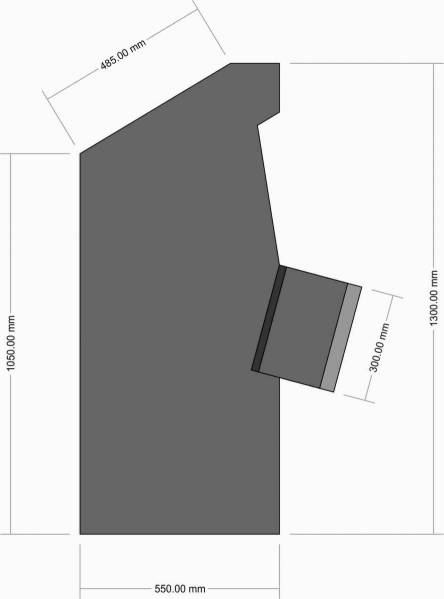
It will be about 1.3m high when its done. I'll see if I can digg up some pics.
I would also like to make an authentic Mario Bros style cabinet for myself at a later stage.
Edit: Found some pics.
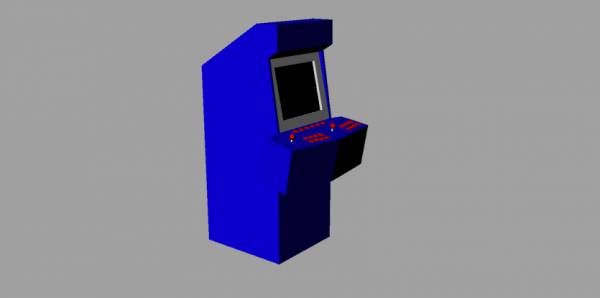
A render:
Side view with dimensions:
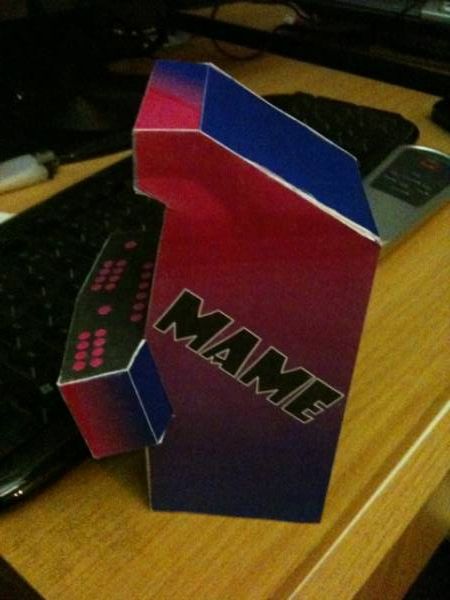
Side view of the paper model I made:
Front view of the model:
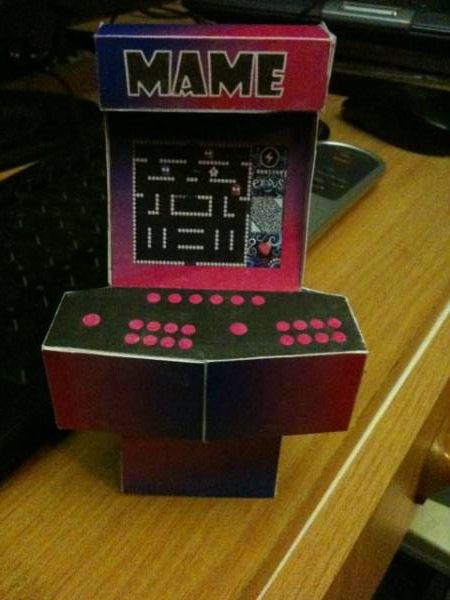
The model is a little battered now, but you get the idea.
I'm all excited now, I think I'm going to start this this weekend.
I'm lazy so I'll do as much as I can on my CNC router. I'll do the control panel out of some 10mm perspex I have lying around.
The only thing I still have to source/make are the actual controllers. I have everything else. Even the wood.
@RVZ how are you doing your controllers?
I been planning a mini for my kids for a while now.
I have the pc and I'm going to use an old lcd monitor with 8 buttons ect.
I know LCD and 8 buttons is not authentic but I'm making it so its easy for my kids to play.
It will be about 1.3m high when its done. I'll see if I can digg up some pics.
I would also like to make an authentic Mario Bros style cabinet for myself at a later stage.
Edit: Found some pics.
A render:
Side view with dimensions:
Side view of the paper model I made:
Front view of the model:
The model is a little battered now, but you get the idea.
I'm all excited now, I think I'm going to start this this weekend.
I'm lazy so I'll do as much as I can on my CNC router. I'll do the control panel out of some 10mm perspex I have lying around.
The only thing I still have to source/make are the actual controllers. I have everything else. Even the wood.
@RVZ how are you doing your controllers?
Last edited:
I have the pc and I'm going to use an old lcd monitor with 8 buttons ect.
I know LCD and 8 buttons is not authentic but I'm making it so its easy for my kids to play.
Yup, LCD will be a lot easier than using a tv. The problem is that you don't get a 4:3 LCD bigger than 21".
@RVZ how are you doing your controllers?
I bought the UltraStick 360 joysticks that you connect via USB, and then connecting the buttons to the joystick. 2 Joysticks, 6 buttons each, and a 1-player & 2-player button. Pics coming up...
Closed the back of the cabinet and added a place for the top fan.
http://img84.imageshack.us/img84/5852/arcade12.jpg
http://img84.imageshack.us/img84/5852/arcade12.jpg
Control panel layout done.
http://img5.imageshack.us/img5/9236/arcade13.jpg
And a close up...
http://img707.imageshack.us/img707/5893/arcade14.jpg
http://img5.imageshack.us/img5/9236/arcade13.jpg
And a close up...
http://img707.imageshack.us/img707/5893/arcade14.jpg
Ah, now I see what you did at the top RVZ, You used 3 strips of wood so you can curve it!
Hey man!
Yeah we should each build something like this too - Unfortunately I don't have all the tools and suck at woodwork (I think), and don't have the time either
Is there anyone in Gauteng that can build this stuff for a reasonable price?
Thought I'd find Keeper in here!
RVZ - looks totally awesome so far man. Been meaning to do this for quite a while, but alas, I'm not getting around to it. Also going to run some Future Pinball tables on there using Hyperpin?
Hey man!
Yeah we should each build something like this too - Unfortunately I don't have all the tools and suck at woodwork (I think), and don't have the time either
Is there anyone in Gauteng that can build this stuff for a reasonable price?
Yea, I'm using a 17" for the Mini. Small, but good for this size.Yup, LCD will be a lot easier than using a tv. The problem is that you don't get a 4:3 LCD bigger than 21".
I bought the UltraStick 360 joysticks that you connect via USB, and then connecting the buttons to the joystick. 2 Joysticks, 6 buttons each, and a 1-player & 2-player button. Pics coming up...
That sounds cool. Did you get them locally?
How much did you pay?
Ive been looking on the Ultimarc site and they're $59 each there, do you think its worth it over the 4-8 ones at half the price?
I suppose about R500 is not too bad.
Is there anyone in Gauteng that can build this stuff for a reasonable price?
Leme see how the MiniMame comes out... Then we can talk.
The smaller stuff and the control panel I will make on the cnc router, so that will come out perfect I'm sure, but since my cnc only has a bed size of 900 x 700mm it won't be able to do the sides. I'll have to do those the hard way.
What I'm thinking of doing is making an overlay for the control panel out of some uhi and reverse printing the graphics onto some clear vinyl, then cover it with white so the graphics are behind the uhi.
That sounds cool. Did you get them locally?
How much did you pay?
Ive been looking on the Ultimarc site and they're $59 each there, do you think its worth it over the 4-8 ones at half the price?
I suppose about R500 is not too bad.
Nope, imported all the parts.
If you buy one of the cheaper ones, you need to buy something like the IPac or OptiPac as well. It's a hardware device where you connect all the joysticks and buttons to, then connect to your usb port. The UltraStik 360 has this built in already. Or if you're really cheap, you can open up a keyboard or gamepad and map the controls to there. But the UltraStick 360's are much better quality joysticks than the others. You can also change it from 4-way to 8-way joysticks through the software. So when you start a 4-way game like Pacman for example, the joystick will only be a 4-way joystick. And because it doesn't work with switches like some of the other joysticks, you don't get that "clicking" sounds.

Last edited:
What I'm thinking of doing is making an overlay for the control panel out of some uhi and reverse printing the graphics onto some clear vinyl, then cover it with white so the graphics are behind the uhi.
That my friend, is a friggen brilliant Idea - No wear & tear on the graphics!
But I guess you could also just print it on normal vinyl - the sticker doesn't need to be stuck to the uhi (what's that, like perspex?)
That my friend, is a friggen brilliant Idea - No wear & tear on the graphics!
But I guess you could also just print it on normal vinyl - the sticker doesn't need to be stuck to the uhi (what's that, like perspex?)
Its like perspex only stronger/not as brittle. I have some lying around that's about 1mm thick. They use them for those curved light boxes because its so strong. A brick would bounce off the stuff. UHI - Ultra High Impact.
It would probably be easier printing directly onto white and then just putting a uhi overlay. Easier to change the overlay at a later stage if Ineed to. I will just have to see how the uhi does on the router. If it doesn't cope, I will just get a buddy to cut it on his laser.
First coat of paint.
http://a.imageshack.us/img202/7264/arcade16.jpg
And the view from the side / back.
http://a.imageshack.us/img20/3619/arcade17.jpg
http://a.imageshack.us/img202/7264/arcade16.jpg
And the view from the side / back.
http://a.imageshack.us/img20/3619/arcade17.jpg