-
- News
-
Categories
- 5G
- ADSL
- AI
- Banking
- Black Friday
- Broadband
- Broadcasting
- Business
- Business Telecoms
- Cellular
- Cloud and Hosting
- Columns
- Cryptocurrency
- Energy
- Enterprise
- Fibre
- Gadgets
- Gaming
- Government
- Hardware
- Industry News
- Internet
- Internet of Things
- Investing
- IT Services
- Motoring
- Reviews
- Science
- Security
- Smartphones
- Software
- Technology
- Telecoms
- Trending
- Wireless
- Press Office
- Forum
- Industry News
- What's Next
- Company hub
- Speed Test
- About us
- Advertise with us
- Contact
- Careers


-
Join the MyBroadband community
South Africa’s biggest forum. Discuss, discover, and connect with thousands of members.
-
Question of the Day: How much would you be willing to pay for a next-generation gaming console?

You are using an out of date browser. It may not display this or other websites correctly.
You should upgrade or use an alternative browser.
You should upgrade or use an alternative browser.
Cheapest/low power device to run Plex server?
- Thread starter airborne
- Start date


It's not as polished as Plex but it's usable.Nice, I'm surprised your experience with AppleTV has been so good.
Based on videos online the AppleTV experience was significantly worse not too long ago.

airborne
Honorary Master
- Joined
- Jul 13, 2007
- Messages
- 29,751
- Reaction score
- 16,093
The free Swiftfin app works on all apple platforms, seems pretty decent going by reviews.Are the AppleTV / IOS apps for Jellyfin improved since that rant? I think that's one thing he called out as needing a bit more work and when i looked last year there wasn't an official app you could get for AppleTV - you had to use a different app

W@P
Honorary Master
- Joined
- Sep 10, 2007
- Messages
- 11,382
- Reaction score
- 9,092
I was using plex server and then playing via vlc on ios. Had endless issues.
Installed Jellyfin and all is good. Except for the fscking buffering. I have no idea how to sort that, transcoding, etc. makes my head hurt. Have no idea what I am doing.
Any tips?
Installed Jellyfin and all is good. Except for the fscking buffering. I have no idea how to sort that, transcoding, etc. makes my head hurt. Have no idea what I am doing.
Any tips?

TheMightyQuin
Not amused...
No, it's not available in the Samsung Store yet.Is there a Samsung app for jellyfin yet?
Read info here:
Jellyfin on Tizen TV?
Hi all, My parents just bought a new Samsung Smart TV and as I can't seem to find information for running Jellyfin on Tizen TVs. Is there an app developed? Thanks in advance for your help. John
TheMightyQuin
Not amused...
Any Plex boffins here that can help me to connect my phone to my Plex server from "outside"?
Would be nice for when we travel, as we do that a lot.
I've tried following the instructions as per Plex re. external access and router settings, but no luck.
Would be nice for when we travel, as we do that a lot.
I've tried following the instructions as per Plex re. external access and router settings, but no luck.

ShakeSpeer
Senior Member
You can try to enable Throttle Transcodes under playback.I was using plex server and then playing via vlc on ios. Had endless issues.
Installed Jellyfin and all is good. Except for the fscking buffering. I have no idea how to sort that, transcoding, etc. makes my head hurt. Have no idea what I am doing.
Any tips?
I have a 16GB RAM drive setup for transcoding
airborne
Honorary Master
- Joined
- Jul 13, 2007
- Messages
- 29,751
- Reaction score
- 16,093
So after tearing my hair out learning Linux and getting Jellyfin installed and up and running on my RPi, incl negotiating the peculiar file permissions that seems to be a thing on Linux, I finally got it up and running, works great!!The free Swiftfin app works on all apple platforms, seems pretty decent going by reviews.
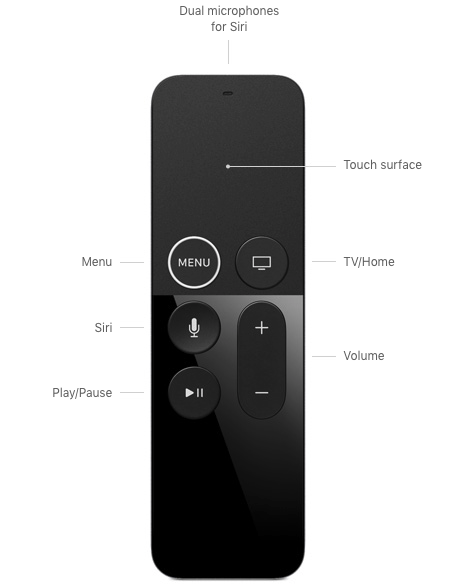
EXCEPT the damn Swiftfin Apple TV app, which is the only app you can use to access Jellyfin other than paying for Infuse, bizarrely does not support skipping forward/back with the Gen 1 Apple TV 4k remote.
Is this a known thing, the Gen 1 4k remote works fine skipping forward/back with Plex?
EDIT: In the process I worked out these apps incl Vidhub and Swiftfin for some reason use 1 or 2 quick taps on the touchpad left or right side to FFD/RWD where you would normally click to FFD/RWD, Plex still uses the click.
Last edited:
airborne
Honorary Master
- Joined
- Jul 13, 2007
- Messages
- 29,751
- Reaction score
- 16,093
This is the tutorial I used to setup Jellyfin on RPi:

backstreetboy
Honorary Master
- Joined
- Jun 15, 2011
- Messages
- 49,395
- Reaction score
- 56,417
Tried vidhub? https://apps.apple.com/za/app/vidhub-video-library-player/id1659622164So after tearing my hair out learning Linux and getting Jellyfin installed and up and running on my RPi, incl negotiating the peculiar file permissions that seems to be a thing on Linux, I finally got it up and running, works great!!
EXCEPT the damn Swiftfin Apple TV app, which is the only app you can use to access Jellyfin other than paying for Infuse, bizarrely does not support skipping forward/back with the Gen 1 Apple TV 4k remote.
Is this a known thing, the Gen 1 4k remote works fine skipping forward/back with Plex?
airborne
Honorary Master
- Joined
- Jul 13, 2007
- Messages
- 29,751
- Reaction score
- 16,093
Thanks, that looks really good, it supports Plex/Emby/Jellyfin and works well. Strange that it's free, probably quite new and trying to gain some traction?
In the process I worked out these apps incl Vidhub and Swiftfin for some reason use 2 quick taps on the touchpad to FFD/RWD where you would normally click to FFD/RWD, Plex still uses the click.

Agent Hydell
Well-Known Member
- Joined
- Apr 8, 2024
- Messages
- 224
- Reaction score
- 291
A few things to watch out for with that type of installation that might not be so apparent at first glance:So after tearing my hair out learning Linux and getting Jellyfin installed and up and running on my RPi, incl negotiating the peculiar file permissions that seems to be a thing on Linux, I finally got it up and running, works great!!
Don't use Sandisk microSD cards for your OS - they are cheap and readily available yes, but tend to lock up (no write access) after about 2 years of constant use. OS won't boot without write access to the disk.
If you are updating the host on a regular basis you need to empty unused repositories and packages as well to prevent the cache from becoming full. If it does cause the disk to become full and there is no writable space left then the OS won't boot. (apt-get autoclean & apt-get autoremove)
Big distro upgrades potentially can (and in my personal experience, most likely will) mess up something in the current installation, which will cause the bootloader to go into panic mode and prevent the OS from loading. Technical expertise (read: searching linux forums) will be required to fix the problem generally.
airborne
Honorary Master
- Joined
- Jul 13, 2007
- Messages
- 29,751
- Reaction score
- 16,093
I'm using a Samsung MicroSDA few things to watch out for with that type of installation that might not be so apparent at first glance:
Don't use Sandisk microSD cards for your OS - they are cheap and readily available yes, but tend to lock up (no write access) after about 2 years of constant use. OS won't boot without write access to the disk.
By that I'm assuming you are referring to updating the RPi OS and installed programs?If you are updating the host on a regular basis you need to empty unused repositories and packages as well to prevent the cache from becoming full. If it does cause the disk to become full and there is no writable space left then the OS won't boot. (apt-get autoclean & apt-get autoremove)
Fk me this is getting complicated now, Windoze is set and forget but finding a low power fanless mini pc isn't very easy. Then again I don't really need to upgrade the Linux OS if all is working fine and I'm just using it for Plex/HA?Big distro upgrades potentially can (and in my personal experience, most likely will) mess up something in the current installation, which will cause the bootloader to go into panic mode and prevent the OS from loading. Technical expertise (read: searching linux forums) will be required to fix the problem generally.
Agent Hydell
Well-Known Member
- Joined
- Apr 8, 2024
- Messages
- 224
- Reaction score
- 291
I haven't read any complaints about Samsung MicroSD cards, so it could be fine. Only one way to find out though... in a few years' time.
As for Plex... take this article for a spin: LastPass Hack: Engineer's Failure to Update Plex Software Led to Massive Data Breach
I opted for the set and forget method with a SSD and I haven't looked back since. It got somewhat tiresome after having to rebuild my Linux based media server the 4th time over the course of about 8 years.
I'm using a G8 HP Microserver currently and it is working well for me.
You can always set up the RPi as an interim media server to play around with and get the hang of things for now while you search for a more suitable long term solution. Do make sure to have a backup of your media though.
Also, I'm not implying that Linux is a bad solution for an OS per se, it's just that when problems arise they can be quite cumbersome to resolve if your knowledge of Linux isn't that good.
YesBy that I'm assuming you are referring to updating the RPi OS and installed programs?
You can...... but I wouldn't really recommend it if the device has any connection to the Internet. Pretty much hit & miss like playing hopscotch in a minefield. Exploited vulnerabilities for Linux has also been rising over the last year or so.Fk me this is getting complicated now, Windoze is set and forget but finding a low power fanless mini pc isn't very easy. Then again I don't really need to upgrade the Linux OS if all is working fine and I'm just using it for Plex/HA?
As for Plex... take this article for a spin: LastPass Hack: Engineer's Failure to Update Plex Software Led to Massive Data Breach
I opted for the set and forget method with a SSD and I haven't looked back since. It got somewhat tiresome after having to rebuild my Linux based media server the 4th time over the course of about 8 years.
I'm using a G8 HP Microserver currently and it is working well for me.
You can always set up the RPi as an interim media server to play around with and get the hang of things for now while you search for a more suitable long term solution. Do make sure to have a backup of your media though.
Also, I'm not implying that Linux is a bad solution for an OS per se, it's just that when problems arise they can be quite cumbersome to resolve if your knowledge of Linux isn't that good.
Last edited:
airborne
Honorary Master
- Joined
- Jul 13, 2007
- Messages
- 29,751
- Reaction score
- 16,093
Yeah Linux is a whole different ballpark compared to Windows, very steep learning curve if you have no prior experience and especially on RPi it can be doubly annoying because on top of that the machine is dead slow.I haven't read any complaints about Samsung MicroSD cards, so it could be fine. Only one way to find out though... in a few years' time.
Yes
You can...... but I wouldn't really recommend it if the device has any connection to the Internet. Pretty much hit & miss like playing hopscotch in a minefield. Exploited vulnerabilities for Linux has also been rising over the last year or so.
As for Plex... take this article for a spin: LastPass Hack: Engineer's Failure to Update Plex Software Led to Massive Data Breach
I opted for the set and forget method with a SSD and I haven't looked back since. It got somewhat tiresome after having to rebuild my Linux based media server the 4th time over the course of about 8 years.
I'm using a G8 HP Microserver currently and it is working well for me.
You can always set up the RPi as an interim media server to play around with and get the hang of things for now while you search for a more suitable long term solution. Do make sure to have a backup of your media though.
Also, I'm not implying that Linux is a bad solution for an OS per se, it's just that when problems arise they can be quite cumbersome to resolve if your knowledge of Linux isn't that good.
How exactly does the SD card integrate into the Rpi OS, can I swop the SD card with a different one without needing to reinstall everything?
Agent Hydell
Well-Known Member
- Joined
- Apr 8, 2024
- Messages
- 224
- Reaction score
- 291
Easiest way would probably be to create an ISO image of the MicroSD card after everything is set up, using a normal PC/laptop with a SD card reader. (USB Image Tool looks like a good candidate for this job)Yeah Linux is a whole different ballpark compared to Windows, very steep learning curve if you have no prior experience and especially on RPi it can be doubly annoying because on top of that the machine is dead slow.
How exactly does the SD card integrate into the Rpi OS, can I swop the SD card with a different one without needing to reinstall everything?
If something happens to your live SD card you can always write the image back from ISO to the same or a new card using Rufus.
This is theoretically speaking though, I haven't done something like this yet. Though I might give it a try since it looks like something interesting to do.
airborne
Honorary Master
- Joined
- Jul 13, 2007
- Messages
- 29,751
- Reaction score
- 16,093
I need to look into this because under no circumstances do I want to have to start from scratch and having an OS image has saved me numerous times in the past.Easiest way would probably be to create an ISO image of the MicroSD card after everything is set up, using a normal PC/laptop with a SD card reader. (USB Image Tool looks like a good candidate for this job)
If something happens to your live SD card you can always write the image back from ISO to the same or a new card using Rufus.
This is theoretically speaking though, I haven't done something like this yet.
SykomantiS
Expert Member
- Joined
- May 7, 2012
- Messages
- 4,551
- Reaction score
- 1,695
Interesting thread.
I think I'm going to give Jellyfin a spin. First thing so far that I don't like compared to plex, is accessing a remote server. From a Plex perspective you have an account and once you log in, any servers shared with you are available. Not so with Jellyfin, you need to know the IP address or URL to be able to connect to your server (and I'm assuming ou can't connect to multiple servers at once?). So if I wanted to share my media via Jellyfin with my parents, it's gonna be a ball ache, since they're not that savvy with networking stuff, and I'm not sure if/when/how often ISPs recycle your public facing IP (I'm with Afrihost and as far as I know, I don't have a static IP address).
I think I'm going to give Jellyfin a spin. First thing so far that I don't like compared to plex, is accessing a remote server. From a Plex perspective you have an account and once you log in, any servers shared with you are available. Not so with Jellyfin, you need to know the IP address or URL to be able to connect to your server (and I'm assuming ou can't connect to multiple servers at once?). So if I wanted to share my media via Jellyfin with my parents, it's gonna be a ball ache, since they're not that savvy with networking stuff, and I'm not sure if/when/how often ISPs recycle your public facing IP (I'm with Afrihost and as far as I know, I don't have a static IP address).

MakoPC
Expert Member
- Joined
- May 14, 2022
- Messages
- 1,060
- Reaction score
- 517
You should be able to request one in the Afrihost feedback thread, I got mine within an hourInteresting thread.
I think I'm going to give Jellyfin a spin. First thing so far that I don't like compared to plex, is accessing a remote server. From a Plex perspective you have an account and once you log in, any servers shared with you are available. Not so with Jellyfin, you need to know the IP address or URL to be able to connect to your server (and I'm assuming ou can't connect to multiple servers at once?). So if I wanted to share my media via Jellyfin with my parents, it's gonna be a ball ache, since they're not that savvy with networking stuff, and I'm not sure if/when/how often ISPs recycle your public facing IP (I'm with Afrihost and as far as I know, I don't have a static IP address).
SykomantiS
Expert Member
- Joined
- May 7, 2012
- Messages
- 4,551
- Reaction score
- 1,695
Are you referring to this thread?You should be able to request one in the Afrihost feedback thread, I got mine within an hour