DVI to HDMI

gtRpr

Member
Joined
Oct 27, 2008
Messages
10
Reaction score
0
Hi All.

I want to connect my PC to my Home Theatre System, I don't think I will loose on image quality when using a DVI to HDMI converter but I have heard people saying that they have lost sound. This is weird as my Graphics card came with sound drivers, has on board sound and can play sound through the 2 DVI HD outputs.

Can someone please clarify this?
Thanx in advance:confused:

What I have (off hand):
ASUS EAH3870 Radeon (Graphics card in PC)
Sony Bravio 40"
Sony HD-DVD Player
Sony HD-Audio Amp

All the above are FullHD
I have my DVD player connected to the AMP through one of the 4 HDMI inputs and my AMP connected to the TV from its HDMI output.
I want to connect the PC to one of the other 3 HDMI inputs on my AMP
 
DVI does not carry sound but it does have a better image quality than HDMI or so i was told at matrix, you can get a DVI to HDMI converter for R80.00 from them, as for the audio you'll have to use the output jack from the pc, better to get a splitter so you can connect the red/white audio jacks to your surround sound
 
DVI does not carry sound but it does have a better image quality than HDMI or so i was told at matrix, you can get a DVI to HDMI converter for R80.00 from them, as for the audio you'll have to use the output jack from the pc, better to get a splitter so you can connect the red/white audio jacks to your surround sound

DVI and HDMI are the same, except for the fact that HDMI also carries sound
 
DVI does not carry sound but it does have a better image quality than HDMI or so i was told at matrix, you can get a DVI to HDMI converter for R80.00 from them, as for the audio you'll have to use the output jack from the pc, better to get a splitter so you can connect the red/white audio jacks to your surround sound

Nope. HDMI is theoretically capable of better quality than DVI. DVI is limited to a 32 bit colour space (IIRC), HDMI ver 1.3 offers up to 48 bit.
 
arf9999 wrote:
Sony don't make an HD-DVD player.
I found that weird, but that is what I was told by the salesman.
It's "lose" not "loose".
Typing error
DVI doesn't include audio...
Pity, well my pc has 7.1 audio already so I will just have to buy the extra audio cables and connect them from my PC to the amp.

Thank you all.

As to my DVD player being HD:
I had 4 DVD Players (LG, Pioneer, Sony and a Samsung) that were stolen about 3 weeks ago and I bought this new Sony.
The difference in image quality with the same DVD's is huge.
I will later on today check the model number and post it here.
 
It's not an HD-DVD player. It's a DVD player with HDMI output and upscaling. HD-DVD is a defunct format developed by Toshiba, Sony's version is Blu-ray.
 
a
Pity, well my pc has 7.1 audio already so I will just have to buy the extra audio cables and connect them from my PC to the amp.
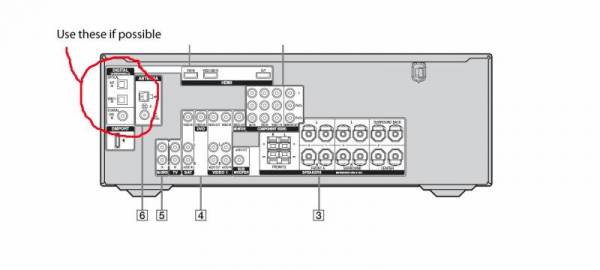
I suggest that you check whether you can get 7.1 output in a digital format from your soundcard (check for SPDIF which will be a co-axial output, or optical - a TOSLINK connector) This is much more elegant than 8 analogue cables. In addition, it is fairly likely that your amp can process the surround sound far better than your PC, plus you won't get any loss of quality over the analogue cables.
Optical-coax.jpg
 
Last edited:
Nice product, but not fit for purpose. The OP wants to go from DVI to HDMI. HDCP isn't an issue in his setup as all the components (Amp and TV) are HDCP compliant.

Ok, I misread, thought he wanted HDMI 2 DVI.

However, even with HDCP compliance, there are reasons to have
an HDCP remover. :) Remember not all sets with 'HDCP compliance'
are compliant for the same version of HDCP. Better to get rid
of it altogether :), if possible, that way you can even record the
signal.
 
It's not an HD-DVD player. It's a DVD player with HDMI output and upscaling. HD-DVD is a defunct format developed by Toshiba, Sony's version is Blu-ray.
So thats where all the confusion comes from. thanx
check for SPIDIF which will be a co-axial output, or optical - a TOSLINK connector
Don't you mean SPDIF?
If so yes its got one will it maintain 7.1 audio?
In addition, it is fairly likely that your amp can process the surround sound far better than your PC
I agree, its on board sound.

Any Idea on how much a SPDIF cable will cost at HIFI-Corp and/or Matrix?
 
Last edited:
So thats where all the confusion comes from. thanx

Don't you mean SPDIF?
Yup... i edited the typo...;)
If so yes its got one will it maintain 7.1 audio?
In theory, as long as it is in a format that the amp can decode.

Any Idea on how much a SPDIF cable will cost at HIFI-Corp and/or Matrix?
You can just use a good quality RCA to RCA cable. Shouldn't cost much more than R20. You've probably got some lying around anyway.
 
You've probably got some lying around anyway.
No I don't,

When they broke in and took everything from my TV (46") to Amp’s to DVD players etc (they even took the remotes and spare batteries I bought that same day) they cut each and every cable connected to the appliances.
I mean the idiots to lazy to simply pull out over R3000.00 worth of cables.
 
That's because few people realise the value of cables ;)


I have a solid silver Kimber that's over R1000.00 for 1 thing, 0.5m cable.
 
When I tried the same thing a while back (DVI to HDMI cable),
I couldn't make the sound go from my PC to my Sony LCD (mini-stereo to RCA)

I had to take the sound to my surround system.

It seemed my 8800GT put a "blank" sound signal on the HDMI cable, this resulted in the Sony detecting an audio and sound signal on the HDMI-in and then disabling the audio input of the sound RCA-in.

Strangely enough this exact same setup worked 100% with my older 6600GT.

I have just made peace with using 3 remotes.
 
Top
Sign up to the MyBroadband newsletter
X