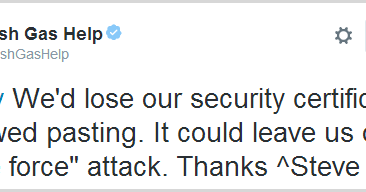
FNB blocks users from saving passwords in their browser

Re-read. My bad. Seems he was on a preview. So they're using JS to make sure you're pressing keys (or something).
Yep,deleting and typing 1 character (or inverse) bypasses this "feature"
 
So what I usually do is store the random generated string in the password manager.. and then add an additional string to it which i remember and is not stored anywhere except my brain :p.

Use the same strategy for banking passwords...
 
Weird - I'm still only getting warnings in Chrome, nary a peep with Safari, which is fine by me.
 
It's easy enough to check which Useragents are connecting most frequently,then direct your attention to the bigger share % first
 
It's not rolled out yet.
I had a preview of it because reasons.

Lastpass does not work. It uses some sort of Javascript to detect whether keys were pressed, specifically meta keys, and Lastpass does not simulate keypresses.
Weird - I'm still only getting warnings in Chrome, nary a peep with Safari, which is fine by me.
Not so much weird, they probably haven't figured Safari out yet. There's a good chance their devs don't have access to MacOS, though at $20 a month, they can get macincloud.com
^^
 
I know what Sinbad said, and most of us disagree. I think what he means is that his password manager respects the sites request to not save passwords. You have to override it and save them manually.
No. I said the automatically entered password by the password manager is detected by the fnb mechanism as a saved password, and the site rejects it.
 
The intention might be to avoid a vulnerability, the browser password store, but the result will be to encourage people to use weaker passwords. The same applies to preventing easy use of a password manager because you're worried about the clipboard.
 
Why are they stupid enough to ask for your full password every time:confused:keyloggers must have a field day.

Could have just made a system asking for random characters of the password each time?
ABSA does this, it's infuriating because if you're got a random password saved in a password manager like Lastpass or Bitwarden, you've got to go and count characters.

Everyone should be encouraging the use of password managers, not discouraging it. And passwords should have a *minimum* length of ~64 characters, I've seen quite a few sites that limit you to 30.

2FA is also an excellent idea. But nooo. That would be too much like a good idea, we'll stick to being infuriating. FNB are getting good at that lately.
 
ABSA does this, it's infuriating because if you're got a random password saved in a password manager like Lastpass or Bitwarden, you've got to go and count characters.

Everyone should be encouraging the use of password managers, not discouraging it. And passwords should have a *minimum* length of ~64 characters, I've seen quite a few sites that limit you to 30.

2FA is also an excellent idea. But nooo. That would be too much like a good idea, we'll stick to being infuriating. FNB are getting good at that lately.
A password manager will NOT protect you in anyway from phishing attacks, Thousand character password won't even help for man in the middle or phishing attack.

I know that Absa has been doing that for ages and ages and where this idea comes from.
2FA with the verified App is also been used for about 3 years by them to approve transactions, limits Etc.
If you cannot remember one simple password of at least 8 characters then how can you actually remember to pay bills and do your taxes?

They actually have 2 levels to the login process on an unverified device such as a random PC.

1. Acc number and numerical PIN. (Notification warning of login triggered on phone)

2. Your unique security phrase is shown to you on the screen to make sure it's really Absa along with the warning of a login. You are asked to provide 3 random characters of your password and not the full one ever and you are logged in.

The App is verified already so only biometric or passcode needed.
 
Last edited:
A password manager will NOT protect you in anyway from phishing attacks, Thousand character password won't even help for man in the middle or phishing attack.

I know that Absa has been doing that for ages and ages and where this idea comes from.
2FA with the verified App is also been used for about 3 years by them to approve transactions, limits Etc.
If you cannot remember one simple password of at least 8 characters then how can you actually remember to pay bills and do your taxes?

They actually have 2 levels to the login process on an unverified device such as a random PC.

1. Acc number and numerical PIN. (Notification warning of login triggered on phone)

2. Your unique security phrase is shown to you on the screen to make sure it's really Absa along with the warning of a login. You are asked to provide 3 random characters of your password and not the full one ever and you are logged in.

The App is verified already so only biometric or passcode needed.
I disagree. A proper password manager will protect you from a phishing attack by not having a password saved for the "fake" site
 
<snip>.

2FA is also an excellent idea. But nooo. That would be too much like a good idea, we'll stick to being infuriating. FNB are getting good at that lately.

Reason I'm busy leaving FNB. They're really getting good at being overly complicated and as you put it, infuriating.
 
A password manager will NOT protect you in anyway from phishing attacks, Thousand character password won't even help for man in the middle or phishing attack.

I know that Absa has been doing that for ages and ages and where this idea comes from.
2FA with the verified App is also been used for about 3 years by them to approve transactions, limits Etc.
If you cannot remember one simple password of at least 8 characters then how can you actually remember to pay bills and do your taxes?

They actually have 2 levels to the login process on an unverified device such as a random PC.

1. Acc number and numerical PIN. (Notification warning of login triggered on phone)

2. Your unique security phrase is shown to you on the screen to make sure it's really Absa along with the warning of a login. You are asked to provide 3 random characters of your password and not the full one ever and you are logged in.

The App is verified already so only biometric or passcode needed.
Sure, a long password won't save you from a phishing attack but 2FA can go a long way towards that. They being said, I have seen sophisticated attacks which do a login live while you supposedly put in your OTPs.

Long passwords are for protection against brute force attacks, and using a password manager ensures that if one account is compromised, your other ones aren't. If you force users to type in a memorable password, then they'll often revert to using either the same one or simple variations on it which would be easy to brute force or dictionary attack.
 
I disagree. A proper password manager will protect you from a phishing attack by not having a password saved for the "fake" site

That is indeed correct. But then we fail to realize that the majority that use these sites are not technically inclined so even if the browser or password manager doesnt fill it in they will then just assume some bug and enter it themselves handing over the full password.

The layered approach with PIN and random characters of password on each login still is best to prevent most scenarios or just using 2FA.

But to use just an email/username and one simple password? That most of these nobs probably have used on 10 other websites. Not very convincing security.

Reason I'm busy leaving FNB. They're really getting good at being overly complicated and as you put it, infuriating.

I guess its a balance of losing your money and convenience? They must have realized that this weakness lack of layers approach and especially Gmail login level security has been costing them.

Sure, a long password won't save you from a phishing attack but 2FA can go a long way towards that. They being said, I have seen sophisticated attacks which do a login live while you supposedly put in your OTPs.

Long passwords are for protection against brute force attacks, and using a password manager ensures that if one account is compromised, your other ones aren't. If you force users to type in a memorable password, then they'll often revert to using either the same one or simple variations on it which would be easy to brute force or dictionary attack.

Sure man in the middle attack is pretty much as sophisticated as it gets I would imagine from a banking site to try and get in.

The brute force method is irrelevant with sites such as these as they should lock the profile with just 3 attempts but they have appealed to people multiple times not to use this password on any other site. Sadly the type of person dumb enough to do that wont use a password manager as-well most likely.

Browser passwords aren’t secure at all and wont be surprised if these kinds of individuals have used the browser untill now that they are forced to change their ways.
 
How is enabling good security practice being a dictatorship now?
Perhaps because it would result in bad security? The easiest way to get passwords is to monitor what's entered rather than trying to examine password fields. If your device is compromised this doesn't make you safer but quite the opposite. Our banks know nothing about security but want to dictate the passwords we should use and how.
 
A password manager will NOT protect you in anyway from phishing attacks, Thousand character password won't even help for man in the middle or phishing attack.

I know that Absa has been doing that for ages and ages and where this idea comes from.
2FA with the verified App is also been used for about 3 years by them to approve transactions, limits Etc.
If you cannot remember one simple password of at least 8 characters then how can you actually remember to pay bills and do your taxes?

They actually have 2 levels to the login process on an unverified device such as a random PC.

1. Acc number and numerical PIN. (Notification warning of login triggered on phone)

2. Your unique security phrase is shown to you on the screen to make sure it's really Absa along with the warning of a login. You are asked to provide 3 random characters of your password and not the full one ever and you are logged in.

The App is verified already so only biometric or passcode needed.
#2 doesn't work when they serve you a duplicate page through a proxy.
 
That's what they get for using Firefox... Bit in seriousness, i have no issue blocking the browser passwords, but shutting out proper password managers is daft.
 
So as of today I had to ****ing copy and paste my password into a Word Document so I could read it and type it out.

JESUS CHRIST FNB?

Are you literally employing the most useless IT security people ever?
 
Forward them these articles:

 
Top
Sign up to the MyBroadband newsletter
X