


Is it just me or is the documentation just a bit **** on this.The sensors need the state_class and device_class, as well as a last_reset attritube.
-
- News
-
Categories
- 5G
- ADSL
- AI
- Banking
- Black Friday
- Broadband
- Broadcasting
- Business
- Business Telecoms
- Cellular
- Cloud and Hosting
- Columns
- Cryptocurrency
- Energy
- Enterprise
- Fibre
- Gadgets
- Gaming
- Government
- Hardware
- Industry News
- Internet
- Internet of Things
- Investing
- IT Services
- Motoring
- Reviews
- Science
- Security
- Smartphones
- Software
- Technology
- Telecoms
- Trending
- Wireless
- Press Office
- Forum
- Industry News
- Features
- Company hub
- Speed Test
- About us
- Advertise with us
- Contact
- Careers
-
Join the MyBroadband community
South Africa’s biggest forum. Discuss, discover, and connect with thousands of members.
-
Question of the Day: Google Maps vs Waze vs Apple Maps vs physical paper maps?
You are using an out of date browser. It may not display this or other websites correctly.
You should upgrade or use an alternative browser.
You should upgrade or use an alternative browser.
Home Assistant : Q&A, Tips & Tricks, Your Configs
- Thread starter TedLasso
- Start date

Bit like my spelling...Is it just me or is the documentation just a bit **** on this.

AxField
Expert Member
- Joined
- Apr 30, 2009
- Messages
- 1,647
- Reaction score
- 1,749
I was lucky enough to already have utility meters set up for my other dashboards; so literally just used those as inputs to the energy dashboard and voila. It was a lot simpler than I thought it would be; took all of 2 mins to set up. Now I’ll use the linked energy card on my main dashboard to clean the graphs up a littleI just created utility meter for each device I want to add to the energy dashboard

Tinuva
The Magician
I should admit I also had most ready. Only the individual sensors that I was lazy and didn't have all of them. Wish I had a way to easier template this out each time I add a new power sensor.I was lucky enough to already have utility meters set up for my other dashboards; so literally just used those as inputs to the energy dashboard and voila. It was a lot simpler than I thought it would be; took all of 2 mins to set up. Now I’ll use the linked energy card on my main dashboard to clean the graphs up a little

w1tw0lf
Expert Member
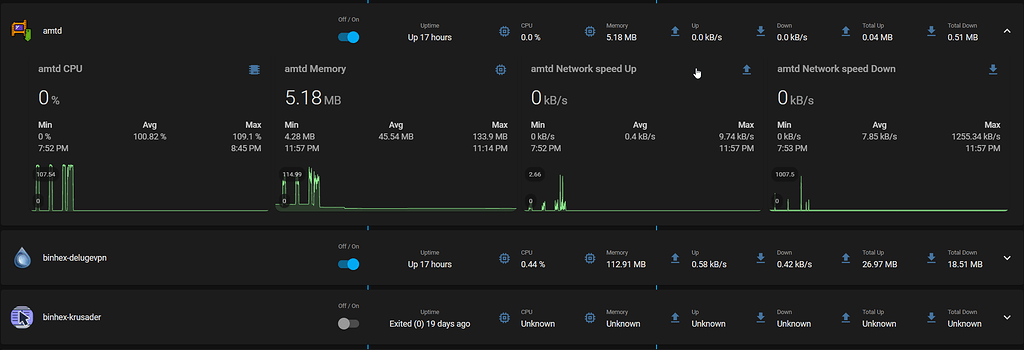
Sharing this here, as I thought it was a nice find to show a device which has multiple sensors/entities....
 community.home-assistant.io

Currently using the same way as the example for my docker images.
Easy-Layout-Card: Duplicate cards for multiple entities
I have recently tried to set up a dynamic docker dashboard: I have struggled quite a lot to get it automatically populate and look the way I want it. The biggest struggle for me was nesting the layout cards and figuring out how to properly configure which part the card is going to duplicate...
community.home-assistant.io
Currently using the same way as the example for my docker images.

TedLasso
Executive Member
- Joined
- Feb 23, 2016
- Messages
- 5,155
- Reaction score
- 2,845
So a question. upgraded to 2021.8.3 to use Energy bits . I only had grid power but was expecting my efergy connected to DB to show up as total consumption etc has been tracked in inside HA since I started.
However, it appears it has not been configured to support long term statistics or something so I can't choose it.

Unsure if any of you are still using Efergy but is there a way around it. This is my config inside configuration.yaml

However, it appears it has not been configured to support long term statistics or something so I can't choose it.
Unsure if any of you are still using Efergy but is there a way around it. This is my config inside configuration.yaml
Last edited:

Speedster
Honorary Master
I updated the morning too. HA didn't immediately recognise my efergy, CBI Astute or Sonoff POW. Haven't tried to troubleshoot thoughSo a question. upgraded to 2021.8.3 to use Energy bits . I only had grid power but was expecting my efergy connected to DB to show up as total consumption etc has been tracked in inside HA since I started.
However, it appears it has not been configured to support long term statistics or something so I can't choose it.
View attachment 1122100
Unsure if any of you are still using Efergy but is there a way around it. This is my config inside configuration.yaml
View attachment 1122108
I got it working by pulling the efergy sensors into the Utility Meter. The graphs look pretty but they don't match on what the Efergy dashboard says. I'm just going to wait until its feature has had a few more updates. I expect a lot of breaking changes coming.So a question. upgraded to 2021.8.3 to use Energy bits . I only had grid power but was expecting my efergy connected to DB to show up as total consumption etc has been tracked in inside HA since I started.
However, it appears it has not been configured to support long term statistics or something so I can't choose it.
View attachment 1122100
Unsure if any of you are still using Efergy but is there a way around it. This is my config inside configuration.yaml
View attachment 1122108

Charlesjjm
Expert Member
I added this under sensor:So a question. upgraded to 2021.8.3 to use Energy bits . I only had grid power but was expecting my efergy connected to DB to show up as total consumption etc has been tracked in inside HA since I started.
However, it appears it has not been configured to support long term statistics or something so I can't choose it.
View attachment 1122100
Unsure if any of you are still using Efergy but is there a way around it. This is my config inside configuration.yaml
View attachment 1122108
sensor:
- platform: efergy
app_token: ""
utc_offset: -120
monitored_variables:
- type: instant_readings
- type: budget
- type: cost
period: day
currency: R
- type: amount
period: day
- type: current_values
- platform: integration
source: sensor.energy_consumed
name: "Energy Consumption"
then this:
utility_meter:
daily_energy:
source: sensor.energy_consumed
cycle: daily
This brings up the sensor under the energy tab. Strangely it is not a 100% match. Maybe someone more clever can point out the issue with the source code.
TedLasso
Executive Member
- Joined
- Feb 23, 2016
- Messages
- 5,155
- Reaction score
- 2,845
Thanks, will give that a shot.I added this under sensor:
sensor:
- platform: efergy
app_token: ""
utc_offset: -120
monitored_variables:
- type: instant_readings
- type: budget
- type: cost
period: day
currency: R
- type: amount
period: day
- type: current_values
- platform: integration
source: sensor.energy_consumed
name: "Energy Consumption"
then this:
utility_meter:
daily_energy:
source: sensor.energy_consumed
cycle: daily
This brings up the sensor under the energy tab. Strangely it is not a 100% match. Maybe someone more clever can point out the issue with the source code.
Have a question. Why is your UTC offset -120. Shouldn't it be +120 as we are GMT+ 2?
Have to be honest , haven't actually paid to the daily consumption in HA Vs what efergy tells me, but I just checked mines now and maybe mines is wrong.
Efergy says I am 20kw for day but HA says it's 18kw.
Cheers
AxField
Expert Member
- Joined
- Apr 30, 2009
- Messages
- 1,647
- Reaction score
- 1,749
Maybe because efergy updates in real-time but HA only updates every hour. At least, I suspect that’s what’s happening. If I look at my dash during the day, the HA side lags the real-time one off my inverter. But if I go look at the end of day data, the results are the same.Thanks, will give that a shot.
Have a question. Why is your UTC offset -120. Shouldn't it be +120 as we are GMT+ 2?
Have to be honest , haven't actually paid to the daily consumption in HA Vs what efergy tells me, but I just checked mines now and maybe mines is wrong.
Efergy says I am 20kw for day but HA says it's 18kw.
Cheers

SauRoNZA
Honorary Master
Just eWelink.
Then the answer is no work around for that situation.
With other more advanced platforms many different ways to skin that cat.
Being this thread one would assume you are running Home Assistant in which case you could do it with that if the Sonoff integration works to turn it on and off, I haven’t followed that.
Alternatively Alexa could likely take over a routine for this, also not 100% sure but it’s likely a bit more clever than EWeLink.
SauRoNZA
Honorary Master
I added this under sensor:
sensor:
- platform: efergy
app_token: ""
utc_offset: -120
monitored_variables:
- type: instant_readings
- type: budget
- type: cost
period: day
currency: R
- type: amount
period: day
- type: current_values
- platform: integration
source: sensor.energy_consumed
name: "Energy Consumption"
then this:
utility_meter:
daily_energy:
source: sensor.energy_consumed
cycle: daily
This brings up the sensor under the energy tab. Strangely it is not a 100% match. Maybe someone more clever can point out the issue with the source code.
Do you have an option to reference total_consumed instead? I know with Tasmota that solved this problem for me.
Utility meter then works out the necessary.
Charlesjjm
Expert Member
Thanks, will give that a shot.
Have a question. Why is your UTC offset -120. Shouldn't it be +120 as we are GMT+ 2?
Have to be honest , haven't actually paid to the daily consumption in HA Vs what efergy tells me, but I just checked mines now and maybe mines is wrong.
Efergy says I am 20kw for day but HA says it's 18kw.
Cheers
Good question about UTC. I can't remember why I set it up like that. Will have to google it.
Charlesjjm
Expert Member
Do you have an option to reference total_consumed instead? I know with Tasmota that solved this problem for me.
Utility meter then works out the necessary.
This is a higher grade question that I can't answer. I'm still figuring it out as I go.
SauRoNZA
Honorary Master
This is a higher grade question that I can't answer. I'm still figuring it out as I go.
Well it might not be that exact value but I just one where the sensor provides the total consumed.
HA and utility would then just work out the difference over time.

MidnightZA
Expert Member
- Joined
- Mar 9, 2013
- Messages
- 2,600
- Reaction score
- 1,469
I got a 12V battery charger and a 12v 17Ah battery for some backup power. Made a voltmeter using an ESP board and got it running in HA but only using voltages.

Any idea of how I can convert this to a percentage range? I have no idea what percentage will correspond to what voltage.
Any idea of how I can convert this to a percentage range? I have no idea what percentage will correspond to what voltage.
Speedster
Honorary Master
I got a 12V battery charger and a 12v 17Ah battery for some backup power. Made a voltmeter using an ESP board and got it running in HA but only using voltages.
View attachment 1123840
Any idea of how I can convert this to a percentage range? I have no idea what percentage will correspond to what voltage.

MidnightZA
Expert Member
- Joined
- Mar 9, 2013
- Messages
- 2,600
- Reaction score
- 1,469
Thanks. Now how to I get that into HA? I was thinking a gauge like how I currently have it but with the percentages

For eg.
The green area must be when its charging. I think the charging voltage is always above 13V
The orange must be when discharging (between 100% and 50% DoD) and
The is the no go area below 50%.
Tinuva
The Magician
Create a template sensor that converts the voltage to %. Then base your gauge on the template sensor instead.Thanks. Now how to I get that into HA? I was thinking a gauge like how I currently have it but with the percentages
View attachment 1124118
For eg.
The green area must be when its charging. I think the charging voltage is always above 13V
The orange must be when discharging (between 100% and 50% DoD) and
The is the no go area below 50%.