Home Automation - Smartkit

I got some assistance from someone wrt to my alarm connection.
My alarm output is switched 0V outputs. This means they apply 0V when active. When inactive they are pulled up to 12V.

interesting, that is good to know :thumbsup:
 
So I need that module, female to female jumper leads, and jumper pins.
Header pins I solder onto the sonoff, and then use jumpers leads to connect the module to the sonoff.

I don't know these electrical components all that well, are there different sizes of these things?
Or could you possibly post links to communica for what I need.
There's like two or three devices you have to solder. The rest can be held in place, or use some Prestik.
 
@SmartKit given the updated Gazette, are you guys going to be delivering orders?
Points 10, 18 and 20 may all touch on your business

1588235874976.png
 
We'll follow up with the warehouse tomorrow. They have to green light.
Oh yes of course... thanks - have my cart ready ;)
Pity you guys don't sell those jumpers for flashing, else I could have gotten everything I need from you.
 
Anyone using a Sonoff sensor probe to monitor pool water temperature?

I'm thinking that inside the weir not be a bad place for it right? I can remove a few bricks and drill a hole into the weir - pushing the probe in. At least it would be out of the way then.
 
@SAguy Just take note: That PL2303 from Communica, it may have a knock-off PL2303 chip, which leads to almost being useless without the very OLD driver you need to install. I have the install file if you need it. Also, due to the old driver and the knock-off chip, it may lead to BSODs on Windows (Ask me how I know...) Not sure about Linux.

While the TTL levels is 3.3v, just check that you have a 3.3v power pin as well. A ESP8266 fries with 5v power. I killed one that way.
One downside, I cannot flash Arduino Pro Minis with it, because it does not have a DTR pin to reset the micro to flash it. You can flash it, but you have to manually reset the micro the right time when avrdude needs to reset the micro.

I have the FTDI converter bought off BGG for cheap. I haven't noticed a crash with it yet but suspect it may be a knock-off. If you buy the FTDI with the 3.3v - 5v jumper, just select the jumper and flash or use. I have flashed a few Sonoffs, few 3.3v and 5v arduino pro mini's with it.
 
Anyone using a Sonoff sensor probe to monitor pool water temperature?

I'm thinking that inside the weir not be a bad place for it right? I can remove a few bricks and drill a hole into the weir - pushing the probe in. At least it would be out of the way then.
Depends on which sensor you use. There's two, to my knowledge.
One is the Temperature and Humidity, looks like this:
1588275325999.png

The other one is temperature only:
1588275396835.png

This first one is obvs not waterproof.
The second one may work. Just as a precaution, you can use some silicone on the newly drilled hole and sommer around the heatshrink of the probe, to stop water ingress.

I have noticed that the second sensor is just a DS18B20. Tasmota have support for it out of the box.

Also, if you want to use a simple point-and-click way of flashing the Sonoffs, you can use Tasmotizer: https://github.com/tasmota/tasmotizer

Good luck!
 
@SAguy Just take note: That PL2303 from Communica, it may have a knock-off PL2303 chip, which leads to almost being useless without the very OLD driver you need to install. I have the install file if you need it. Also, due to the old driver and the knock-off chip, it may lead to BSODs on Windows (Ask me how I know...) Not sure about Linux.

While the TTL levels is 3.3v, just check that you have a 3.3v power pin as well. A ESP8266 fries with 5v power. I killed one that way.
One downside, I cannot flash Arduino Pro Minis with it, because it does not have a DTR pin to reset the micro to flash it. You can flash it, but you have to manually reset the micro the right time when avrdude needs to reset the micro.

I have the FTDI converter bought off BGG for cheap. I haven't noticed a crash with it yet but suspect it may be a knock-off. If you buy the FTDI with the 3.3v - 5v jumper, just select the jumper and flash or use. I have flashed a few Sonoffs, few 3.3v and 5v arduino pro mini's with it.
Thanks for the tips!
Once I can get my hands on things I'll be upping my home automation game.

The FTDI chip that Smartkit sells, assume that one is good for the job?
 
Wiring a Sonoff SV with Tasmota to use with a gate motor should be simple right?
12v to power it, and the outputs of the sonoff go to the same inputs as the remote receiver do on the motors control board

Then just set the Tasmota to have a PulseTime of a second?
 
Another project I have in mind (hence the pool temperature probe) is to have a solenoid valve that sends water up to my roof for pool heating, with another temperature probe for the water coming back down (or use ambient temp).

Valve is closed/opened as required so that I'm not actually cooling my pool down on a cold day...
I've realised with home automation the question isn't "why should I automate it" but more "why shouldn't I" ;)
 
Wiring a Sonoff SV with Tasmota to use with a gate motor should be simple right?
12v to power it, and the outputs of the sonoff go to the same inputs as the remote receiver do on the motors control board

Then just set the Tasmota to have a PulseTime of a second?

You will need to put the sv in isolated mode. Then the relay closes common and trigger. Pulse time of 1s should do.
 
As Steamy Tom says you need to follow this to make the Sonoff isolated and safe.

 
Anyone have advice on getting a Sonoff Basic to connect to the wifi - it picks up the Wifi networks at 45-48% signal - but keeps timing out trying to connect.

00:00:00 CFG: Loaded from flash at F4, Count 10345
00:00:00 Project tasmota Spot Version 8.2.0(tasmota)-STAGE
00:00:00 WIF: Connecting to AP1 HomeWifi in mode 11N as Spot-6530...
00:00:08 WIF: Connect failed with AP timeout
00:00:08 WIF: Connecting to AP2 HomeWifi_IoT in mode 11N as Spot-6530...
00:00:15 WIF: Connect failed with AP timeout
00:00:15 WIF: WifiManager active for 3 minutes
00:00:16 HTP: Web server active on Cinema_Lamp_1-6530 with IP address 192.168.4.1

EDIT: Reseting it seems to have helped. Back on the network.
 
Last edited:
I just feel the need to rant ever so slightly....

I have largely left Home Assistant in a static state for months due to time to sit and play and figure the stuff out...

Figured this long weekend would be a good place to start with that, so pulled out some very old Tasmota'd Sonoff Basics and upgraded them to the latest firmware (that process took me a bit of time to figure out but hey)... Then trying to get the MQTT shyte to work was incredibly frustrating. I spent hours with the things connecting, and throwing weird errors relating to the ClientID stuff (connect, then reconnecting and closing old connections)... sorted that and then nothing, it just refused to Auto Discover anything.. no matter what I did. SetOption19 1 or anything like that achieved sweet FA.

Got frustrated, and uninstalled MQTT and the integration... stepped away from the PC for a few hours. Came back and just re-installed MQTT and it all started working like nothing was wrong. What the actual fek...
 
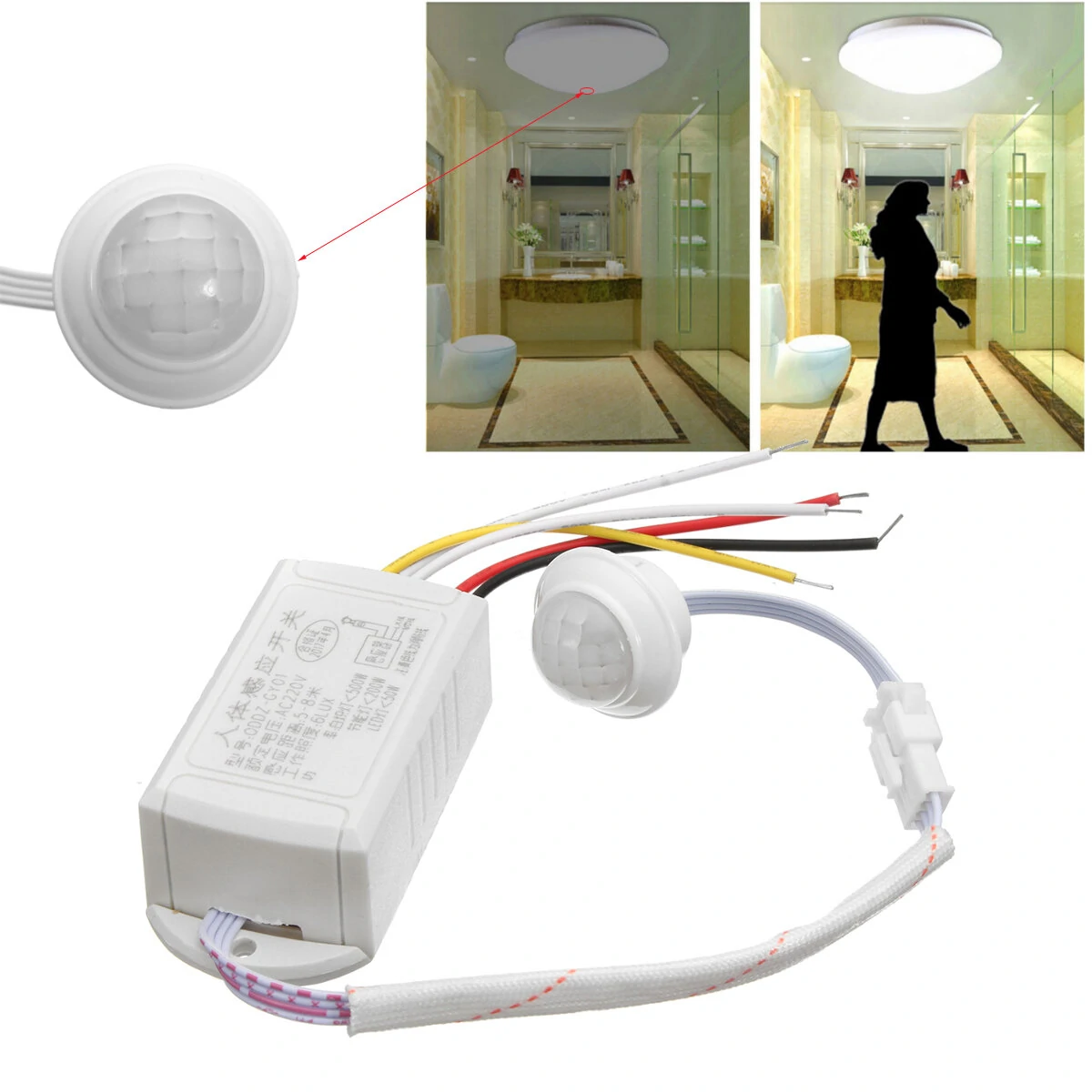
Where to find this in South Africa. Basically I have a bathroom mirror with a light, this mirror does not have a switch and I have not wired a switch anywhere. I can install this under the vanity as that is where the power leads from, so if you step in from of the vanity the bathroom light switches on. Vanity has drawers that light up as well.

 
I just feel the need to rant ever so slightly....

I have largely left Home Assistant in a static state for months due to time to sit and play and figure the stuff out...

Figured this long weekend would be a good place to start with that, so pulled out some very old Tasmota'd Sonoff Basics and upgraded them to the latest firmware (that process took me a bit of time to figure out but hey)... Then trying to get the MQTT shyte to work was incredibly frustrating. I spent hours with the things connecting, and throwing weird errors relating to the ClientID stuff (connect, then reconnecting and closing old connections)... sorted that and then nothing, it just refused to Auto Discover anything.. no matter what I did. SetOption19 1 or anything like that achieved sweet FA.

Got frustrated, and uninstalled MQTT and the integration... stepped away from the PC for a few hours. Came back and just re-installed MQTT and it all started working like nothing was wrong. What the actual fek...
If it makes you feel better, I spent the entire day yesterday installing flood lights, and thought a good place for the Sonoff Basic was behind the flood light, when done - and turning on the power - none of them picked up WiFi, I'm assuming because they were all above the metal roof sheeting.

Needless to say, that's why it took all day, had to redo 50% of the conduits and wiring. Moved the basics below the sheeting and everything is working.

Feet are killing me from spending the day on a ladder.
9a2728b311ded1275e34c2c7ec2a7bab.jpg
c1398a69d087b887cd649489a17b9980.jpg
 
Last edited:
Where to find this in South Africa. Basically I have a bathroom mirror with a light, this mirror does not have a switch and I have not wired a switch anywhere. I can install this under the vanity as that is where the power leads from, so if you step in from of the vanity the bathroom light switches on. Vanity has drawers that light up as well.


Seems you’ve already found a perfectly good place to buy it?

Why always the need for things to be IN South Africa as if they don’t come from elsewhere in the first place? I just don’t get it.

People will rather go without something for no logical reason than simply click and order as on any other online store and import it themselves.
 
Seems you’ve already found a perfectly good place to buy it?

Why always the need for things to be IN South Africa as if they don’t come from elsewhere in the first place? I just don’t get it.

People will rather go without something for no logical reason than simply click and order as on any other online store and import it themselves.
With lockdown no idea when it will be delivered.

I order most is these kinds of things but in the current situation.
 
Top
Sign up to the MyBroadband newsletter
X