-
- News
-
Categories
- 5G
- ADSL
- AI
- Banking
- Black Friday
- Broadband
- Broadcasting
- Business
- Business Telecoms
- Cellular
- Cloud and Hosting
- Columns
- Cryptocurrency
- Energy
- Enterprise
- Fibre
- Gadgets
- Gaming
- Government
- Hardware
- Industry News
- Internet
- Internet of Things
- Investing
- IT Services
- Motoring
- Reviews
- Science
- Security
- Smartphones
- Software
- Technology
- Telecoms
- Trending
- Wireless
- Press Office
- Forum
- Industry News
- What's Next
- Company hub
- Speed Test
- About us
- Advertise with us
- Contact
- Careers


-
Join the MyBroadband community
South Africa’s biggest forum. Discuss, discover, and connect with thousands of members.
-
Question of the Day: Are you collecting Checkers Stickables?

You are using an out of date browser. It may not display this or other websites correctly.
You should upgrade or use an alternative browser.
You should upgrade or use an alternative browser.
Homekit recommendations
- Thread starter neoprema
- Start date

Just resurrecting this thread as it spoke about Yeelight and Homekit. I have a strange thing that is happening.
If I turn my Yeelight's 1S on with the button in the Yeelight app, they come on FULL brightness.
if I tell Siri to turn the lights (1S) on, they come on but not as bright like about 95%. I've tried telling Siri to set maximum brightness but they already are.
Can't seem to figure out why what Homekit thinks is maximum brightness is not what the Yeelight actually is when you use the app.
Its not a huge brightness difference but enough for the eye to pick-up.
If I turn my Yeelight's 1S on with the button in the Yeelight app, they come on FULL brightness.
if I tell Siri to turn the lights (1S) on, they come on but not as bright like about 95%. I've tried telling Siri to set maximum brightness but they already are.
Can't seem to figure out why what Homekit thinks is maximum brightness is not what the Yeelight actually is when you use the app.
Its not a huge brightness difference but enough for the eye to pick-up.
Woah!! Can’t wait for this doorbell to launch in South Africa!
Aqara is such an awesome brand… HomeKit support for the win!! Been loving the security hub M1S with door/ window sensors and the motion sensors, also with most of the sensors supporting battery it all works during Loadshedding (provided you have a battery backup for the hub).
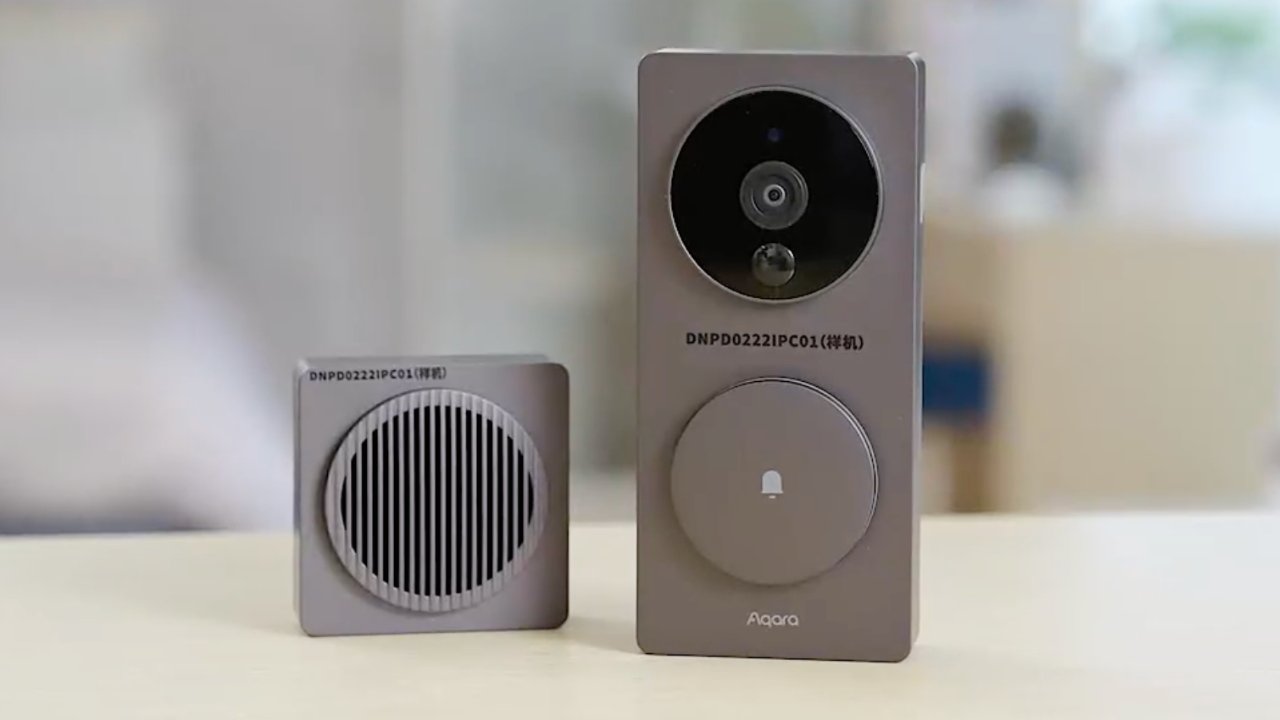
Aqara Video Doorbell G4 is battery powered with HomeKit Secure Video:
Video Review:
Aqara is such an awesome brand… HomeKit support for the win!! Been loving the security hub M1S with door/ window sensors and the motion sensors, also with most of the sensors supporting battery it all works during Loadshedding (provided you have a battery backup for the hub).
Aqara Video Doorbell G4 is battery powered with HomeKit Secure Video:
Aqara Video Doorbell G4 is battery powered with HomeKit Secure Video
Aqara's previously announced Video Doorbell G4 is now available, delivering HomeKit Secure Video in a battery-powered device with a separate chime speaker.
appleinsider.com
Video Review:
I would say that if you're happy with the limited set of automations in Homekit but still want to connect non-Homekit supported devices, and have a Raspberry Pi lying around, then Homebridge is the easiest way to get started. There is practically no learning curve with Homebridge and all it really does is act as a bridge between a non-supported device and Homekit.
I'm currently using Homebridge mainly to connect my DSC alarm via the rather pricey Envisalink hardware connector module. I use the plugin Homebridge-Envisalink that I contributed some code to in order to get it working better and in the way that I wanted it to work. Apart from being able to set and disarm the security with a tap (or Siri) the biggest benefit is getting access to all the motion sensors. These can then be used as triggers to turn on lights etc.
View attachment 1072203
This is great to hear [mention]rafiqs [/mention] I’ve always wanted to find a solution for connecting a linked to security company alarm and sensor setup to HomeKit for the ability to arm and disarm in a single app and make use of automations etc. thanks for sharing this!
How is the HomeKit integration still going?
It is a whole management system on it’s own yes, but exposes a bridge to HomeKit and as you suspected all devices published there are are exported to it.
I was all about that HomeKit life in the beginning as well, even with HA in place but over time it’s more about the wife-approval and use case than mine personally.
Automations are too limited and notifications also too predefined.
It works nicely as a remote connection option though when you can’t set that up due to your network or not bothered to.
Bear in mind you need an Apple TV, iPad or HomePod inside your house to make use of HomeKit.

I have more than these per room but most frequently used options. The one not responding is because it’s power supply died.

[mention]SauRoNZA [/mention] what are you using for your geyser thermostat here? It also looks like you can change that temperature within HomeKit?

SauRoNZA
Honorary Master
[mention]SauRoNZA [/mention] what are you using for your geyser thermostat here? It also looks like you can change that temperature within HomeKit?
I used to have a Sonoff TH16 in there at the time but it died a horrible explosive death and so I put a normal thermostat back in and use a CBI Astute relay to turn it on and off instead since I’ve gone full solar since.
I have a TH10/16 there still but purely for the temperature which I’ve hack jobbed by taping the temperature probe to the actual thermostat for a reasonably accurate reading.
I DO NOT recommend building your own thermostat with smart tech as I’m pretty sure it’s illegal and if it fails in an on state you’ll literally boil your geyser. This was one of those Geyserwise popped over Christmas situations where I had the tools and quickly made a plan and it stayed in action much longer than it should have because it seemed to work fine.
SauRoNZA
Honorary Master
Woah!! Can’t wait for this doorbell to launch in South Africa!
Aqara is such an awesome brand… HomeKit support for the win!! Been loving the security hub M1S with door/ window sensors and the motion sensors, also with most of the sensors supporting battery it all works during Loadshedding (provided you have a battery backup for the hub).
Aqara Video Doorbell G4 is battery powered with HomeKit Secure Video:
Aqara Video Doorbell G4 is battery powered with HomeKit Secure Video
Aqara's previously announced Video Doorbell G4 is now available, delivering HomeKit Secure Video in a battery-powered device with a separate chime speaker.appleinsider.com
Video Review:
Also very keen on this one.
Deeply annoyed though because I just had the wires from my ancient door bell plastered closed because I have a crappy Chinese-version Xiaomi doorbell running off batteries instead and figured what’s the point.
Now this runs can be wired or run on batteries and I’m annoyed.

Ma’bad
Well-Known Member
- Joined
- Mar 26, 2016
- Messages
- 493
- Reaction score
- 147
-Light bulbs without a bridge - you could go with Nanoleaf - for best results their new products work with thread and it is advisable to have homepod mini / apple tv 4k… it will also allow remote controlCan anyone recommend brands (available locally) that work with Apple HomeKit? (no i don't want to hear about why I should switch to Alexa or Google etc lol)
I'm looking particularly for;
-Light bulbs 220V pref without bridge, but if not possible...
-Smart switches 220V
-Garage door controllers (for Digidoor III)
I know there's Aqara but looking for other options too.
-for garage door controllers - ismartgate and meross are both options available.
- for aircon control you could consider sensibo
- for sensors eve products
- door locks - if you have euro profile you could go with nuki / yale linus
Aqara does offer great products at reasonable prices and if you are in need a camera then theirs can also act as a hub.
SauRoNZA
Honorary Master
Quick question on paradox ip150 and homebridge plugin. Anyone installed this and working fine? Looking at the guide it seems complicated.
Homebridge as a whole just seemed painful compared to simply using Home Assistant with HomeKit.
Homebridge as a whole just seemed painful compared to simply using Home Assistant with HomeKit.
Everything works like a dream for me on homebridge. I am up for buying the ip150 module but the guides on getting this up and running are extremely confusing. Talking about Mqtt broker and monitor etc etc - no clue what this means or how it needs to be set up.
homebridge-paradox-security-system/README.md at master · MnrGreg/homebridge-paradox-security-system
Homebridge iOS HomeKit Accessory plugin to control your Paradox Alarm System - MnrGreg/homebridge-paradox-security-system
 github.com
SauRoNZA
Honorary Master
Everything works like a dream for me on homebridge. I am up for buying the ip150 module but the guides on getting this up and running are extremely confusing. Talking about Mqtt broker and monitor etc etc - no clue what this means or how it needs to be set up.

homebridge-paradox-security-system/README.md at master · MnrGreg/homebridge-paradox-security-system
Homebridge iOS HomeKit Accessory plugin to control your Paradox Alarm System - MnrGreg/homebridge-paradox-security-system
Exactly why I said what I said.
All that stuff is baked right into Home Assistant.
MQTT is pretty standard (enhanced) smart home stuff, most of my stuff runs on it.
Inverter
Door Sensors
Temperature Sensors etc.
Front Gate
Garage
Tasmota Switches.
If it can MQTT then I use it so probably a good time to start.
Exactly why I said what I said.
All that stuff is baked right into Home Assistant.
Would it be easier to run home assistant just only for paradox sake to expose to homekit?
SauRoNZA
Honorary Master
Would it be easier to run home assistant just only for paradox sake to expose to homekit?
My opinion is make Home Assistant the backbone of everything.
Use HomeKit as a front end for it if you don’t want to use their app and build your own thing.
I have 52 accessories pushed into HomeKit from Home Assistant. From thermostats, temp sensors to cameras and lights.
Only reason I don’t have more is because of the limits imposed by HomeKit.
I had to disconnect my homekit to the DSC alarm. Everytime its connected i lose ADT radios (mentioned elsewhere) randomly.
I've yet to connect to the serial ports to see what the ADT radio is doing, what i DO know is its been almost 2 months since disconnected the ESP32 homekit connection for my DSC Alarm and the ADT radio is rock solid. Compared to having to replace a radio almost every 2-3 weeks.
Its a pity cause i did like having my Alarm on Homekit.
I've yet to connect to the serial ports to see what the ADT radio is doing, what i DO know is its been almost 2 months since disconnected the ESP32 homekit connection for my DSC Alarm and the ADT radio is rock solid. Compared to having to replace a radio almost every 2-3 weeks.
Its a pity cause i did like having my Alarm on Homekit.

airborne
Honorary Master
- Joined
- Jul 13, 2007
- Messages
- 29,741
- Reaction score
- 16,085
What does HomeKit compatible mean on video cameras?
If you use those Cameras with Apple/Homekit can you monitor the camera and get security alerts directly though the Apple Home app and then I won’t need monthly 3rd party subscriptions to get alerts and offsite recording?
If you use those Cameras with Apple/Homekit can you monitor the camera and get security alerts directly though the Apple Home app and then I won’t need monthly 3rd party subscriptions to get alerts and offsite recording?
You get a few things like secure video processing, AI recognition of the photos etc. Because only iPad and iPhone/Mac would have video capability, Apple have extended it for non-visual queues.What does HomeKit compatible mean on video cameras?
If you use those Cameras with Apple/Homekit can you monitor the camera and get security alerts directly though the Apple Home app and then I won’t need monthly 3rd party subscriptions to get alerts and offsite recording?
For example, if you have Bob your friend's photo tagged as Bob in iCloud, and Bob is at your door, when he presses the bell on a homekit-compatible device Siri will announce "Bob is at the door" for example. When in security mode it can also alert you to animals moving, or people etc.
Here's an excerpt from a Logitech camera with Homekit:
Private and Secure
Video analysis and notifications happen on your Apple device. And everything is encrypted before it’s stored in iCloud.Rich Notifications
Set your cameras and doorbells to notify you when an animal, vehicle, or person is present — and even recognize selected friends and family.Activity Zones
Set your camera to only report motion in the areas you choose.
10-Day Camera Activity Storage
Securely store your recorded footage in iCloud for 10 days — and it won’t count against your storage limit
Present a smarter welcome with the Logitech Circle View Wired Doorbell. Circle View Doorbell is an easy-to-use video doorbell featuring HomeKit Secure Video with Face Recognition, best-in-class Logitech TrueView™ video, a 160° field of view with head-to-toe HD optics, and color night vision. Designed to fit any home, the seamless glass face and slim silhouette add a touch of elegance and intelligence to your entrance. Works with your current wired doorbell systems and chime modules, and comes with everything you need to get set up, including mounting options. Receive rich notifications with two-way audio across all your Apple devices whenever a person or package is at the door. The high-quality sensor with High Dynamic Range gives you unbelievable detail in sunlight or shadows. The ultimate solution to security and privacy, Circle View Doorbell supports HomeKit Secure Video for secure end-to-end encryption, a 10-day recording history, custom Activity Zones, and private home hub video analysis.
Ma’bad
Well-Known Member
- Joined
- Mar 26, 2016
- Messages
- 493
- Reaction score
- 147
The advantage of HomeKit Secure Video is its utilization of end-to-end encryption and integration within your Home app. However, recording videos necessitates an iCloud subscription, and having a home hub is also a requirement.
airborne
Honorary Master
- Joined
- Jul 13, 2007
- Messages
- 29,741
- Reaction score
- 16,085
Ah yes I recall reading that but couldn’t believe it was all included with iCloud. That’s the only “catch” but it’s only R15pm and that’s waaaay cheaper than the cheapest offsite video monitoring/recording subscriptions.The advantage of HomeKit Secure Video is its utilization of end-to-end encryption and integration within your Home app. However, recording videos necessitates an iCloud subscription, and having a home hub is also a requirement.
It’s actually a killer deal.
So if I’m reading it right with R15pm iCloud premium and any Homekit Camera you are set, full video surveillance with 10 days offsite recording and zone alerts?
So a camera like this and done?
Takealot.com: Online Shopping | SA's leading online store
South Africa's leading online store. Fast, reliable delivery to your door. Many ways to pay. Shop anything you can imagine: TVs, laptops, cellphones, kitchen appliances, toys, books, beauty & more. Shop the mobile app anytime, anywhere.
Last edited:
SauRoNZA
Honorary Master
Ah yes I recall reading that but couldn’t believe it was all included with iCloud. That’s the only “catch” but it’s only R15pm and that’s waaaay cheaper than the cheapest offsite video monitoring/recording subscriptions.
It’s actually a killer deal.
So if I’m reading it right with R15pm iCloud premium and any Homekit Camera you are set, full video surveillance with 10 days offsite recording and zone alerts?
So a camera like this and done?
Takealot.com: Online Shopping | SA's leading online store
South Africa's leading online store. Fast, reliable delivery to your door. Many ways to pay. Shop anything you can imagine: TVs, laptops, cellphones, kitchen appliances, toys, books, beauty & more. Shop the mobile app anytime, anywhere.www.takealot.com
Yup.
Just be mindful that’s an indoor camera.
I’ve had success with indoor cameras outside but not one that tilt and scan as I expect moisture would be an issue real quick in the motor mechanism.