Huawei Mobile Partner V23

Tun@

Expert Member
Joined
Oct 2, 2007
Messages
4,749
Reaction score
1,205
Location
Durban
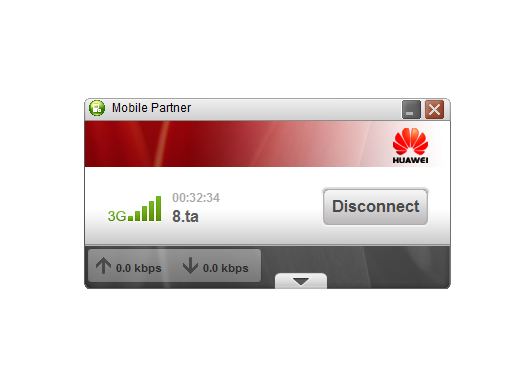
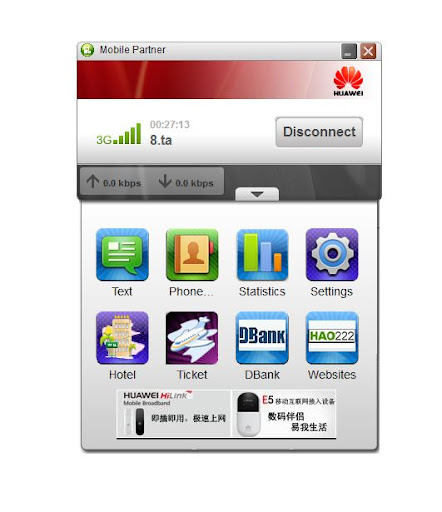
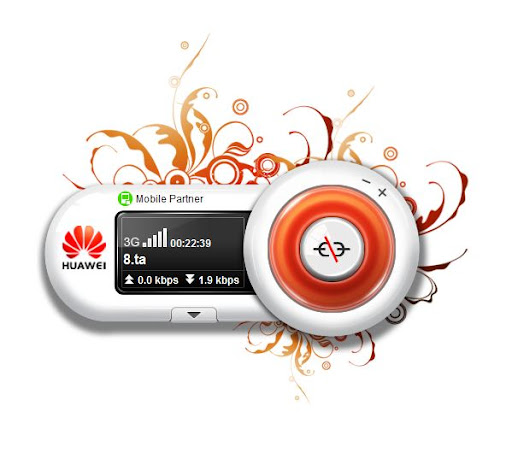
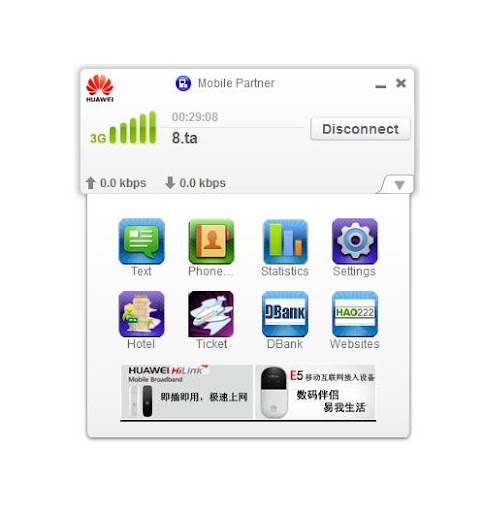
I see Huawei has a V23 Mobile Partner out i hadn't noticed before - Gives you the choice of 3 skins

Default
Huawei23Defaultmin.JPG


Default expanded
Huawei23Defaultmax.JPG


Flower
Huawei23FlowerMin.JPG


Flower expanded
Huawei23FlowerMax.JPG


White
Huawei23WhiteMin.JPG


White expanded
Huawei23WhiteMax.JPG


As default it has no USSD enabled & only "Network Type" dropdown box enabled not the "Network Band" box,
With a bit of messing around i'm sure that + the Links & Icons can be modded.
Atm it has Driver version 4.23.03 which is a step up from Mtn's latest dash that's using 4.22.19

I think that "Flower" skin i quite cool - well done Huawei - bout time you woke up:p

http://www.huaweidevice.com/resource/mini/201111101685/mpartner/index.html
 
Last edited:
Default is fine, except the red band on the top is irritating.
 
Here's an unofficial install file to put in on your stick for those that want to do that.
http://www.mediafire.com/?h3p8nka32mjix97

WARNING: Unless its just me, i think these new 4.23 drivers aren't quite up to scratch.
Seems to have trouble detecting/installing the modem driver when installing this version from stick.
Might be just 1 of my ports being stubborn ,but caution advised.
The PC install version (link in 1st post) works fine.

If anyone does the stick install can you post if the modem driver installs ok without any issues.
Another possibly good thing about this version is it has "Live Update" function which if they use it could be a win.
 
Last edited:
Have now got the USSD option working for checking balances:
From the "Operation" menu you'll now see it there.
Cell C for Balance enter *101#
8ta enter *188# then it sends you balance via SMS
For USSD menu for both Cell C or 8ta *147# works

Has all 5 skins in it.
Doesn't have the modem adverts at the bottom of the expansion window.
Is one version below the 1st one but is still V23 & now has the latest 4.23.03 drivers in it.
Opening Network Bands looked like creating more problems than solutions so i left it closed.

For PC
http://www.mediafire.com/?m2evdvfwfkir4fb (17MB)

For install onto the Dongle/Stick
http://www.mediafire.com/?6ycw9xuoua16a9q (20MB)

If you install it onto dongle/stick let the drivers install then go to the dongle & run AutoRun.exe or Setup.exe.
You may need to reboot if it still doesn't detect the modem after that.
Actually picks up the drivers better on Win8 than Win7.

Enjoy!
 
thanks you for sharing to us. use the latest on your post. work flawlessly on my E156G will try to 3770 Vodafone
 
Last edited:
Thanks for this info. I had stumbled across the same release from India and they have another skin which you can view here:
http://drrdb.blogspot.com/2012/03/huawei-india-contact-support-mobile.html

Anyone know if there is a version for Linux from Huawei? Will be building a flash file to put both Windows and Mac on same stick. Would like to include Linux if possible as I am always on a variety of machines.

Thanks again,

Stephen
 
Thanks, Stephen. I installed this one after having some problems with my older version and it's great - been using it for a week now on my Huawei E2010. My connection seems a bit more stable and when it does die on me the Mobile Partner doesn't hang and reconnects far quicker.

I don't know if the voice, USSD option is any use in SA with 8ta. I tried making a call to my cell phone and it didn't work. I tried sending the *147# and *188# commands and got no response from 8ta.

A significant addition to the Settings tab is an online update.
 
Was a new release 3/12/12 with V4.25.10 drivers in it(23.009.05.03.1014) available here
This looks like single skin & no USSD - i haven't bothered to monkey with it.

Below is the same earlier dash i posted with drivers updated from v4.23.03 to v4.25.10 now.
Still has the 5skins & the USSD enabled.
CellC Balance = *101#
8ta Balance = *188#
USSD menu for loading bundles for either = *147#

File to install just to PC (17MB) - http://www.mediafire.com/?a747ynoyy2f8kf3

File to install to Dongle/Stick (20MB) - http://www.mediafire.com/?wcyai97wcxc6jun


Version 4.23.03.00
Fix the inf files and PNF files can not remove when the driver uninstalled.

Version 4.23.04.00
Add new PID 155B and 151A,151B,151C,151D,151E,151F.

Version 4.23.05.00
Add a request to set the MTU size for NDIS driver.

Version 4.23.05.11
Fixed an issue that K4605 can not check the SIM card when PIN is locked in Win7.

Version 4.23.06.00
Support dual mode feature.

Version 4.23.07.00
Fix the issue that driver returns incorrect response status to vendor specific mode selection order command.

Version 4.24.00.00
Fix the issue that failed to get IP address after restart dashboard or PC.
Add Jungo baseline.
Support dual mode feature.
Add parameter "-f2" to create and delete log file.
Add power state command from S0 to S0 when system startup or reboot.
note: This version is based on version 4.23.05.00

Version 4.24.01.00
Fix the issue that failed to connect to network in dual mode .
Fix two jungo wwan issues.
Fix the issue that crash in intialize.
Support more download speed display.
note: This version is based on version 4.24.00.00

Version 4.24.02.00
Add the support for new pid of 156A,156B,156C,156D,156E,156F.
Add the new MODEM port name, with matched with protocol 0x17 for Orange on J platform.
Add a new feature for setting register mode with WWAN(VDF requirement).
Add the new port name without "HUAWEI" on J platform.
Fix the issue that not support 5s suspend on J platform.
Fix the issue that cant use SDT tool on J platform.
Fix the issue that packet lost in NDIS driver on J platform.
Fix the issue that EVDO mode can't show signal on WWAN.
Fix the issue that in manual registration.
Fix the issue that VMB can't display right option in "Bearer".
Fix the issue that attemptsRemaining when entering pin with wwantestapp.
Fix the issue that HEADER doesn't intialize when querying OID_WWAN_SIGNAL_STATE with wwantestapp.
note: This version is based on version 4.24.01.00

Version 4.24.03.00
Fix the issue that failed to open web by wwan.
Fix the issue that wwan driver initialize delay.
Add a new feature for QUALCOMM WWAN setting static NBNS.
note: This version is based on version 4.24.02.00

Version 4.25.00.00
Support IPV6 feature for NDIS driver both in Qualcomm and Jungo.
note: This version is based on version 4.24.03.00

Version 4.25.01.00
Support AT^EONS for dispaly register name in UCS2.
Add new PID information.
Fix the issue that WWAN visible provider display incorrect.
Fix the issue that WWAN driver can't hanlde multi-inications from UE
Fix the issue that set register mode failed.
Fix the issue that can't support UNICODE charset in WWAN page.
note: This version is based on version 4.25.00.00

Version 4.25.04.00
Fix the issue that busenum.sys can't be loaded with newest pid info
Fix the issue that at response parsing problem in infineon platform
Fix the issue that IPV6 DNS can't be acquired in E5 products
Fix the issue that the auto listening is disabled in modem dialing process
Fix the issue that IPV6 primary and secondary dns's order are not correct
Fix the issue that LTE submode can't be displayed in Jungo Driver
Add the feature that driver informs acm port status to device
Fix the issue that wwan state abnormal with device that can't handle at^syscfgex? correctly
Add the feature that support wwan driver's OID read unicode MMS through cdma datacard
Add the feature that disable wwan sms function according to registry config in J and Q platform.
Fix the issue that still indicating RSSI after removing sim card.
note: This version is based on version 4.25.01.00

Version 4.25.06.00
Fix the issue that connecting vpn failed in k3770
Fix the issue that remaining pin times when input error pin codes in k3806 and e369
Fix the issue that k3806 update airplane icon failure in Win8 OS
Fix the issue that driver can't handle ^ltersrp indication in E3276
Fix the issue that K4605 fail to connect network in win7
note: This version is based on version 4.25.04.00

Version 4.25.07.00
Fix the issue that connection speed not correct in LTE mode(E3276)
note: This version is based on version 4.25.06.00

Version 4.25.08.00
Fix the issue that wwan cann't connnect when back to network again in Win8 in Q and J platform.
Support ports name without "HUAWEI".
Fix the issue that crash in WLK1.6 authentication with MC607 module.
Add the passby of not obtain provider name and ICCID in win8.
note: This version is based on version 4.25.07.00

Version 4.25.10.00
Fix the issue that wwan driver can't be unloaded in low power mode in Q platform.
note: This version is based on version 4.25.08.00
 
OK, so I tried out the newest Mobile Connect from Huawei (http://www.huaweidevice.com/resource/mini/201111101685/mpartner/index.html) and I cannot seem to find where to modify the links. I first looked in the skins folder at the various xml files but found nothing. Any ideas on where these may be found?

Thanks. Stephen

Update 1: The links are to Huawei sites in Chinese. This link tray automatically opens after a set time. Haven't times this yet.

Update 2: The link tray opens after 20 seconds. Cannot find where this is set yet.
 
Last edited:
In the Skins folder - Open the ExtendFrame.ui with notepad.
EG:
#miniplugin_two_2:hover{
border-image: url(./skin/IDS_MINISKIN_BLACK/2_hover.png);
}</string>
</property>
<property name="text">
<string/>
</property>
<property name="flat">
<bool>false</bool>
</property>
<property name="CLASSID" stdset="0">
<string/>
</property>
<property name="URL" stdset="0">
<string>http://www.ctrip.com/smartlink/smartlink.asp?c=hw</string>
</property>
<property name="EXEPATH" stdset="0">

With the older 5skin dash you can stop that ad bar from showing by editing as below in the "config"/PluginsConfig
Change it to the red line & no more ad bar.


<item name="XFramePlugin" clsid="D754AE84-535F-4c18-85F8-F154CFE34DDF"/>
<!--item name="AppListUIPlugin" clsid="F367D78A-0578-FBC4-A89E-65CB0AB3CCEC"/-->

that will give you this

MPnoadbar.GIF

instead of this

MPV23adbar.GIF

You can still use all of the functions by right clicking & selecting from that menu
 
Last edited:
Sheasbys - I've had time tonite to have a look at that new release more - the info above don't hold true for that one - the URL's aren't in that file anymore & editing off that AppListUIPlugin will make the dash not visible.

In its original form it will show as this

MPV23newads.GIF


.
If anyone wants it use that dash (23.009.05.03.1014) but without the ads showing so it stays just like this

V23noads.GIF


Here for PC - http://www.mediafire.com/?61fv793qci529fx

Here for Dongle/Stick - http://www.mediafire.com/?uhhgd2on72j1my6

Its just single skin as above but now the USSD function is working & no ad tray shows

*Edit*
To anyone that installed the dongle file before now:
If your getting the window popup reading " The same version has been installed.Do you want to remove it first?
That's now been fixed - you do need to re-download & install the dongle file again tho.
Should'nt have been an issue with the PC file.
 
Last edited:
Another v23 option...

View attachment 126855

This is an enhanced version with extra signal and network info, USSD, frequency band selection, etc.
Comes with driver version 5.01.06.00

Download link: http://yadi.sk/d/NoZYPgmoL5US7

Driver version 5.01.10.00 download link: http://yadi.sk/d/viS8swTlQRkZG

The 4G Band drop-down list for the above installation contains only 2 LTE bands from which you can make a choice. Here are some modified files which will enable you to select from 7 common LTE bands.
 
Last edited:
Hi, can anyone please help me to get the call function working. The USSD etc works perfectly in the version above. However the call function isnt. Under settings etc the options for USSD etc shows but no Call. How do I get the option to work? This version is amazing apart from the Call not working. It works in other versions of the Software etc.. but I like this look & feel with the skins etc.. please help if you can.
 
Note that the 'Call' function will only work if your USB modem supports voice calling. Most don't.
 
HI , yes mine does.. the voice is enabled. I can make normal call etc with Mobile Partner 16 - 21. I just thought with this nicer looking version it can be enabled somehow.
 
Top
Sign up to the MyBroadband newsletter
X