Linux and RAW on a AAO

Mine seems to be 9-12MB.

Cool thanks. My Canon blasts out ~4MB files but the thing is that I have an 8GB card... enough space for 1800 photos (only 7.2GB available space)... more than my 500-shot battery can do, so having anything up to ~10MB for a RAW image doesn't bother me whatsoever.


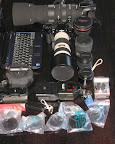
This is my assorted gear though I tend to leave one body at work during the week and cart the rest (sans the big lens).

Am I the only one to spot the Rizla in that picture? :D

go bwana!
 
Hey Bwana, you're not supposed to advertise!

all those bags from your bank that is
 
Hey Bwana, you're not supposed to advertise!

all those bags from your bank that is
:) those hard cases take up too much space.
Thats nice and considerate of them :D
I'm sure you used to be able to get papers without the adhesive on them but for the life of me I cant find them anywhere so its Rizla for now.
 
OK - well I gave up on Linux and RAW with my netbook and went with Lightroom under W7.

Anyone know of a way of auto importing the contents of the SD card when I insert it into the netbook?
 
Don't have a clue HOW I set mine up... but mine does that, almost....

It fires up lightroom and the import window pops up as soon as I plug in my camera (or any external drive with pictures on for that matter)
 
Don't have a clue HOW I set mine up... but mine does that, almost....

It fires up lightroom and the import window pops up as soon as I plug in my camera (or any external drive with pictures on for that matter)
I'm not really sure yet that I want it to open Lightroom 3 and import. I'm looking for more of a quick, on the run, SD/CF card backup facility.
 
I knew I'd seen SOMETHING :D
The bolded one is prob the easiest


You could write an autorun.inf for the SD card, so that when you insert the SD card you can run a backup script from the autorun menu.

Or you could write a script in autohotkey to run in the background and detect when a drive is inserted, check if it's a particular one and run your backup script if it is. That is pretty advanced though - you'd probably want to ask for help in the autohotkey forums.
 
I'm not really sure yet that I want it to open Lightroom 3 and import. I'm looking for more of a quick, on the run, SD/CF card backup facility.

I have not used this, but from what I've heard, PhotoMechanic may be what you're looking for. Now if you hadn't gone and installed Windows, I could have given you some one-liner magic for it :)
 
I knew I'd seen SOMETHING :D
The bolded one is prob the easiest


You could write an autorun.inf for the SD card, so that when you insert the SD card you can run a backup script from the autorun menu.

Or you could write a script in autohotkey to run in the background and detect when a drive is inserted, check if it's a particular one and run your backup script if it is. That is pretty advanced though - you'd probably want to ask for help in the autohotkey forums.
Actually I ended up using window's own auto play function. :o

I have not used this, but from what I've heard, PhotoMechanic may be what you're looking for. Now if you hadn't gone and installed Windows, I could have given you some one-liner magic for it :)
OSX wouldn't have worked. WIFI drivers.
 
Dont forget to calibrate . . .

picture.php


:D
 
:mad: windows query in linux thread :mad:

seriously though, look at faststone for moving your images around under win.

On topic, I found gThumb to be really nice for viewing RAW images on my Samsung NC10 with Ubuntu.

@Bwana: that pic of yours is a *really* good idea - wish you'd shown it earlier. Am off to ETvl tomorrow and don't have time to calibrate now. [Thinks: hmmm, maybe I should take Spyder and ArgyllCMS with to ETvl.] :D
 
Top
Sign up to the MyBroadband newsletter
X