Looking for a media player

Hope I can find some help here.. I am looking for a media player with no onboard storage, ie, I can play content off my home network via LAN or via external hdd attached via USB.

I had a look at the Seagate Goflex TV and teh Western Digital WD TV Live. Both seem to have performance issues..

I thought I should ask the SA public for an opinion.. Anyone have a good media player for a full HDTV? I am also looking to play a host of formats (avi,mkv,divx,mp4,mov,iso etc) :)

Any help would be appreciated :)

OK, I have researched this for a while and it depends what you primarily wanna use it for. If your main use is gonna be for Netflix/Vudu/Hulu Plus (which it doesn't sound like it from your post) then you'll probably be best off with a WDTV Live or one of the main consoles (360 or PS3; PS3 if you want 1080p Netflix).

My guess is that you want it mainly for playing off local content over your home network/attached storage. The Boxee Box from D-Link is what I settled on and it's a brilliant little box. Unconventional design which IMHO looks super cool. Here's a picture of it:

images


IT supports HDMI out, 10/100 ethernet, any hard drive connected to it essentially becomes a NAS since the Boxee makes it available over the network and this thing plays any format you throw at it...and I mean anything. One of the best things about it is probably the remote: it's a very very simple design, D-Pad on one side with play/pause button and a menu/back button; that's pretty much all you need. But if you flip it over it's a full kwerty keyboard!

Boxee-Box-remote.jpg


It runs off an Intel Atom processor and can handle 1080p content just fine unlike the Apple TV. It also has Netflix and Vudu if you plan to VPN.

It's super quiet too. I think what's most appealing about it for me is that it presents your TV Shows and Movies in a format that's made for a TV. It looks like this:
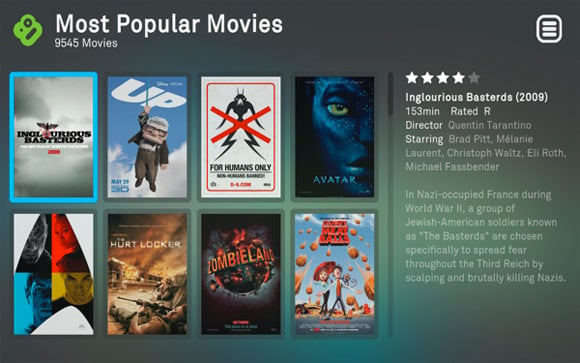
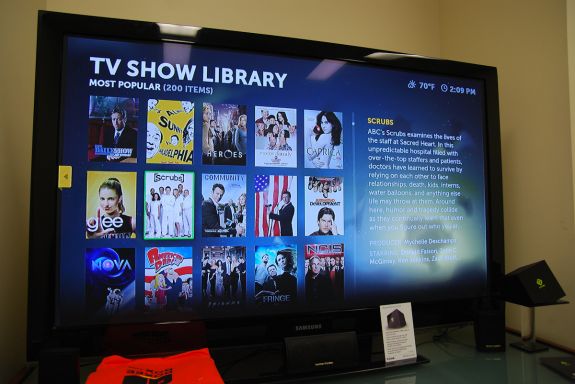
boxee-box-ui.jpg


boxee-05_575px.jpg


But that's not all (no I don't work for them so bleh...)

You also get access to a full repository of apps for this box and 3rd party repositories are all over the place that gives you access to content from 3rd party developers and providers. Apps look like this:

viewsonic_boxee_smart_tv_demo_ces_2011.jpg


The main things are Youtube, Revision 3, Netflix, Vudu, Break, Shoutcast and pretty much anything else you can think of (almost).

This Box isn't available in SA but you can buy it through Amazon and have a 3rd party mail forwarder ship it for you or if you have family that side that's a better option.

If not, Boxee has the software which runs on the Boxee Box available for download for multiple platforms like Windows, Mac and Linux so if you're up for it, you can even build an HTPC on the cheap and load just the Boxee software to DIY it yourself. That's a good idea if you want to have the old v0.9 Boxee UI. Consensus is that the older UI was preferred to the one currently on the Boxee Box but either way, for me, it trumps the hell outta the other options out there.

I forgot to mention it's also got built in Wireless N so that's a plus too. Software is not 100% polished but they're a small company and they're expanding quickly so this thing is on it's way up. I've had it for over a month now and it's awesome, can't recommend it enough.
 
Wow... really indepth review :), I think i am goign to settle with the WDTV, seem like just what I need
 
Boxee Box looks decent.

Still recommend Mede8er if you have a bit extra to spend (compared to WD TV). It's probably the most popular, looks great and is bundled with great accessories. You can put a HDD inside it, too - unlike the WD TV.

Really depends on budget.
 
I have two WDTVs - one the original model and the other the WDTV Live. Pretty well no problems at all. The older one travels with me and used in hotel rooms around the world and in my cabin while the other stays on my home network.

Only issue with the home network gizmo is streaming full-size Blue-Ray files (m2ts) which stutter if the original bitrate is too high. In such cases I just put the relevant movie on a external HDD and connect it direct to the WDTV and it works like a bomb. I don't have a BD player but I'm told by my mates who have, the quality ex the WDTV Live is perfect.

Incidentally there was a firmware upgrade to the 'Live' on Friday and according to the splurge put out by WD, my Blue-Ray streaming issue should have been addressed but I haven't had a chance to check it out. Cricket and Rugby watching seems to have got in the way.
 
Are all of these sheets with teh info and pics about the movies/tv series downloaded automatically or do you have to do it manually?

You use thumbgen and it looks up each movie/series based on the file or folder name and scrapes all the content from IMDB and other sites. There are lots of templates available online so you can customize it to a high degree.

I ran the original FW for a year before taking the plunge and it improves on the WD TV Live immeasurably.
 
Boxee Box looks decent.

Still recommend Mede8er if you have a bit extra to spend (compared to WD TV). It's probably the most popular, looks great and is bundled with great accessories. You can put a HDD inside it, too - unlike the WD TV.

Really depends on budget.

I've got a friend with mede8er and it's not bad, it's just more than what many people need for a lot of money. If you like to keep your media centrally, on a NAS, and have a universal remote you really only need as simple and cheap a box as possible. The WD TV Live also has the advantage of having a homebrew community allowing you to customize it heavily.
 
I've got a friend with mede8er and it's not bad, it's just more than what many people need for a lot of money. If you like to keep your media centrally, on a NAS, and have a universal remote you really only need as simple and cheap a box as possible. The WD TV Live also has the advantage of having a homebrew community allowing you to customize it heavily.

Yeah, I actually misread the OP - if he doesn't want internal storage, WD TV Live is the way.
 
You use thumbgen and it looks up each movie/series based on the file or folder name and scrapes all the content from IMDB and other sites. There are lots of templates available online so you can customize it to a high degree.

I ran the original FW for a year before taking the plunge and it improves on the WD TV Live immeasurably.

where about on the hard drive does thumbgen save everything?
 
The mede8tor, xtreamer pro, egreat, WD Live and the Seagate are all old technology and is going to be absolute in the next few months, I would go with the BoxEe, its technical specs are very good and it can do just about everything/anything

If you are willing to wait a month or two you can rather get the Xtreamer Ultra, its going to change the face of media players http://www.xtreamer.net/ultra/
 
The mede8tor, xtreamer pro, egreat, WD Live and the Seagate are all old technology and is going to be absolute in the next few months, I would go with the BoxEe, its technical specs are very good and it can do just about everything/anything

If you are willing to wait a month or two you can rather get the Xtreamer Ultra, its going to change the face of media players http://www.xtreamer.net/ultra/

What is the costs involved?
 
The mede8tor, xtreamer pro, egreat, WD Live and the Seagate are all old technology and is going to be absolute in the next few months, I would go with the BoxEe, its technical specs are very good and it can do just about everything/anything

If you are willing to wait a month or two you can rather get the Xtreamer Ultra, its going to change the face of media players http://www.xtreamer.net/ultra/

You are talking about a full blown HTPC with 4GB RAM, dual core processor etc. That is not *new* or revolutionary; it's to fulfill a different need. What I want and I think the OP is looking for is a small, cheap box that can play all his media over the network.

Bigger/more powerfull/more expensive is not necessarily better for a media player.
 
where about on the hard drive does thumbgen save everything?

You can configure it, but it's either inside the movie folder if they're all in separate folders, or in a separate folder. WDLX TV live will pick it up. It's all highly configurable.
 
According to some rumours, they will be obsolete ... But not because of full blown media PCs.

The media section of TVs is increasing to the point where one doesn't need anything external. They're not there yet - but they close.

My 18 month old LCD does pretty most formats thrown at it and has DLNA support for streaming wireless from the other PCs. The reason I don't like it is the GUI and speed compared to a dedicated streamer at this point.

However in another 18 months we may not have media streamers
 
I have a WD TV Live and once I installed custom FW and set up my network properly I have had no issues. It plays 1080p MKVs with DTS with no issues and the custom FW (WDLXTV Live) you can make movie sheets for all your movies and series which is very neat.

If you want to use external HDs you can plug them into the USB port and it will share them over the network.

Overall I think that with the custom FW at the price it cannot be beaten.

(BTW the Xbox does not play MKV with DTS properly)

+1 :)
 
According to some rumours, they will be obsolete ... But not because of full blown media PCs.

The media section of TVs is increasing to the point where one doesn't need anything external. They're not there yet - but they close.

My 18 month old LCD does pretty most formats thrown at it and has DLNA support for streaming wireless from the other PCs. The reason I don't like it is the GUI and speed compared to a dedicated streamer at this point.

However in another 18 months we may not have media streamers

That makes a lot of sense, especially for less technical folk. My older plasma doesn't have the feature set, but for simple plug and play movie viewing I wouldn't mind the feature. I still like to hack and customize though, so I could imagine it ending up being a bit like iphone vs android.
 
Top
Sign up to the MyBroadband newsletter
X