Looking for a media player

dayav07

Senior Member
Joined
Jul 25, 2008
Messages
608
Reaction score
21
Location
Durban
Hope I can find some help here.. I am looking for a media player with no onboard storage, ie, I can play content off my home network via LAN or via external hdd attached via USB.

I had a look at the Seagate Goflex TV and teh Western Digital WD TV Live. Both seem to have performance issues..

I thought I should ask the SA public for an opinion.. Anyone have a good media player for a full HDTV? I am also looking to play a host of formats (avi,mkv,divx,mp4,mov,iso etc) :)

Any help would be appreciated :)
 
Other than the software updates being a little buggy and requiring factory resets I have never had any problems with my WD TV Live.It has played every format I have thrown at it including the ones listed in your post.Would highly recommend it and I see you can get it at Computer Mania now for <R1K.
What performance issues are you referring to?
 
On some websites they say that playback of 1080p video over a lan network can be a bit laggy, for both players.... how does the wd handle when it comes to viewing many files in a folder?

EDIT: I am still waiting to see what router I get from Telkom, but if it has a USB port ill plug my 2TB external into it and share over lan with the media player... If not then Ill buy a USB to NAS converter... I prefer to have it connected to the network rather than moving it around everytime I want to add files to the drive
 
Last edited:
Sorry to hijack - but you guys seen the Toshina Stor.E?!
 
I can and will recommend a eGreat media player, i have two, one in my room and one in out tv lounge they often are both running at the same time streaming HD and SD content works 100%. The two models i have are the eGreat M31B and the M34A. The M34A would be the one you are looking for as it doesnt take an internal but it has LAN and USB and esata, can even power a sata drive via the media player as it has one of those dual connectors as well...

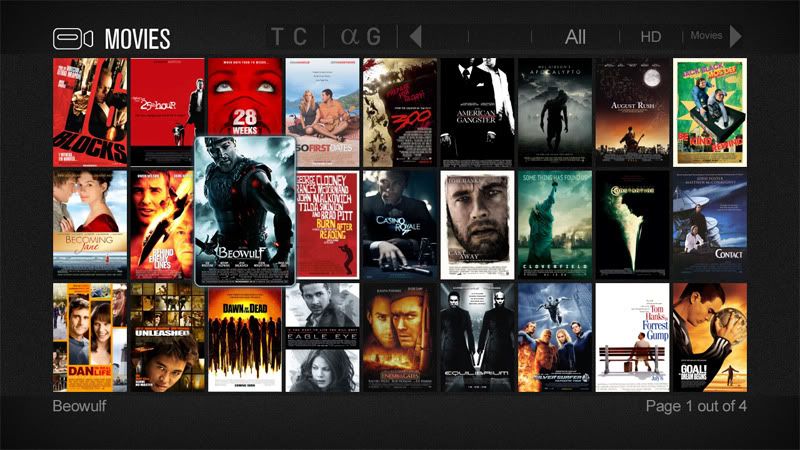
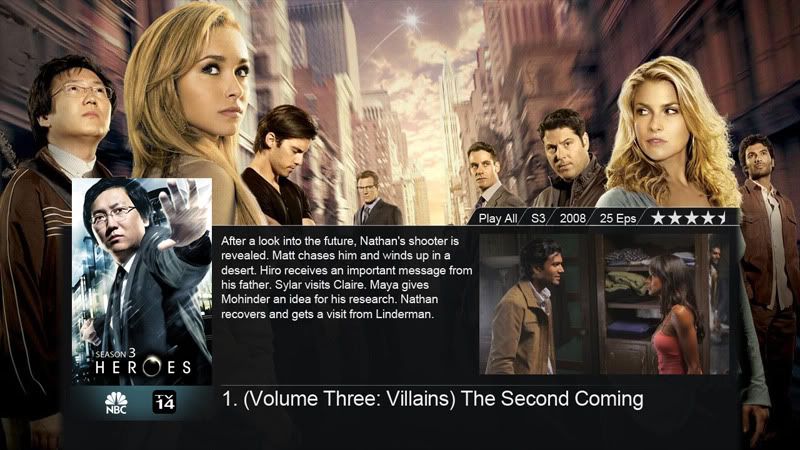
Both are great little devices and i have set them up to use YAMJ which makes my media library appear like this:

01_3-row_popup.jpg


18_coikenmod.jpg


21_tv_dim.jpg


09_8-banner.jpg


I then use TVRename with task scheduler to move my series to the correct folder and YAMJ to update the library twice daily. Works like a charm my tv series is an automated process from start to end.
 
I had issues with the WD media player, returned it, and had issues with the 2nd one as well.
So I tossed it in the rubbish bin.

I wanted to buy something else, but found that my xbox does a pretty decent job.
 
How about the medi8tor? Locally produced product which a lot of my friends say is the best media player around. They have many different models and one of the cheaper ones doesn't have a hdd, but does have a NIC!
 
I can and will recommend a eGreat media player, i have two, one in my room and one in out tv lounge they often are both running at the same time streaming HD and SD content works 100%. The two models i have are the eGreat M31B and the M34A. The M34A would be the one you are looking for as it doesnt take an internal but it has LAN and USB and esata, can even power a sata drive via the media player as it has one of those dual connectors as well...

Both are great little devices and i have set them up to use YAMJ which makes my media library appear like this:

I then use TVRename with task scheduler to move my series to the correct folder and YAMJ to update the library twice daily. Works like a charm my tv series is an automated process from start to end.

nice apps, never heard of them.
 
I have an Xtreamer (Mk1) which is rubbish and Patriot Memory PBO core Media Player running mede8er firmware. PBO+wifi dongle appox. R1.3k
 
Sorry to hijack - but you guys seen the Toshina Stor.E?!

Have had two of those. Now using one as an internal drive after the hard drive enclosure packed up and have just moved the second one to a Vantec enclosure after the same problem occurred. Both were around 3 months old at the time

Avoid :mad:
 
nice apps, never heard of them.

Its a really great setup, i love the fact that its automated from beginning to end, RSS downloads files get moved and library is updated by the time i want to watch anything. If you want any help with commands to automate TVRename i can give you the text in the batch file im using! Just shout!
 
I can and will recommend a eGreat media player, i have two, one in my room and one in out tv lounge they often are both running at the same time streaming HD and SD content works 100%. The two models i have are the eGreat M31B and the M34A. The M34A would be the one you are looking for as it doesnt take an internal but it has LAN and USB and esata, can even power a sata drive via the media player as it has one of those dual connectors as well...

Both are great little devices and i have set them up to use YAMJ which makes my media library appear like this:

01_3-row_popup.jpg


18_coikenmod.jpg


21_tv_dim.jpg


09_8-banner.jpg


I then use TVRename with task scheduler to move my series to the correct folder and YAMJ to update the library twice daily. Works like a charm my tv series is an automated process from start to end.

I must say.... that is really impressive!! What sort of formats does it play and whats the price range?
 
or anyone else care to give some feedback on the western digital wd tv?
 
I have a WD TV Live and once I installed custom FW and set up my network properly I have had no issues. It plays 1080p MKVs with DTS with no issues and the custom FW (WDLXTV Live) you can make movie sheets for all your movies and series which is very neat.

If you want to use external HDs you can plug them into the USB port and it will share them over the network.

Overall I think that with the custom FW at the price it cannot be beaten.

(BTW the Xbox does not play MKV with DTS properly)
 
Wow... I have just swung over from wanting to buy a Seagate Goflex TV to a WD TV Live :)
 
If you want to check out the potential do an image search for "thumbgen movie sheets". It takes some time to set up, but it's worth it when you have over 500 movies.
 
I am watching a Youtube video on it right now... :) If I have a hard drive plugged into my router via usb or nas will the wd tv live pick it up?
 
I then use TVRename with task scheduler to move my series to the correct folder and YAMJ to update the library twice daily. Works like a charm my tv series is an automated process from start to end.

Downloaded TVRename - works nicely. Thanks.
 
If you want to check out the potential do an image search for "thumbgen movie sheets". It takes some time to set up, but it's worth it when you have over 500 movies.

Are all of these sheets with teh info and pics about the movies/tv series downloaded automatically or do you have to do it manually?
 
Top
Sign up to the MyBroadband newsletter
X