Motherboard temperatures

The_Unbeliever

Honorary Master
Joined
Apr 19, 2005
Messages
103,193
Reaction score
10,233
Location
Nkaaaaandla
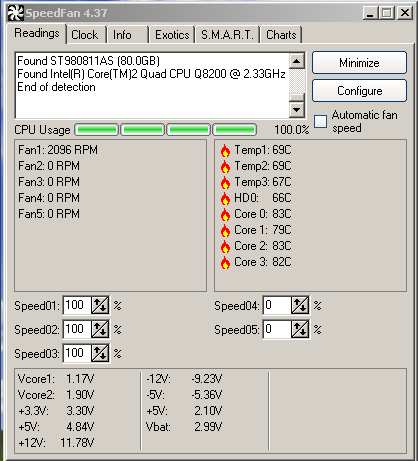
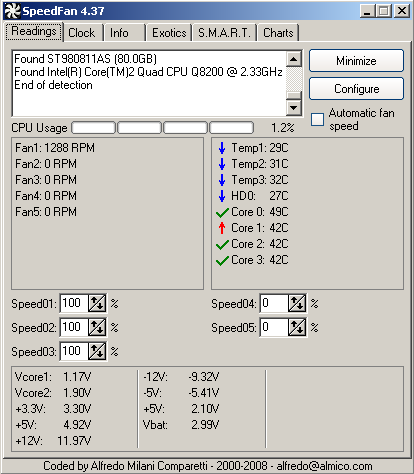
Compare the following screenshots (before and after) :
start.PNG


high.PNG


What happened here is that we put the motherboard in a sealed box - and left it overnight.

Clearly we have to look at other cooling solutions - either have two fans mounted on the box, one blowing cool air in, the other one sucking hot air out, or some other heat exchanging system.

A fluid-based heat exchanging system is out of the question, so it'll have to be either the fans or something simple like a heat exchanger/diffuser mounted to the box to remove excess heat. (Something like a CPU heatsink, but with two fans on, one outside the box, and the other one inside the box).

Any other solutions we can look at?

Regards

Libs
 
And why is it sealed?
In the first screenshot the CPU is 1.2% and the second it is 100%. Was the first picture outside the sealed box, and the second inside? If so what does the temp look like outside the sealed box under full load?
 
Last edited:
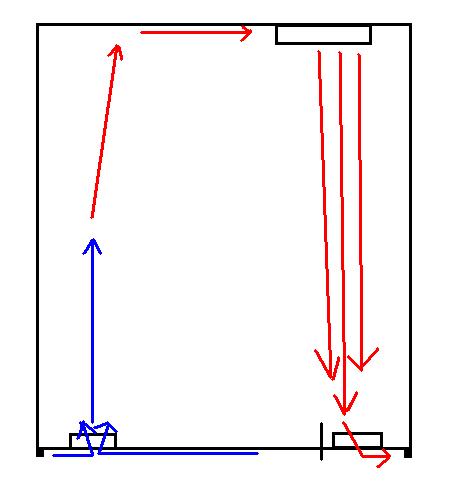
Hole at bottom for fan blowing in, hole at top for fan sucking out, and one inside blowing at motherboard/components to dissipate heat upwards.
 
The box is a stainless-steel tamper-proof box, to prevent unauthorized access.

(Like the big electrical switchboard boxes, but build specifically to our specifications to house our equipment inside).

I cannot say more, NDA and all that stuff. :(

@ Postman - was thinking the same, but if security requirements are such that we cannot do that kind of thing, then we'll have to look at other means.

@ rest - the motherboard was put inside the box, and temperatures was taken when everything was cool. Throughout the day I sampled the temperatures, and it remained thusly : motherboard at around 30 to 45degC, and the CPU at just below 79 deg C.

Obviously the airconditioning played a role in cooling things down as we switched off the airconditioners after hours, and this caused the box not to be cooled down as much.
 
Okay, perhaps you could some how cut some slits/vents at the bottom and top and mount fans on the inside.
 
Based on what you said Libs, perhaps the metal used for the casing is not assisting in dissipating heat to the outside but rather trapping it. Did you guys perhaps consider more powerful fans as well?
 
Something like that should work.

Thanks for your feedback!

Libs

You could also put the box on feet and have the bottom intake slits on the bottom of the case so nothing is visible from the front/sides. The exhaust will pretty much need to be at the top (heat rises), unless you have a bigger fan inside the case at the top forcing rising hot air back down to an exhaust at the bottom.
 
Based on what you said Libs, perhaps the metal used for the casing is not assisting in dissipating heat to the outside but rather trapping it. Did you guys perhaps consider more powerful fans as well?

Ja, fans only move air, doubt internal fans in a sealed box will make things any cooler.
 
A cooling solution for this rig should have been implemented at the design stage. What bright spark stipulated that this "secure data facility" could not have any airflow??? That's like an architect specifying that the toilets in a house should be plumbed into a blanked off 1 metre long pipe terminating in the front garden. Sounds like madness to me.:confused:
 
That design's going to need some serious ducting, Postman...
 
We had a similar scenario once; the customer did not want holes made for a fan. It is a security flaw if you can just punch out the fan and stick your hand in to change things ;)

We ended up mounting a massive inverted heatsink at the top of the inside of the enclosure, with a fan blowing through the heatsink blades. This and lowering the CPU clock was enough to run everything coolly.....

Edit: Do you need to run a Quad at 100%??
 
A cooling solution for this rig should have been implemented at the design stage. What bright spark stipulated that this "secure data facility" could not have any airflow??? That's like an architect specifying that the toilets in a house should be plumbed into a blanked off 1 metre long pipe terminating in the front garden. Sounds like madness to me.:confused:

Keep in mind that the setup started off with Pentium2 CPU's - for which no additional cooling was needed.

The CPU won't run at 100% all the time, it is a worst-case scenario. Future CPU's might run cooler, or they might not, so we'll have to look at ventilation.

The box is mounted against the wall, it doesn't sit on the floor. We might be able to get away with passive cooling by just cutting vents at the top and bottom, but at this stage we're playing around with ideas to see what is there that we can do.
 
I asume there's a hole in the case for the PSU.
Also assume it's running inside a building (aircon)
on the side, add a slits/grill for a fan, with a duct running straight onto the CPU heatsink, to extract the hotair.
The slits at top and bottom with fans will also work. Fan at bottom sucking air in and fan at top blowing it out.

Get rid of the hdd. install these 2gb ready boost usb thingies (plug straight into the MB's usb headers). Network storage can be used in a more secure location.

Another option is to do passive cooling, somehow mounting a heatsink on the cpu straight to the case to fins on the outside cooling it. (read massive heatsink)

You can also dump the psu, and get a 12v DC-DC psu, which produces less heat.

Difficult to make recomodations with the limited information provided.
 
Top
Sign up to the MyBroadband newsletter
X