


Gtx Gaming
Gtx Gaming
Hopefully it also does amd cpus lolI teased at it recently on Carbonite. Tentative ETA is August
View attachment 1913095
View attachment 1913096
View attachment 1913097
South Africa’s biggest forum. Discuss, discover, and connect with thousands of members.
Hopefully it also does amd cpus lolI teased at it recently on Carbonite. Tentative ETA is August
View attachment 1913095
View attachment 1913096
View attachment 1913097

It’s literally an option shown in the first screenshot. LOLHopefully it also does amd cpus lol

Is that why I get the placeholder items on your website. Now it makes sense.I teased at it recently on Carbonite. Tentative ETA is August
View attachment 1913095
View attachment 1913096
View attachment 1913097
Placeholder items?Is that why I get the placeholder items on your website. Now it makes sense.
Okay maybe it is an actual brand or somethingPlaceholder items?
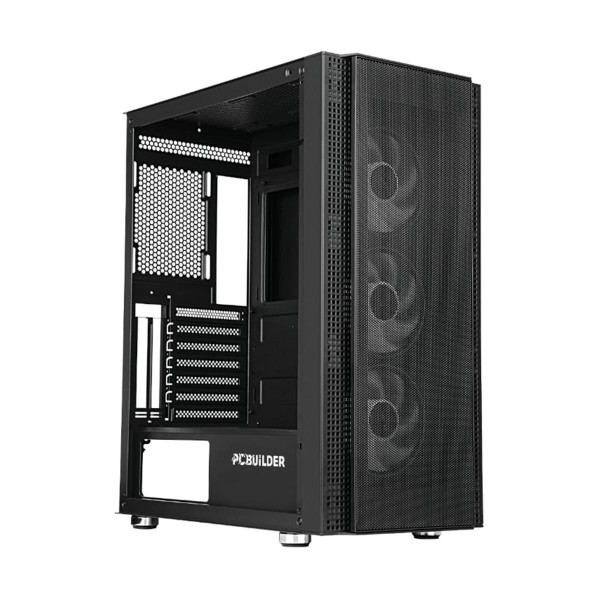
 progenix.co.za
He probably automatically imported that from supplier stock list. The supplier advertise this on there website but you not allowed to buy it. Its only used for internal pc builds for pcbuilder pre builds.They list it for them selfs somehow to keep track stock internally at the supplier.Okay maybe it is an actual brand or something
PCBuilder FORTRESS Tempered Glass Mid Tower ATX Case — Black — Best Deals at Progenix — South Africa
The PCBuilder FORTRESS ATX Gaming Chassis makes your chassis come alive when showing off your inner components. The ATX case ensures durability and protection for your components. The interior is spacious and provides ample opportunity to build on an exis
I don't automatically import ANYTHING.He probably automatically imported that from supplier stock list

This happened to me again, updating my BIOS to a newer recommended microcode fixed version and it's now deactivated.I quoted some random on the internet:
The same method is applicable to any new device. Automatic activation only occurs when the license is linked to an account; otherwise, you will need to activate it manually.
Since Microsoft implemented account linking, I have never reached a limit on my Windows activations. From one device to another, to upgrades, etc.
I am still a bit puzzled how the microcode update triggered a deactivation. I can only think OEM key... but back in 2023 I recycled an old laptop's Windows 7 key that worked on a new Windows 11 install. MS don't allow this any more, unless the key was already used on a Windows 11 activation (and linked to an account), possibly due to grey market license sales.


This happened to me again, updating my BIOS to a newer recommended microcode fixed version and it's now deactivated.
Trying the same fix like last time is not working (yet), the below post from Reddit says to wait a bit.
View attachment 1915089
Below seems like the issue that I am facing, my key was originally a Windows 10 Pro key. I'm now on Windows 11 due to upgrading at some point.This also happened to me some time ago when I did BIOS modding. I got it right by using their built-in Windows troubleshooter.

"Your screenshot of the slmgr command shows a generic product key. Where did the licence for windows originate?
A product key ending in 3V66T cannot be used to activate windows without a valid licence. Did the licence originate from Windows 10 or Windows 7/8 as part of the 2015 free upgrade offer?"

Did you attempt the troubleshooter? The 3V66T key is basically a trial or placeholder key. Your Windows 10 Pro key should already be upgraded so I don't see that being an issue. As long as you have a MS account attached to the device (Windows install), all your device keys should be stored. Have you logged into your MS account and checked which devices are registered?Below seems like the issue that I am facing, my key was originally a Windows 10 Pro key. I'm now on Windows 11 due to upgrading at some point.
In command prompt when i run:
slmgr /dlv
It shows that my product key ends in 3V66T.
how to reactivate windows after motherboard bios update - Microsoft Q&A
Windows 11 deactivated after I updated my motherboard bios. I have been unable to reactivate it. Anyone to contact Microsoft support for help with thislearn.microsoft.com
They mentioned some steps to try before they found that the user in question had this generic product key.
Win 11 trouble shooter reached a deadend:Did you attempt the troubleshooter? The 3V66T key is basically a trial or placeholder key. Your Windows 10 Pro key should already be upgraded so I don't see that being an issue. As long as you have a MS account attached to the device (Windows install), all your device keys should be stored. Have you logged into your MS account and checked which devices are registered?
The troubleshooter should prompt which devices are available. Basically you will be migrating the key. Just know that OEM keys don't like that. Since you have only upgraded (or even downgraded the BIOS), it should still ID.


The troubleshooter should prompt which devices are available. Basically you will be migrating the key. Just know that OEM keys don't like that. Since you have only upgraded (or even downgraded the BIOS), it should still ID.

Win 11 trouble shooter reached a deadend:
View attachment 1915241
When I login to my MS account I see the below device listed twice with the same details. Can you see where the issue lies, is there meant to be a serial number?
View attachment 1915237
@Fulcrum29 how does one contact MS Support? When I clicked 'Get support' from my device page, it sends me to a support page for Surface devices, https://support.microsoft.com/en-us/surface


Thanks I got hold of a support agent, they told me,I see they have changed up how they provide service. You need to go through this: https://visualsupport.microsoft.com/ Where you don't succeed you will have the option to have live chat.