


Need some advice from the network guru's out there.
Intent: Safeguard my web content by specifying the DNS to point to OpenDNS.
Problem: There is no option for a DNS address on any of the mobile & carrier screens.
When I had a normal ADSL line it was easy, DNS was one of the optional input options.
Some guides point to the DNS settings on the Ethernet tab:
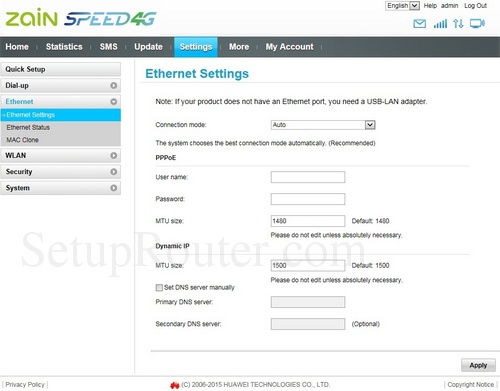
But this only affects LAN connections made to the router, wireless connections are "open".
When I set the DNS to OpenDNS in this screen above it also didnt block suspect content while connected via LAN.
I want to filter content at source like I had with ADSL. Any device that connects, via wireless or LAN and tries to access suspect content will get a screen like this:


Possible Solution: Buy a wireless router, plug the Huawei LTE router into this router via WAN port and configure the new router to use the OpenDNS DNS servers?
Intent: Safeguard my web content by specifying the DNS to point to OpenDNS.
Problem: There is no option for a DNS address on any of the mobile & carrier screens.
When I had a normal ADSL line it was easy, DNS was one of the optional input options.
Some guides point to the DNS settings on the Ethernet tab:
But this only affects LAN connections made to the router, wireless connections are "open".
When I set the DNS to OpenDNS in this screen above it also didnt block suspect content while connected via LAN.
I want to filter content at source like I had with ADSL. Any device that connects, via wireless or LAN and tries to access suspect content will get a screen like this:
Possible Solution: Buy a wireless router, plug the Huawei LTE router into this router via WAN port and configure the new router to use the OpenDNS DNS servers?


