Soldering vs Thermal Paste for CPU's

rambo919

Banned
Joined
Jul 30, 2008
Messages
27,890
Reaction score
11,537
Honestly this is confusing to me. I get a sense that either all the articles on the subject are in some kind of greek I never learnt or I was missing something all along.

What exactly gets soldered to what?
The chip to the heat spreader?
The heat spreader to the heat-sink&fan?

Is this actual physically hardened/dried metal?
Are you supposed to tear off the glued on heat spreader at some point and change the paste there too?

EDIT: Sorry my head was working overtime, changed the bad title
 
Last edited:
Honestly this is confusing to me. I get a sense that either all the articles on the subject are in some kind of greek I never learnt or I was missing something all along.

What exactly gets soldered to what?
The chip to the heat spreader?
The heat spreader to the heat-sink&fan?

Is this actual physically hardened/dried metal?
Are you supposed to tear off the glued on heat spreader at some point and change the paste there too?

What chip, what heat spreader?
 
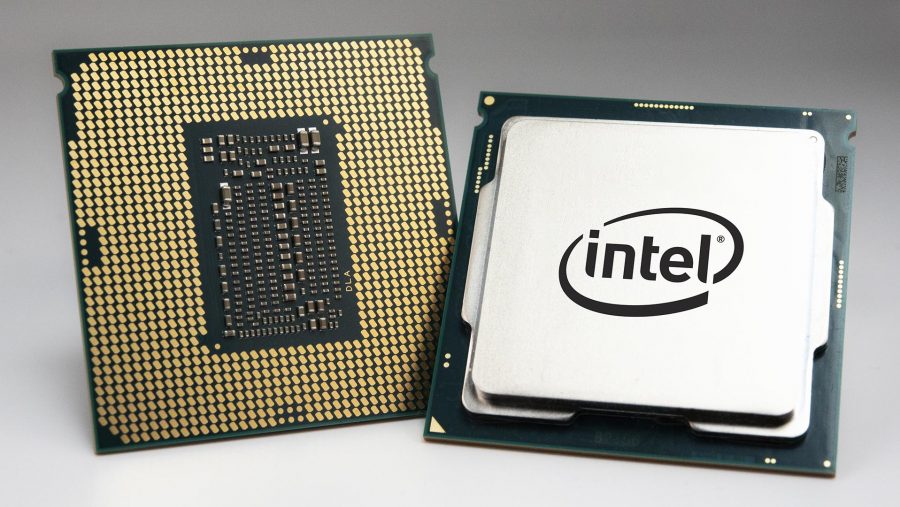
This is a CPU:

Intel-i7-9700K-CPU-900x507.jpg


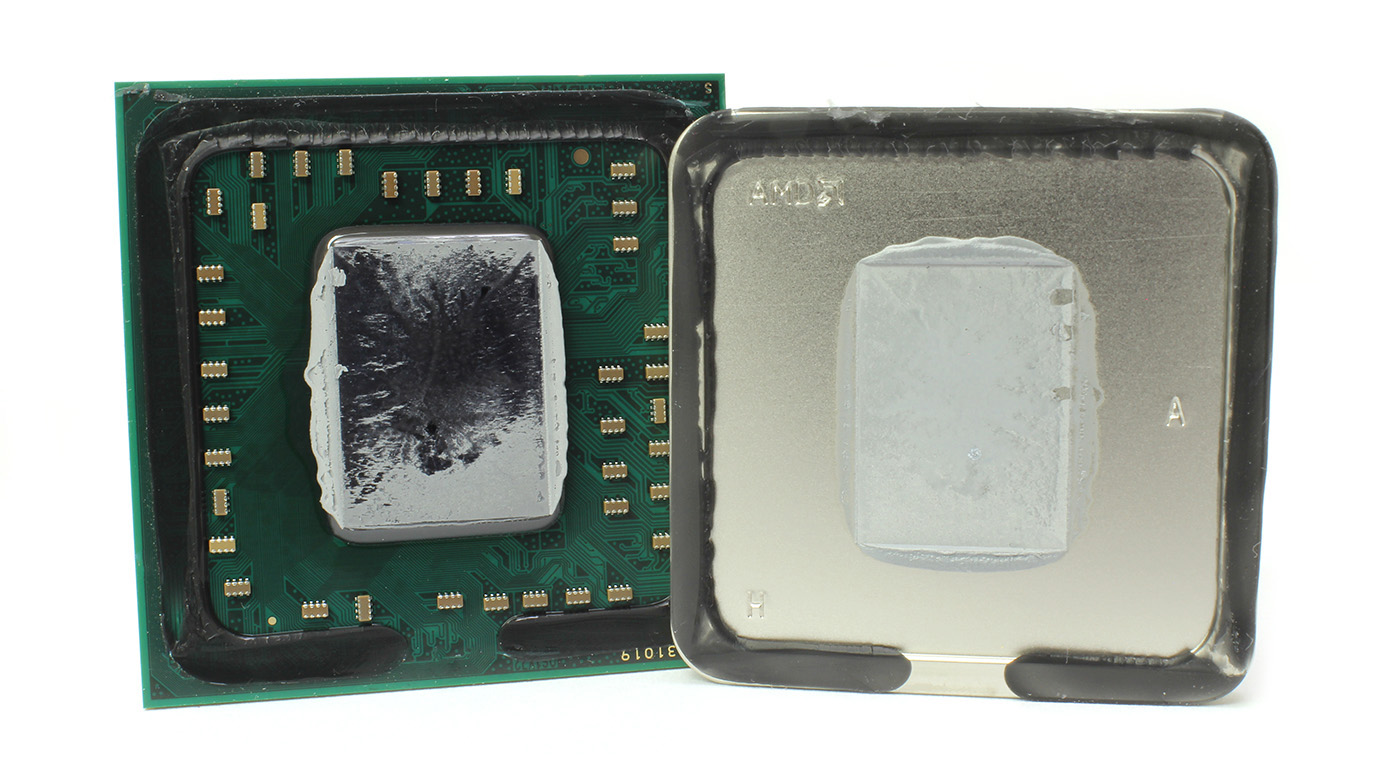
This is a delidded CPU:

CPU-Delid-Relid-Service-Intel-Socket-1150.jpg


Sometimes the CPU die has thermal paste on it which connects it to the heat spreader:

09.jpg


But other times on high end chips the die and IHS are soldered together.

To answer your question, no, you don't have to open the CPU and change the thermal paste at any point unless you are an enthusiast and want the lowest temps possible from your high overclock.
 
What exactly gets soldered to what?
The chip to the heat spreader?
The heat spreader to the heat-sink&fan?

Is this actual physically hardened/dried metal?
Are you supposed to tear off the glued on heat spreader at some point and change the paste there too?

The TIM between the CPU die and the heat spreader can be soldered or pasted. Soldered performs better (being metal) but I haven't heard of anyone risking delidding as you can with paste under the heat spreader. Don't think there's any benefit really - replacing the silicone gluey stuff under the heat spreader used to get some nice reductions in temperatures but with soldering, that becomes unnecessary.

You add more TIM between the heat spreader and the heatsink of your cooler. Many kinds of pastes, liquid metal, carbon sheets...lots of different options there.
 
This is a CPU:

Intel-i7-9700K-CPU-900x507.jpg


This is a delidded CPU:

CPU-Delid-Relid-Service-Intel-Socket-1150.jpg


Sometimes the CPU die has thermal paste on it which connects it to the heat spreader:

09.jpg


But other times on high end chips the die and IHS are soldered together.

To answer your question, no, you don't have to open the CPU and change the thermal paste at any point unless you are an enthusiast and want the lowest temps possible from your high overclock.

Mybb

Where is the button that allows me to select this as the best answer and pin it below the OP?
 
So it has thermal paste both under and over the heatspreader

Generally my first instinct is also "who in his right mind tears opens a glued piece of hardware unless it stops working"

I had visions of CPU's soldered to heatsinks.....
 
Now that we are talking about CPU's as opposed to Chips and the title makes more sense I am less confused :)
 
So it has thermal paste both under and over the heatspreader

Generally my first instinct is also "who in his right mind tears opens a glued piece of hardware unless it stops working"

I had visions of CPU's soldered to heatsinks.....
People get pretty amazing results opening the CPU and changing to high quality paste, like reduced by 20°C results.

Stock vs delidded 4770k:

YwO1Oom.png
 
Last edited:
People get pretty amazing results opening the CPU and changing to high quality paste, like reduced by 20°C results.

Stock vs delidded 4770k:

YwO1Oom.png


Once it helped to reduced the cabinet heat after the troubleshooting of a destination port unreachable error. https://www.corenetworkz.com/2019/08/destination-port-unreachable-error.html

I completed the steps with another guide on net unreachable error solution. https://www.corenetworkz.com/2009/05/destination-net-unreachable-icmp-error.html

Then successfully connected to the wireless network using password find on windows 10 command prompt. https://www.systosys.com/2019/07/find-wireless-network-password-using-windows.html
Wonderful change. I never had any idea about changing the thermal paste to reduce the cabinet heat.
 
Last edited:
The main idea is to eliminate any microscopic air gaps between the CPU and coolers. Metal TIMs are better than pastes and silicon compounds.

... All this take me back fifteen years to overclocking on Prescotts ... and bright memories of LG775, Arctic Silver, Coollaboratory Liquid Pro ... And chilling the CPU to -42 C with the VapoChill and Prometeia Mach II ... the Baroque Age of Overclocking...
 
Replace “Pentium 4” with “Athlon64” and I’d agree with you. I had my lapped FX-55 at 3.4 GHz 24/7 under a Prommie with chilly1 evaporator head for ages. Sadly I had to leave both it and my Vapochill on the pavement when I moved from Cape Town :(
 
Top
Sign up to the MyBroadband newsletter
X