Streaming Blu Ray Quality over Wireless N

Hemps

Honorary Master
Joined
Jan 19, 2009
Messages
11,661
Reaction score
1,632
Location
Slummies
I am using my Xbox360 as an extender to my HTPC running Win7 x64 Ultimate in my office, signal is about 50% a the moment.
My HTPC has high quality Blu Ray copies on it and a Blu Ray drive etc.

I want to know if it's possible to stream to my xbox360 in the lounge?

Currently have trouble streaming and there is plenty lag - I have an SMCWBR14S-N2 in the lounge connected by Cat6 lead to Xbox360.
HTPC has a pci Planet WNL-9330 Wireless N card in it.

On the SMC router I'm using WEP, channel 6, Wireless N only, 20/40mhz
On the HTPC it is saying connected but at "G" ??
 
It might work, I'm guessing it will be buffering a lot. I suggest you rather copy it first, then watch it when its on your xbox's hard drive.
 
Been googling and it looks bleak!

Can't believe in this day and age that wireless is so far behind still in terms of speed.
 
Is the htpc re-encoding the data? I have happily streamed hd data via G with a decent signal an no lag, but that was to a Playon Mini, so the encoding was done on the device not by my media server.
 
When you say copies....what do you mean...?
copies or blurays converted to mkv's? 4GB files should be able to stream...but anything bigger is a no no....
 
In the USA they are now using N750 wifi routers in the home.

I came back recently with a cheap USD70 Belkin N600 router, I guess that is what you need for this sort of stuff.
 
Blu-Ray has a bitrate of 40.0Mbps. You will not get that on any sort of WiFi
 
Do you have any devices running on 802.11g? In my house I can get pretty awesome speeds if the 11g devices are switched off (6-5 MB/s), but as soon as I switch on G devices, I drop to about 2 MB/s. I suspect it has to do with spectrum allocation when you associate with the access point. Also check that your channel bandwidth is set to 40mhz.
 
Blu Ray are exact copies from my collection, just placed them on HTPC for convenience +- 45GB in size each.
Then I also have 720p rips.

You would think in this day and age that we would have something faster by now to keep up with this.
I really don't want wires running up the walls etc.

If I do run cat6 can I just create a crossover cable and plug in directly to xbox360, don't require internet access for the xbox.
 
Blu Ray are exact copies from my collection, just placed them on HTPC for convenience +- 45GB in size each.
Then I also have 720p rips.

You would think in this day and age that we would have something faster by now to keep up with this.
I really don't want wires running up the walls etc.

If I do run cat6 can I just create a crossover cable and plug in directly to xbox360, don't require internet access for the xbox.

Which xbox do you have at the moment?
 
Blu-Ray has a bitrate of 40.0Mbps. You will not get that on any sort of WiFi
If you have a very good WiFi AP and WiFi receiver, both with MIMO (multiple in & multiple out), then you should be able to get that kind of speeds with 802.11n if you have a good signal strength.

I'm currently doing between 1 - 3MB/s with my 802.11n device, which is rather poor. I have had up to like 8MB/s.

BluRay rips (~8GB for 2 hours) needs like 10Mbps, which even 802.11g would be able to provide you with.
 
Arcade , bought in 2010 with HDMI.

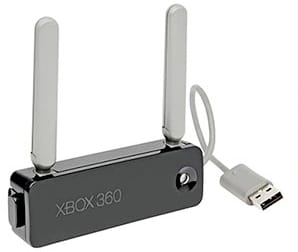
Ahh, so are you using the wireless dongle that you buy seperately?

Which unit do you have? (below are 2 links)

Wireless G unit
XBoxWirelessAdapter.jpg


Wireless N unit
wireless-n-adapter-xbox-360-rm-eng.jpg


802.11g should be capable of doing full hd streaming (blu-ray) but under perfect circumstances (full signal strength, no interference, no packet loss etc.

I would suggest upgrading to wireless N, but it's very dependent on your access point (modem/router). To be honest, I'm moving back to wired myself for HTPC HD streaming as even wireless N struggles.
 
Do you have any devices running on 802.11g? In my house I can get pretty awesome speeds if the 11g devices are switched off (6-5 MB/s), but as soon as I switch on G devices, I drop to about 2 MB/s. I suspect it has to do with spectrum allocation when you associate with the access point. Also check that your channel bandwidth is set to 40mhz.
Cheap WiFi routers only have one network running, so they have to drop the whole network down to 802.11f when a legacy device connects. Routers such as the Airport Extreme run 3 networks concurrently - a combined 802.11g and 802.11n network and then a separate guest network. That way wirelessg devices dont cause the whole network to drop down to wirelessg
Bet wirelessn cant transmit blu-ray quality video
 
Xbox 360 connects directly via cat6 lead to SMC Wireless N router.
So there are no adapter plugged into the xbox.
 
If you have a very good WiFi AP and WiFi receiver, both with MIMO (multiple in & multiple out), then you should be able to get that kind of speeds with 802.11n if you have a good signal strength.

I'm currently doing between 1 - 3MB/s with my 802.11n device, which is rather poor. I have had up to like 8MB/s.

BluRay rips (~8GB for 2 hours) needs like 10Mbps, which even 802.11g would be able to provide you with.

That is not true at all.
BluRay rips are about 45Gb.
Compressed BluRay rips are about 8gb
The difference is in the bitrate (40Mb/s vs 2Mb/s) which determines the quality of the picture
 
If you have a very good WiFi AP and WiFi receiver, both with MIMO (multiple in & multiple out), then you should be able to get that kind of speeds with 802.11n if you have a good signal strength.

I'm currently doing between 1 - 3MB/s with my 802.11n device, which is rather poor. I have had up to like 8MB/s.

BluRay rips (~8GB for 2 hours) needs like 10Mbps, which even 802.11g would be able to provide you with.
You might possibly be able to stream it if you have your wireless router and receiver using multi-channels. Otherwise, not likely
 
Last edited:
Issue I'm still seeing is that Win7 is showing radio type as G should it not be N?
 
That is not true at all.
BluRay rips are about 45Gb.
Compressed BluRay rips are about 8gb
The difference is in the bitrate (40Mb/s vs 2Mb/s) which determines the quality of the picture
Thanks for that info. I completely forgot that you can "rip" content as uncompressed too ;)

Please don't mix MB/s (megabyte per second) and Mb/s (megabit per second), because 2Mb/s is typical for 720p compressed rips and not 1080p ones, since 2Mb/s would give you a 2GB file for 2 hours.

@hemps:
You'll need it to run at Wireless N, otherwise you won't get a high enough throughput to be able to stream BluRay compressed rips (~8GB).

2Mb/s amounts to 2GB for 2 hours, which is the size for a typical 720p (compressed) rip, and not a BluRay/1080p (compressed) rip.
 
Issue I'm still seeing is that Win7 is showing radio type as G should it not be N?
If you have a cheap router, it will drop to the highest common speed of all connecting devices. This includes laptop, cellphones, etc. If one of those devices is G, the whole network will be in G
 
Top
Sign up to the MyBroadband newsletter
X